Summary: in this tutorial, you will learn how to use the Oracle SUM() function to calculate the sum of all or distinct values in a set.
Introduction to Oracle SUM() function #
The Oracle SUM() function is an aggregate function that returns the sum of all or distinct values in a set of values.
Here’s the syntax of the Oracle SUM() function:
SUM( [ALL | DISTINCT] expression)Code language: SQL (Structured Query Language) (sql)The Oracle SUM() function accepts a clause which can be either DISTINCT or ALL.
- The
DISTINCTclause forces theSUM()function to calculate the sum of unique values. - The
ALLclause causes theSUM()function to calculate the sum of all values, including duplicates.
For example, the sum of DISTINCT of 1, 1, and 2 is 3, while the sum of ALL of 1, 1, and 2 is 4.
If you omit the clause, the SUM() function will use the ALL clause by default.
Note that the SUM() function ignores NULL in calculation.
Oracle SUM() function examples #
We’ll use the order_items table in the sample database for the demonstration.
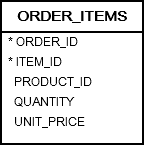
Basic Oracle SUM() function example #
The following statement returns the sum of the quantity of products placed by customers:
SELECT
  SUM(quantity)
FROM
  order_items;Code language: SQL (Structured Query Language) (sql)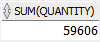
Using Oracle SUM() with GROUP BY clause #
The following example uses the SUM function with the GROUP BY clause to calculate the sum of the quantity of products on sales order by product:
SELECT
  product_id,
  SUM(quantity)
FROM
  order_items
GROUP BY
  product_id
ORDER BY
  SUM(quantity) DESC;Code language: SQL (Structured Query Language) (sql)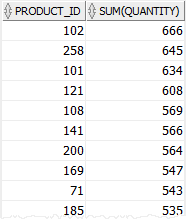
In this example,
- First, the
GROUP BYclause groups the rows in theorder_itemsinto groups by product id (product_id). - Second, the
SUM()function returns the sum of the quantity for each group.
Similarly, you can use the SUM() function with the GROUP BY clause to retrieve the sales orders and their total values:
SELECT
  order_id,
  SUM(quantity * unit_price) order_total
FROM
  order_items
GROUP BY
  order_id
ORDER BY
  order_total;Code language: SQL (Structured Query Language) (sql)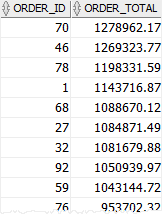
In this example,
- First, the formula
quantity * unit_pricereturns the value of each order item. - Second, the
GROUP BYclause divides theorder_itemsinto groups by orders (order_id). - Third, the
SUM()function returns the sum of all order items for each order.
Using the Oracle SUM() with HAVING clause #
The following statement returns the orders whose total values are between 1,000 and 20,000:
SELECT
  order_id,
  SUM(quantity * unit_price) order_total
FROM
  order_items
GROUP BY
  order_id
HAVING
  SUM(quantity * unit_price) BETWEEN 1000 AND 20000
ORDER BY
  order_total DESC;Code language: SQL (Structured Query Language) (sql)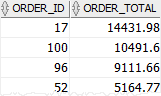
In this example, we use a HAVING clause to query to select only orders whose total values are between 1,000 and 20,000.
Using Oracle SUM() with INNER JOIN clause example #
The following statement returns the products and their sales:
SELECT
  product_name,
  SUM(quantity * unit_price) sales
FROM
  order_items
  INNER JOIN products USING (product_id)
GROUP BY
  product_name
ORDER BY
  sales DESC;Code language: SQL (Structured Query Language) (sql)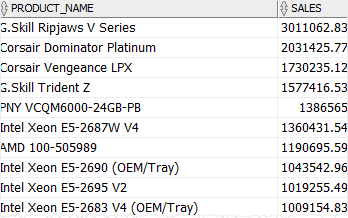
Since the order_items table only stores the product_id, we have to join it with the products table to get the product names.
Summary #
- Use the Oracle
SUM()function to calculate the sum of all or unique values in a set of values.


