Summary: In this tutorial, you will learn how to use Oracle aliases, including column and table aliases, to make the output’s heading more meaningful and to improve a query’s readability.
Oracle column aliases #
In Oracle, a column alias is a temporary column name that you assign to a column or expression during a query’s execution.
When you query data from a table, Oracle displays the column headings using the table’s column names.
For example, the following statement returns the first name and last name of employees:
SELECT
first_name,
last_name
FROM
employees
ORDER BY
first_name;Code language: SQL (Structured Query Language) (sql)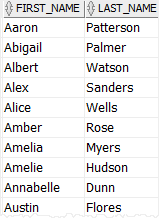
In this example, first_name and last_name column names are pretty clear. However, sometimes, the column names are quite vague in describing the meaning of data, such as:
SELECT
  lstprc,
  prdnm
FROM
  long_table_name;Code language: SQL (Structured Query Language) (sql)
To better describe the data displayed in the output, you can substitute a column alias for the column name in the query results.
For instance, instead of using first_name and last_name, you might want to use forename and surname to display the names of employees.
To instruct Oracle to use a column alias, you list the column alias next to the column name in the SELECT clause as shown below:
SELECT
  first_name AS forename,
  last_name  AS surname
FROM
  employees;Code language: SQL (Structured Query Language) (sql)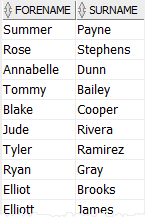
The AS keyword is used to distinguish between the column name and the column alias. Since the AS keyword is optional, you can skip it as follows:
SELECT
  first_name forename,
  last_name surname
FROM
employees;Code language: SQL (Structured Query Language) (sql)Using Oracle column aliases to make column headings more meaningful #
By default, Oracle capitalizes the column heading in the query result. If you want to change the letter case of the column heading, you need to enclose it in quotation marks (“”).
SELECT
  first_name "Forename",
  last_name "Surname"
FROM
  employees; Code language: SQL (Structured Query Language) (sql)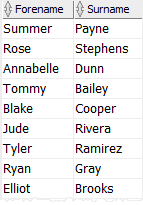
The output indicates that the forename and surname column headings retain their capitalization.
If the column alias consists of only one word without special symbols like spaces, you don’t need to enclose it in quotation marks. Otherwise, you must enclose the column heading in quotation marks, or you will get an error.
See the following query:
SELECT
  first_name "First Name",
  last_name "Family Name"
FROM
  employees;Code language: SQL (Structured Query Language) (sql)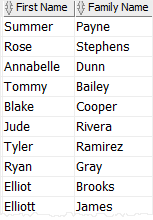
In this example, we used the column aliases "First Name" and "Family Name" enclosed in quotation marks.
If you remove the quotation marks, Oracle will issue the following error:
ORA-00923: FROM keyword not found where expectedUsing Oracle column aliases for the expression #
Besides making the column headings more meaningful, you can use the column alias for an expression, for example:
SELECT
  first_name  || ' '  || last_name
FROM
  employees;Code language: SQL (Structured Query Language) (sql)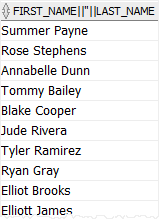
In the above query, we concatenate the first name, a space, and the last name to form the full name. Oracle uses the expression for the column heading, which is not intuitive.
The following query shows how to use a column alias for the expression:
SELECT
  first_name || ' ' || last_name AS "Full Name"
FROM
employees;Code language: SQL (Structured Query Language) (sql)Similarly, the following statement uses a column alias for the gross profit calculation expression:
SELECT
  product_name,
  list_price - standard_cost AS gross_profit
FROM
  products;Code language: SQL (Structured Query Language) (sql)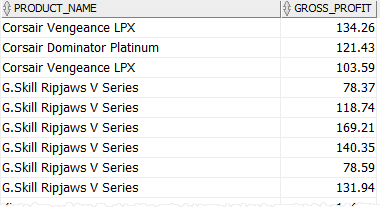
Using Oracle column alias with ORDER BY clause #
You can use the column alias in the ORDER BY clause to sort the result set. For example:
SELECT
  product_name,
  list_price - standard_cost AS gross_profit
FROM
  products
ORDER BY
  gross_profit DESC;Code language: SQL (Structured Query Language) (sql)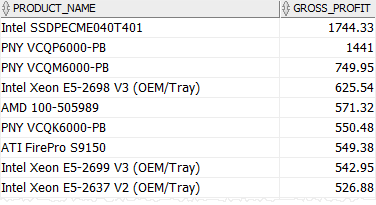
The reason you can use the column alias in the ORDER BY clause is that Oracle evaluates the ORDER BY after the SELECT clause.
The SELECT clause creates column aliases, and these aliases are available in the ORDER BY clause.
Oracle table aliases #
A table alias is a temporary name for a table during the execution of a query. You specify a table alias after the table name, either with or without the AS keyword:
table_name AS table_alias
table_name table_aliasCode language: PHP (php)
Without the table alias, you qualify a column by using the following form:
table_name.column_nameCode language: CSS (css)However, you must use an alias instead of the table name after you assign the table an alias:
table_alias.column_nameCode language: CSS (css)A table alias improves the readability of the query and reduces the number of keystrokes.
SELECT
  e.first_name employee,
  m.first_name manager
FROM
  employees e
  INNER JOIN employees m ON m.employee_id = e.manager_id;Code language: SQL (Structured Query Language) (sql)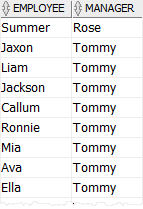
In this example, we joins the employees table to itself. This technique is called self-join. Since a table can only appear in a query once, you must use table aliases to give the employees two names, e for employees and m for managers.
Summary #
- Column aliases are temporary column names during the execution of a query.
- Table aliases are temporary table names in a query.


