Summary: in this tutorial, you will learn how to use the Oracle MERGE statement to perform an update or insert data based on a specified condition.
Introduction to the Oracle MERGE statement #
The Oracle MERGE statement selects data from one or more source tables and updates or inserts it into a target table.
The MERGE statement allows you to specify a condition to determine whether to update data from or insert data into the target table.
Here’s the basic syntax of the MERGE statement:
MERGE INTO target_table
USING source_table
ON search_condition
WHEN MATCHED THEN
UPDATE SET col1 = value1, col2 = value2,...
WHERE <update_condition>
[DELETE WHERE <delete_condition>]
WHEN NOT MATCHED THEN
INSERT (col1,col2,...)
values(value1,value2,...)
WHERE <insert_condition>;Code language: SQL (Structured Query Language) (sql)In this the MERGE statement:
- First, specify the target table (
target_table) in the INTO clause, which you want to update or insert. - Second, provide the source of data (
source_table) to be updated or inserted in theUSINGclause. - Third, define the search condition upon which the merge operation either updates or inserts in the
ONclause.
For each row in the target table, Oracle evaluates the search condition:
- If the result is true, then Oracle updates the row with the corresponding data from the source table.
- If the result is false for any rows, then Oracle inserts the corresponding row from the source table into the target table.
The MERGE statement becomes convenient when you want to combine multiple INSERT, UPDATE, and DELETE statements in a single operation.
Since the MERGE is a deterministic statement, you cannot update the same row of the target table multiple times in the same MERGE statement.
You can add an optional DELETE WHERE clause to the MATCHED clause to clean up after a merge operation. The DELETE clause deletes only the rows in the target table that match both ON and DELETE WHERE clauses.
Oracle MERGE prerequisites #
To execute the MERGE statement, you must have the INSERT and UPDATE object privileges on the source tables. If you use the DELETE clause, you must also have the DELETE object privilege on the target table.
Oracle MERGE example #
Suppose, we have two tables:
memberstable stores the member data.member_stagingtable stores the member data before insert or update to thememberstable.
We’ll insert a new row to the members table whenever we have a new member. Then, the data from the members table is merged with the data of the member_staging table.
First, create the members and member_staging tables:
CREATE TABLE members (
    member_id NUMBER PRIMARY KEY,
    first_name VARCHAR2(50) NOT NULL,
    last_name VARCHAR2(50) NOT NULL,
    rank VARCHAR2(20)
);

CREATE TABLE member_staging AS
SELECT * FROM members;Code language: SQL (Structured Query Language) (sql)
Second, insert sample data into the members and member_staging tables using the following INSERT statements:
-- insert into members table
INSERT INTO members(member_id, first_name, last_name, rank) VALUES(1,'Abel','Wolf','Gold');
INSERT INTO members(member_id, first_name, last_name, rank) VALUES(2,'Clarita','Franco','Platinum');
INSERT INTO members(member_id, first_name, last_name, rank) VALUES(3,'Darryl','Giles','Silver');
INSERT INTO members(member_id, first_name, last_name, rank) VALUES(4,'Dorthea','Suarez','Silver');
INSERT INTO members(member_id, first_name, last_name, rank) VALUES(5,'Katrina','Wheeler','Silver');
INSERT INTO members(member_id, first_name, last_name, rank) VALUES(6,'Lilian','Garza','Silver');
INSERT INTO members(member_id, first_name, last_name, rank) VALUES(7,'Ossie','Summers','Gold');
INSERT INTO members(member_id, first_name, last_name, rank) VALUES(8,'Paige','Mcfarland','Platinum');
INSERT INTO members(member_id, first_name, last_name, rank) VALUES(9,'Ronna','Britt','Platinum');
INSERT INTO members(member_id, first_name, last_name, rank) VALUES(10,'Tressie','Short','Bronze');

-- insert into member_staging table
INSERT INTO member_staging(member_id, first_name, last_name, rank) VALUES(1,'Abel','Wolf','Silver');
INSERT INTO member_staging(member_id, first_name, last_name, rank) VALUES(2,'Clarita','Franco','Platinum');
INSERT INTO member_staging(member_id, first_name, last_name, rank) VALUES(3,'Darryl','Giles','Bronze');
INSERT INTO member_staging(member_id, first_name, last_name, rank) VALUES(4,'Dorthea','Gate','Gold');
INSERT INTO member_staging(member_id, first_name, last_name, rank) VALUES(5,'Katrina','Wheeler','Silver');
INSERT INTO member_staging(member_id, first_name, last_name, rank) VALUES(6,'Lilian','Stark','Silver');Code language: SQL (Structured Query Language) (sql)
Third, retrieve data from members:
SELECT * FROM members;Code language: SQL (Structured Query Language) (sql)
Fourth, query data from the member_staging table:
SELECT * FROM member_staging;Code language: SQL (Structured Query Language) (sql)Output:
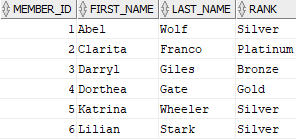
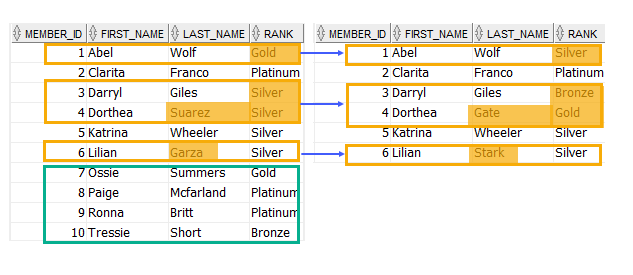
When updating data from the members table to member_staging table, we should perform the following actions:
- First, update the rows with member id 1, 3, 4, and 6 because the rank or the last name of these members in these tables are different.
- Second, insert the rows with member id 7 to 10 are because these rows exist in the
memberstable but not in themember_stagingtable.
In short, we should merge 8 rows as shown in the following picture:
Fifth, merge rows between the members and member_staging tables using the MERGE statement:
MERGE INTO member_staging x
USING (SELECT member_id, first_name, last_name, rank FROM members) y
ON (x.member_id = y.member_id)
WHEN MATCHED THEN
    UPDATE SET x.first_name = y.first_name,
                        x.last_name = y.last_name,
                        x.rank = y.rank
    WHERE x.first_name <> y.first_name OR
           x.last_name <> y.last_name OR
           x.rank <> y.rank
WHEN NOT MATCHED THEN
    INSERT(x.member_id, x.first_name, x.last_name, x.rank)
    VALUES(y.member_id, y.first_name, y.last_name, y.rank);Code language: SQL (Structured Query Language) (sql)
The MERGe statement compares each row in the members table with each row in the member_staging table based on the values in the member_id columns:
ON (x.member_id = y.member_id)Code language: SQL (Structured Query Language) (sql)If the values in member_id columns of both tables are equal, the MERGE statement updates the first name, last name, and rank from the members table to the member_stagingtable only if the values of first name, last name, or rank columns of both tables are different:
WHEN MATCHED THEN
    UPDATE SET x.first_name = y.first_name,
                        x.last_name = y.last_name,
                        x.rank = y.rank
    WHERE x.first_name <> y.first_name OR
           x.last_name <> y.last_name OR
           x.rank <> y.rank Code language: SQL (Structured Query Language) (sql)
Otherwise, it inserts the row from the members table into the member_staging table:
WHEN NOT MATCHED THEN
   INSERT(x.member_id, x.first_name, x.last_name, x.rank)
   VALUES(y.member_id, y.first_name, y.last_name, y.rank);Code language: SQL (Structured Query Language) (sql)
Oracle returned 8 rows merged as expected.
Summary #
- Use the Oracle
MERGEstatement to merge rows between tables.


