Summary: In this tutorial, you will learn how to use the Oracle SELECT DISTINCT operator to query distinct data from tables.
Introduction to Oracle SELECT DISTINCT Operator #
The DISTINCT operator is used in a SELECT statement to filter duplicate rows in the result set. It ensures that rows returned are unique for the column or columns specified in the SELECT clause.
Here’s the basic syntax of the SELECT DISTINCT operator:
SELECT DISTINCT column_1
FROM table_name;Code language: SQL (Structured Query Language) (sql)In this statement, the DISTINCT operator compares values in the column_1 of the table to determine the duplicates.
To retrieve unique data based on multiple columns, you need to specify the column list in the SELECT clause as follows:
SELECT
    DISTINCT column_1,
    column_2,
    column_3
FROM
    table_name;Code language: SQL (Structured Query Language) (sql)
In this syntax, the DISTINCT operator uses the combination of values in the column_1, column_2, and column_3 are evaluate the uniqueness of the data.
Oracle allows you to use DISTINCT clause in the SELECT statement only.
Note that DISTINCT is a synonym of UNIQUE that is not SQL standard. It is a good practice to always use DISTINCT instead of UNIQUE.
Oracle SELECT DISTINCT examples #
Let’s look at some examples of using SELECT DISTINCT to see how it works.
Selecting distinct values in one column #
We’ll use the contacts table in the sample database:
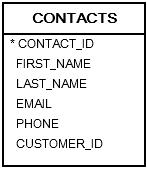
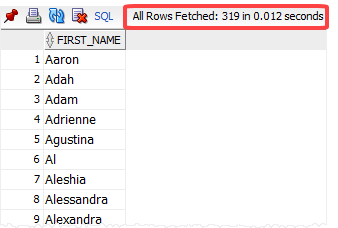
The following statement retrieves the first names of all contacts from the contacts table:
SELECT
  first_name
FROM
  contacts
ORDER BY
first_name; Code language: SQL (Structured Query Language) (sql)The query returned 319 rows, indicating that the contacts table has 319 rows.
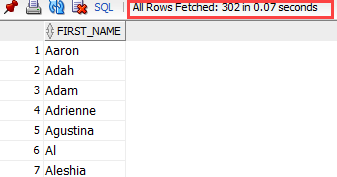
To get unique first names, you add the DISTINCT operator to the above SELECT statement as follows:
SELECT DISTINCT
  first_name
FROM
  contacts
ORDER BY
first_name;Code language: SQL (Structured Query Language) (sql)Now, the result set has 302 rows, meaning that the DISTINCT operator removed 17 duplicate rows.
Selecting distinct values in multiple columns #
The following order_items table stores the order details of each order:
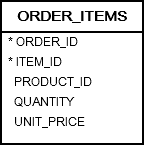
The following statement uses the DISTINCT to select distinct product ids and quantities from the order_items table:
SELECT DISTINCT
  product_id,
  quantity
FROM
  ORDER_ITEMS
ORDER BY
product_id;Code language: SQL (Structured Query Language) (sql)Output:
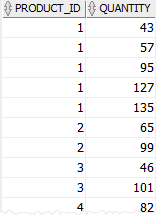
In this example, the DISTINCT operator uses both values in the product_id and quantity columns to evaluate the uniqueness of the rows in the result set.
Oracle SELECT DISTINCT and NULL #
In Oracle, NULL represents unknown data. Therefore, a NULL is different from another. However, the DISTINCT treats NULL differently.
If you use the SELECT DISTINCT operator to retrieve data from a column that has many NULLs, the result set will include only one NULL.
See the locations table in the sample database.
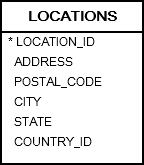
The following statement uses the DISTINCT operator to retrieve data from the state column, which has many NULLs:
SELECT DISTINCT
  state
FROM
  locations
ORDER BY
state NULLS FIRST;Code language: SQL (Structured Query Language) (sql)Result:
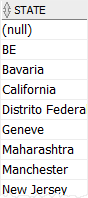
The result set includes only one NULL.
Note that if you want to apply the DISTINCT to some columns, while skipping other columns, you should use the GROUP BY clause instead.
Summary #
- Use the
SELECT DISTINCToperator to get unique values based on one or more columns. - The
DISTINCToperator treatsNULLsthe same.


