Summary: in this tutorial, you’ll learn how to use the Oracle TO_CHAR function to convert a date or a number to a string using a specified format.
Introduction to Oracle TO_CHAR function #
In Oracle, the TO_CHAR() function converts a value of DATE, INTERVAL, and NUMBER to a string using a specified format.
Here’s the syntax of the TO_CHAR() function for a converting a date to a value of VARCHAR2:
TO_CHAR(date_value [, format_model] [, nslparam]);Code language: SQL (Structured Query Language) (sql)The TO_CHAR() accepts three arguments:
- The
expris aDATEor anINTERVALvalue that you want to convert. The data type ofexprcan beDATE,TIMESTAMP,TIMESTAMP WITH TIME ZONE, orTIMESTAMP WITH LOCAL TIME ZONE. - The
date_formatis a string that determines the format that the result string should be. Thedate_formatargument is optional. If you omit it, theTO_CHAR()function will use the default date format forDATEvalues, default timestamp format forTIMESTAMPandTIMESTAMP WITH TIME ZONEvalue, and default timestamp with time zone format forTIMESTAMP WITH TIME ZONEvalues. To construct a value for thedate_formatargument, you use the Oracle date format model. - The
nlsparamargument specifies the languages for names and abbreviations of day and month e.g., Monday, Mon, January, Jan, etc., in the result string. Thenlsparamargument has the following form'NLS_DATE_LANGUAGE = language'. Thisnlsparamargument is also optional. If you omit it, theTO_CHAR()function uses the default date language.
The TO_CHAR() function returns a string represented a DATE or INTERVAL value in a specified format.
Here’s the common date format elements:
YYYY– 4-digit yearMM– 2-digit monthDD– 2-digit dayHH24– 24-hour formatMI– MinutesSS– SecondsDY– Abbreviated day of weekMONTH– Full month name (padded)
You can view a complete Oracle date format model
Converting the current system date #
The following statement uses TO_CHAR() function to convert the current system date to a string with the format YYYY-MM-DD:
SELECT
  TO_CHAR( sysdate, 'YYYY-MM-DD' )
FROM
  dual;Code language: SQL (Structured Query Language) (sql)
Output:
2017-08-02Code language: SQL (Structured Query Language) (sql)To convert the current system date to a long date string, you use the DL date format as follows:
SELECT
  TO_CHAR( sysdate, 'DL' )
FROM
  dual;Code language: SQL (Structured Query Language) (sql)
Output:
Wednesday, August 02, 2017Code language: SQL (Structured Query Language) (sql)To display the names of days and months in another language e.g., French, you use the nlsparam argument as follows:
SELECT
  TO_CHAR (sysdate, 'DL', 'NLS_DATE_LANGUAGE = FRENCH')
FROM
  dual;Code language: SQL (Structured Query Language) (sql)
The result is in French:
Mercredi, Août 02, 2017 Code language: SQL (Structured Query Language) (sql)Formatting an interval example #
This example uses the TO_CHAR() function to format an interval:
SELECT
   TO_CHAR(INTERVAL '600' SECOND, 'HH24:MM') result
FROM
   DUAL;Code language: SQL (Structured Query Language) (sql)
Here’s the output:
RESULT
-------------------
+00 00:10:00.000000
Formatting dates from table data example #
See the employees table in the sample database:
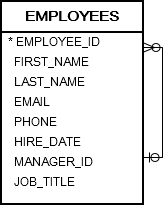
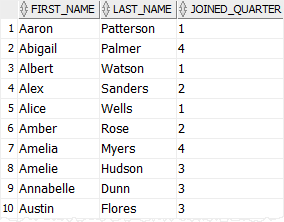
The following statement uses the TO_CHAR() function to return the quarter when the employees joined the company in 2016:
SELECT
  first_name,
  last_name,
  TO_CHAR (hire_date, 'Q') joined_quarter
FROM
  employees
WHERE
  hire_date BETWEEN DATE '2016-01-01' AND date  '2016-12-31'
ORDER BY
  first_name,
  last_name;Code language: SQL (Structured Query Language) (sql)
Output:
 #
#
Converting numbers to strings #
The following form of the TO_CHAR() function converts a number to a string using a specific format:
TO_CHAR(number_value, 'format_model')Code language: JavaScript (javascript)Here are the common number format elements:
9– Digit placeholder0– Zero placeholder,– Comma as a thousands separator.– Decimal pointL– Local currency symbolFM– Removes padding spaces
For example, the following uses the TO_CHAR() function to convert a number to a string:
SELECT
  TO_CHAR (1234567.89, '9,999,999.00') AS result
FROM
  dual;Code language: SQL (Structured Query Language) (sql)
Output:
RESULT
-------------
 1,234,567.89Code language: CSS (css)
Summary #
- Use the Oracle
TO_CHAR()function to convert a date or number to a string in a specified format.


