Summary: in this tutorial, you will learn how to use the Oracle bitmap index for indexing columns with low cardinality.
Introduction to Oracle bitmap index #
We will use the members table created in the CREATE INDEX tutorial for the demonstration.
The following query finds all female members of the members table:
SELECT
*
FROM
members
WHERE
gender = 'F';Code language: SQL (Structured Query Language) (sql)The gender column has two distinct values, F for female and M for male. When a column has a few distinct values, we say that this column has low cardinality.
Oracle has a special kind of index for these types of columns which is called a bitmap index.
A bitmap index is a special kind of database index which uses bitmaps or bit arrays. In a bitmap index, Oracle stores a bitmap for each index key. Each index key stores pointers to multiple rows.
For example, if you create a bitmap index on the gender column of the members table. The structure of the bitmap index looks like the following picture:
It has two separate bitmaps, one for each gender.
Oracle uses a mapping function to convert each bit in the bitmap to the corresponding rowid of the members table.
The syntax for creating a bitmap index is quite simple as follows:
CREATE BITMAP INDEX index_name
ON table_name(column1[,column2,...]);Code language: SQL (Structured Query Language) (sql)
For example, to create a bitmap index for the gender column, you use the following statement:
CREATE BITMAP INDEX members_gender_i
ON members(gender);Code language: SQL (Structured Query Language) (sql)
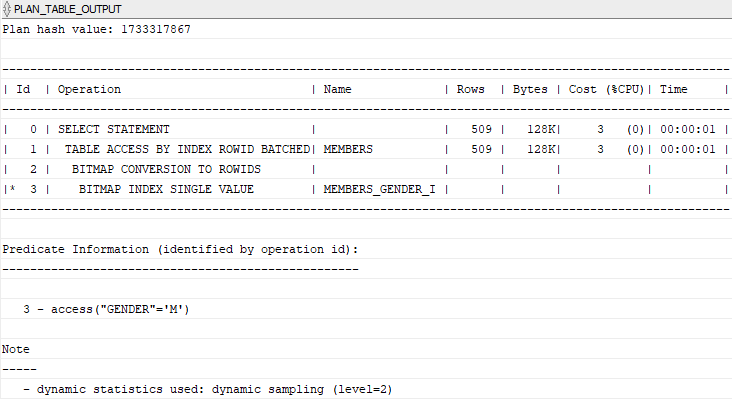
Now, if you query members by gender, the optimizer will consider using the bitmap index:
EXPLAIN PLAN FOR
SELECT
    *
FROM
    members
WHERE
    gender = 'F';


SELECT
    PLAN_TABLE_OUTPUT
FROM
    TABLE(DBMS_XPLAN.DISPLAY());
Code language: SQL (Structured Query Language) (sql)
The following picture shows the execution plan:
When to use Oracle bitmap indexes #
Low cardinality columns #
You should use the bitmap index for the columns that have low cardinality. To find the cardinality of a column, you can use the following query:
SELECT column, COUNT(*)
FROM table_name
GROUP BY column;Code language: SQL (Structured Query Language) (sql)
So how low you can go with the bitmap index? A good practice is any column that has less than 100 distinct values.
Infrequently updated or read-only tables #
Maintaining a bitmap index takes a lot of resources, therefore, bitmap indexes are only good for read-only tables or tables that have infrequently updates. Therefore, you often find bitmap indexes are extensively used in the data warehouse environment.
Notice that using a bitmap index for a table that has many single-row updates, especially concurrent single-row updates will cause a deadlock.
The following statement creates a new table named bitmap_index_demo:
CREATE TABLE bitmap_index_demo(
    id INT GENERATED BY DEFAULT AS IDENTITY,
    active NUMBER NOT NULL,
    PRIMARY KEY(id)
);Code language: SQL (Structured Query Language) (sql)
The following statement creates a bitmap index on the active column:
CREATE BITMAP INDEX bitmap_index_demo_active_i
ON bitmap_index_demo(active);Code language: SQL (Structured Query Language) (sql)
Open two sessions and repeatedly execute one of the following statements in each session:
INSERT INTO bitmap_index_demo(active)
VALUES(1);

INSERT INTO bitmap_index_demo(active)
VALUES(0);Code language: SQL (Structured Query Language) (sql)
The following error will occur:
ORA-00060: deadlock detected while waiting for resourceCode language: SQL (Structured Query Language) (sql)In this tutorial, you have learned how to use the Oracle bitmap index to speed up the query.


