Summary: in this tutorial, you will learn how to use the Oracle CREATE INDEX statement to create a new index for a table.
Introduction to Oracle CREATE INDEX statement #
To create a new index for a table, you use the CREATE INDEX statement.
Here’s the syntax of the CREATE INDEX statement:
CREATE INDEX index_name
ON table_name(column1[,column2,...]);Code language: SQL (Structured Query Language) (sql)In this syntax:
- First, specify an index name after the
CREATE INDEXkeywords. The index name should be meaningful. For example, a common convention of index name is that it includes table alias and column name(s) where possible, along with the suffix_Isuch as:<table_name>_<column_name>_I - Second, provide the table name followed by one or more indexed columns.
By default, the CREATE INDEX statement creates a BTREE index type.
When you create a new table with a primary key, Oracle automatically creates a new index for the primary key columns. More precisely, Oracle creates a implicit unique index for the primary key.
Unlike other database systems, Oracle does not automatically create an index for the foreign key columns.
Oracle CREATE INDEX Statement Examples #
The following statement creates a new table members that stores members’ data:
CREATE TABLE members (
  member_id INT GENERATED BY DEFAULT AS IDENTITY PRIMARY KEY,
  first_name VARCHAR2 (100) NOT NULL,
  last_name VARCHAR2 (100) NOT NULL,
  gender CHAR(1) NOT NULL,
  dob DATE NOT NULL,
  email VARCHAR2 (255) NOT NULL
);Code language: SQL (Structured Query Language) (sql)
To load data into the members table, you use the following script:
Download load_member_data Script
Since the members table has a primary key column member_id, Oracle creates a new index for this column.
To view all indexes of a table, you query from the all_indexes view:
SELECT
    index_name,
    index_type,
    visibility,
    status
FROM
    all_indexes
WHERE
    table_name = 'MEMBERS';
Code language: SQL (Structured Query Language) (sql)
Output:

The index name is SYS_C007865. You’re like see a different name on your Oracle Database server.
Creating an index on one column example #
If you often to look up members by the last name and find that the query is slow. You can speed up the query by creating an index for the last_name column.
The following statement create an index for the last_name column:
CREATE INDEX members_last_name_i
ON members(last_name);Code language: SQL (Structured Query Language) (sql)
To list all the indexes of the memebers table, you use this query:
SELECT
  index_name,
  index_type,
  visibility,
  status
FROM
  all_indexes
WHERE
  table_name = 'MEMBERS';Code language: SQL (Structured Query Language) (sql)
Output:

The following statement finds members whose last name is Harse:
SELECT
  *
FROM
  members
WHERE
  last_name = 'Harse';Code language: SQL (Structured Query Language) (sql)
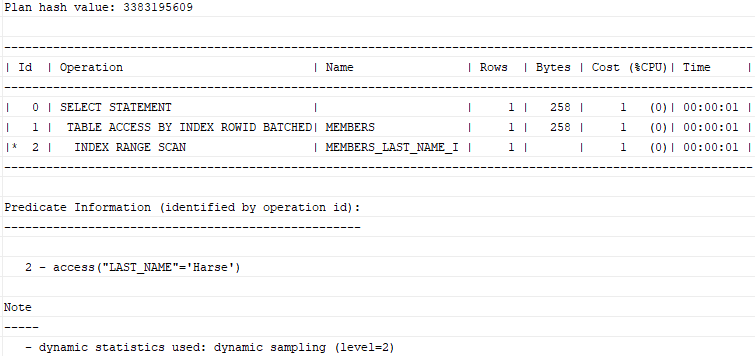
To check if a query uses the index for lookup or not, you follow these steps:
First, add the EXPLAIN PLAN FOR clause immediately before the SQL statement:
EXPLAIN PLAN FOR
SELECT * FROM members
WHERE last_name = 'Harse';Code language: SQL (Structured Query Language) (sql)
This explains the execution plan into the plan_table table.
Then, use the DBMS_XPLAN.DISPLAY() procedure to show the content of the plan_table:
SELECT
  PLAN_TABLE_OUTPUT
FROM
  TABLE (DBMS_XPLAN.DISPLAY ());Code language: SQL (Structured Query Language) (sql)
The following shows the output:
Dropping an index #
To delete an index, you use the DROP INDEX statement:
DROP INDEX index_name;Code language: SQL (Structured Query Language) (sql)For example, the following statement drops the members_last_name_i index:
DROP INDEX members_last_name_i;Code language: SQL (Structured Query Language) (sql)You will learn more about how to drop an index in the next tutorial.
Creating an index on multiple columns #
First, create an index that include last_name and first_name columns:
CREATE INDEX members_name_i
ON members(last_name,first_name);Code language: SQL (Structured Query Language) (sql)
Second, find members whose last name starts with the letter A and first name starts with the letter M:
SELECT *
FROM members
WHERE last_name LIKE 'A%'
    AND first_name LIKE 'M%';Code language: SQL (Structured Query Language) (sql)
This statement uses the members_name_i index as shown in the following execution plan:
EXPLAIN PLAN FOR
SELECT *
FROM members
WHERE last_name LIKE 'A%'
    AND first_name LIKE 'M%';

SELECT
    PLAN_TABLE_OUTPUT
FROM
    TABLE(DBMS_XPLAN.DISPLAY());Code language: SQL (Structured Query Language) (sql)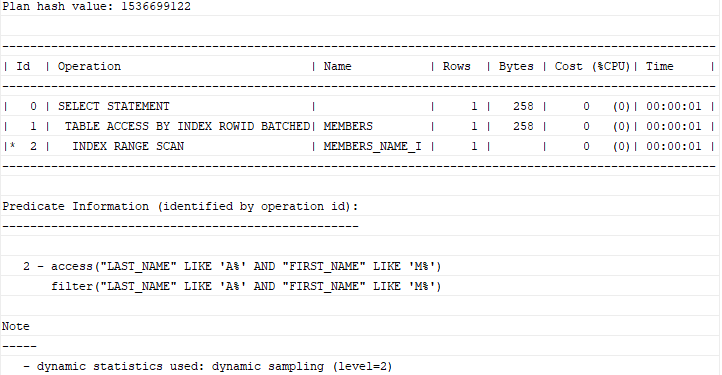
Summary #
- Use Oracle
CREATE INDEXstatement to create a new index on one or more columns of a table.


