Summary: In this tutorial, you’ll learn how to use the Oracle SUBSTR() function to extract a substring from a string with flexible options.
Introduction to the Oracle SUBSTR function #
The SUBSTR function allows you to extract a portion of a string.
Here’s the syntax of the SUBSTR function:
SUBSTR( str, start_position [, substring_length] );Code language: SQL (Structured Query Language) (sql)The SUBSTR() function accepts three arguments:
stris the string that you want to extract the substring. The data type ofstrcan beCHAR,VARCHAR2,NCHAR,NVARCHAR2,CLOB, orNCLOB.start_positionis an integer that determines where the substring starts. If thestart_positionis0, the substring starts at the first character of thestr. If thestart_positionis positive, theSUBSTR()function will count from the beginning of thestrto determine the first character of the substring. If thestart_positionis negative, then theSUBSTR()function will count backward from the end of thestrto find the first character of the substring.substring_lengthdetermines the number of characters in the substring. If you omit thesubstring_length, theSUBSTR()function returns all characters starting from thestart_position.
The SUBSTR() function returns a substring from the str starting at start_position with the substring_length length.
If the substring_length is greater than the length of the input string, the SUBSTR() function returns the whole input string.
If the substring_length is less than 1, the SUBSTR() function returns NULL.
Basic Oracle SUBSTR() function example #
The following example uses the SUBSTR() function to extract a substring from a string:
SELECT
  SUBSTR ('Oracle Substring', 1, 6) SUBSTRING
FROM
  dual;Code language: SQL (Structured Query Language) (sql)
In this example, the SUBSTR() function returns a substring whose length is 6, starting from the beginning of the input string.
Using Oracle SUBSTR() function with a negative position example #
The following statement uses the SUBSTR() function with a negative start_position to extract a substring from a string:
SELECT
  SUBSTR( 'Oracle Substring', - 16, 6 ) SUBSTRING
FROM
dual;Code language: SQL (Structured Query Language) (sql)Using Oracle SUBSTR() function without the substring length #
The following statement uses the SUBSTR function without the substring length argument. The function returns a substring with all characters starting from the 8th character of the input string.
SELECT
  SUBSTR( 'Oracle Substring', 8 ) SUBSTRING
FROM
  dual;Code language: SQL (Structured Query Language) (sql)
Using the Oracle SUBSTR() function with table data #
We’ll use the following employees table in the sample database:
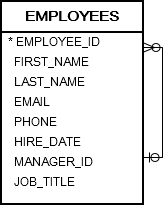
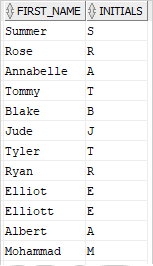
The following statement uses the SUBSTR() function to extract the first character from the first names of all employees:
SELECT
  first_name,
  substr (first_name, 1, 1) initials
FROM
employees;Output:
Using the Oracle SUBSTR() function with aggregate functions #
The following statement uses the SUBSTR() with the COUNT() functions get initials from first names and the number of employees per initial:
SELECT
  SUBSTR( first_name, 1, 1 ) initials ,
  COUNT( * )
FROM
  employees
GROUP BY
  SUBSTR( first_name, 1, 1 )
ORDER BY
  initials;
Code language: SQL (Structured Query Language) (sql)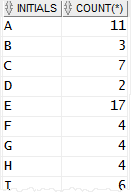
Summary #
- Use the Oracle
SUBSTR()function to extract a substring from a string.


