Summary: in this tutorial, you will learn about the PL/SQL VARRAY and how to manipulate elements of a VARRAY effectively.
Introduction to PL/SQL VARRAY #
VARRAY stands for the variable-sized array. A VARRAY is single-dimensional collections of elements with the same data type.
Unlike an associative array and nested table, a VARRAY always has a fixed number of elements (bounded) and never has gaps between the elements (not sparse).
Declare a VARRAY type #
To declare a VARRAY type, you use this syntax:
TYPE type_name IS VARRAY(max_elements)
OF element_type [NOT NULL];Code language: SQL (Structured Query Language) (sql)In this declaration:
type_nameis the type of theVARRAY.max_elementsis the maximum number of elements allowed in theVARRAY.NOT NULLspecifies that the element of theVARRAYof that type cannot haveNULLelements. Note that aVARRAYvariable can be null, or uninitialized.element_typeis the type of elements of theVARRAYtype’s variable.
To create a VARRAY type which is accessible globally in the database, not just in your PL/SQL code, you use the following syntax:
CREATE [OR REPLACE ] TYPE type_name AS | IS
    VARRAY(max_elements) OF element_type [NOT NULL];Code language: SQL (Structured Query Language) (sql)
In this declaration, the OR REPLACE modifies existing type while keeping all existing grants of privileges.
Declare and initialize VARRAY variables #
Once you created your own VARRAY type, you can declare a VARRAY instance of that type by referencing the VARRAY type.
Here’s the basic syntax for VARRAY declaration:
varray_name type_name [:= type_name(...)];Code language: SQL (Structured Query Language) (sql)In this syntax:
- The
varray_nameis the name of theVARRAY. - The
type_nameis theVARRAYtype. - The
type_name(...)is the constructor of theVARRAYtype, which accepts a comma-separated list of elements as arguments. It has the same name as theVARRAYtype.
Note that before using a VARRAY variable, you must initialize it. Otherwise, you will receive the following error:
ORA-06531: reference to uninitialized collectionCode language: SQL (Structured Query Language) (sql)To initialize a VARRAY variable to an empty collection (zero elements), you use the following syntax:
varray_name type_name := type_name();Code language: SQL (Structured Query Language) (sql)If you want to specify elements for the VARRAY variable while initializing it, you can use this syntax:
varray_name type_name := type_name(element1, element2, ...);Code language: SQL (Structured Query Language) (sql)Accessing array elements #
To access an array element you use the following syntax:
varray_name(n);Code language: SQL (Structured Query Language) (sql)n is the index of the element, which begins with 1 and ends with the max_elements the maximum number of elements defined in the VARRAY type.
If n is not in the range (1, max_elements), PL/SQL raises the SUBSCRIPT_BEYOND_COUNT error.
PL/SQL VARRAY examples #
Let’s take some examples of using VARRAY variables.
Basic PL/SQL VARRAY example #
The following block illustrates a simple example of using VARRAY variables:
DECLARE
    TYPE t_name_type IS VARRAY(2)
        OF VARCHAR2(20) NOT NULL;
    t_names t_name_type  := t_name_type('John','Jane');
    t_enames t_name_type := t_name_type();
BEGIN
    -- initialize to an empty array
    dbms_output.put_line("The number of elements in t_enames " || t_enames.COUNT);

    -- initialize to an array of a elements
    dbms_output.put_line("The number of elements in t_names " || t_names.COUNT);
END;
/
Code language: SQL (Structured Query Language) (sql)
In this example:
First, declare a VARRAY of VARCHAR(2) with two elements:
TYPE t_name_type IS
    VARRAY(2) OF VARCHAR2(20) NOT NULL;Code language: SQL (Structured Query Language) (sql)
Next, declare a VARRAY variable and initialize it to a VARRAY of two elements:
t_names t_name_type := t_name_type('John','Jane');Code language: SQL (Structured Query Language) (sql)Then, declare another VARRAY variable and initialize it to an empty array:
t_enames t_name_type := t_name_type();Code language: SQL (Structured Query Language) (sql)After that, use the COUNT method to get the number of elements in the VARRAY t_enames and display it.
dbms_output.put_line("The number of elements in t_enames " || t_enames.COUNT);Code language: SQL (Structured Query Language) (sql)Finally, use the same COUNT method to get the number of elements in the VARRAY t_names and print it out.
dbms_output.put_line("The number of elements in t_names " || t_names.COUNT);Code language: SQL (Structured Query Language) (sql)Note that you can assign a VARRAY to another using the following syntax:
varray_name := another_varray_name;Code language: SQL (Structured Query Language) (sql)For example:
t_enames := t_names;Code language: SQL (Structured Query Language) (sql)PL/SQL copies all members of t_names to t_enames.
PL/SQL VARRAY of records example #
See the following example:
DECLARE
    TYPE r_customer_type IS RECORD(
        customer_name customers.NAME%TYPE,
        credit_limit customers.credit_limit%TYPE
    );

    TYPE t_customer_type IS VARRAY(2)
        OF r_customer_type;

    t_customers t_customer_type := t_customer_type();
BEGIN
    t_customers.EXTEND;
    t_customers(t_customers.LAST).customer_name := 'ABC Corp';
    t_customers(t_customers.LAST).credit_limit  := 10000;

    t_customers.EXTEND;
    t_customers(t_customers.LAST).customer_name := 'XYZ Inc';
    t_customers(t_customers.LAST).credit_limit  := 20000;

    dbms_output.put_line('The number of customers is ' || t_customers.COUNT);
END;
/Code language: SQL (Structured Query Language) (sql)
First, define a record type that includes two fields customer name and credit limit:
TYPE r_customer_type IS RECORD(
    customer_name customers.name%TYPE,
    credit_limit customers.credit_limit%TYPE
); Code language: SQL (Structured Query Language) (sql)
Next, declare a VARRAY type of the record r_customer_type with the size of two:
TYPE t_customer_type IS VARRAY(2)
    OF r_customer_type;Code language: SQL (Structured Query Language) (sql)
Then, declare a VARRAY variable of the VARRAY type t_customer_type:
t_customers t_customer_type := t_customer_type();Code language: SQL (Structured Query Language) (sql)After that, use the EXTEND method to add an instance to t_customers and the LAST method to append an element at the end of the VARRAY t_customers
t_customers.EXTEND;
t_customers(t_customers.LAST).customer_name := 'ABC Corp';
t_customers(t_customers.LAST).credit_limit  := 10000;

t_customers.EXTEND;
t_customers(t_customers.LAST).customer_name := 'XYZ Inc';
t_customers(t_customers.LAST).credit_limit  := 20000;
Code language: SQL (Structured Query Language) (sql)
Finally, use the COUNT method to get the number of elements in the array:
dbms_output.put_line('The number of customers is ' || t_customers.COUNT);Code language: SQL (Structured Query Language) (sql)Here is the output of the block:
The number of customers is 2Code language: SQL (Structured Query Language) (sql)Adding elements to VARRAY from a cursor example #
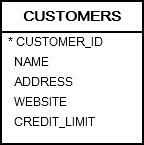
The following example uses a cursor to retrieve five customers who have the highest credits from the customers table and add data to a VARRAY:
DECLARE
    TYPE r_customer_type IS RECORD(
        customer_name customers.name%TYPE,
        credit_limit customers.credit_limit%TYPE
    );

    TYPE t_customer_type IS VARRAY(5)
        OF r_customer_type;

    t_customers t_customer_type := t_customer_type();

    CURSOR c_customer IS
        SELECT NAME, credit_limit
        FROM customers
        ORDER BY credit_limit DESC
        FETCH FIRST 5 ROWS ONLY;
BEGIN
    -- fetch data from a cursor
    FOR r_customer IN c_customer LOOP
        t_customers.EXTEND;
        t_customers(t_customers.LAST).customer_name := r_customer.name;
        t_customers(t_customers.LAST).credit_limit  := r_customer.credit_limit;
    END LOOP;

    -- show all customers
    FOR l_index IN t_customers .FIRST..t_customers.LAST
    LOOP
        dbms_output.put_line(
            'The customer ' ||
            t_customers(l_index).customer_name ||
            ' has a credit of ' ||
            t_customers(l_index).credit_limit
        );
    END LOOP;

END;
/
Code language: SQL (Structured Query Language) (sql)
In this example:
First, declare a record type, a VARRAY type of the record with 5 elements, and a VARRAY variable of that VARRAY type:
TYPE r_customer_type IS RECORD(
    customer_name customers.name%TYPE,
    credit_limit customers.credit_limit%TYPE
);

TYPE t_customer_type IS VARRAY(5)
    OF r_customer_type;

t_customers t_customer_type := t_customer_type();Code language: SQL (Structured Query Language) (sql)
Second, declare a cursor that retrieves 5 customers with the highest credits:
CURSOR c_customer IS
    SELECT name, credit_limit
    FROM customers
    ORDER BY credit_limit DESC
    FETCH FIRST 5 ROWS ONLY;Code language: SQL (Structured Query Language) (sql)
Third, process the cursor and append each element to the VARRAY t_customers:
FOR r_customer IN c_customer LOOP
    t_customers.EXTEND;
    t_customers(t_customers.LAST).customer_name := r_customer.name;
    t_customers(t_customers.LAST).credit_limit  := r_customer.credit_limit;
END LOOP;Code language: SQL (Structured Query Language) (sql)
Finally, iterate over the elements of the VARRAY t_customers and print out the customer name and credit:
FOR l_index IN t_customers .FIRST..t_customers.LAST
    LOOP
        dbms_output.put_line(
            'The customer ' ||
            t_customers(l_index).customer_name ||
            ' has a credit of ' ||
            t_customers(l_index).credit_limit
        );
    END LOOP;Code language: SQL (Structured Query Language) (sql)
Here is the output:
The customer General Mills has a credit of 179916.92
The customer NextEra Energy has a credit of 141953.76
The customer Southern has a credit of 127665.21
The customer Jabil Circuit has a credit of 113340.75
The customer Progressive has a credit of 94989.78
Code language: SQL (Structured Query Language) (sql)
Deleting elements #
To delete all elements of a VARRAY, you use the DELETE method:
varray_name.DELETE;Code language: SQL (Structured Query Language) (sql)To remove one element from the end of a VARRAY, you use the TRIM method:
varray_name.TRIM;Code language: SQL (Structured Query Language) (sql)To remove n elements from the end of a VARRAY, you use the TRIM(n) method:
varray_name.TRIM(n)Code language: SQL (Structured Query Language) (sql)In this tutorial, you have learned about PL/SQL VARRAY and how to manipulate elements of a VARRAY effectively.


