Summary: In this tutorial, you’ll learn how to use the PostgreSQL SUM aggregate function to return the sum of a set of values.
Getting Started with the PostgreSQL SUM Aggregate Function #
The SUM() function takes a set of values and returns their total.
Here’s the syntax of the SUM function that calculates the sum of values in a table column:
SELECT
  SUM(column1)
FROM
  table_name;Code language: PostgreSQL SQL dialect and PL/pgSQL (pgsql)
In this syntax, the SUM will calculate the total values in column1.
Note: The
SUMfunction ignoresNULLin the calculation. Ifcolumn1has no value, theSUM()function returnsNULL, not zero.
Using SUM with GROUP BY #
In practice, you often want to calculate the totals for groups of rows. To do that, you use the SUM function with the GROUP BY clause:
SELECT
  SUM(column1),
  column2
FROM
  table_name
GROUP BY
  column2;Code language: PostgreSQL SQL dialect and PL/pgSQL (pgsql)
In this syntax:
- The
GROUP BYclause groups rows by the values incolumn2into groups. - The
SUMfunction calculates the total value incolumn1for each group.
PostgreSQL SUM Aggregate Function Examples #
Let’s explore some examples of using the SUM function with the inventories table.
Finding the Total Quantity in the Inventory #
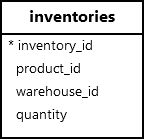
The following SELECT statement uses the SUM() aggregate function to find the total inventory quantity from the inventories table:
SELECT
  SUM(quantity)
FROM
inventories;Code language: PostgreSQL SQL dialect and PL/pgSQL (pgsql)Output:
 sum
------
 5360Code language: PostgreSQL SQL dialect and PL/pgSQL (pgsql)
In this example, the
SUMfunction adds up all values in thequantitycolumn of theinventoriestable and returns a single value.
Finding the Total Quantity in the Inventory for Each Group #
To find the total quantity of each warehouse, you can use the SUM function with the GROUP BY clause:
SELECT
  warehouse_id,
  SUM(quantity)
FROM
  inventories
GROUP BY
warehouse_id;Code language: PostgreSQL SQL dialect and PL/pgSQL (pgsql)Output:
 warehouse_id | sum
--------------+------
            3 | 1780
            2 | 1690
            1 | 1890Code language: PostgreSQL SQL dialect and PL/pgSQL (pgsql)
In this example:
- The
GROUP BYclause groups rows in theinventoriesby the values in thewarehouse_idcolumn.- The
SUMfunction calculates the total quantity for each group.
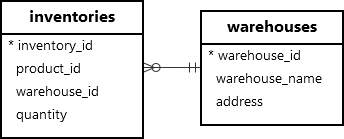
To retrieve the warehouse name instead of the id, you can join the inventories table with the warehouses table:
SELECT
  warehouse_name,
  SUM(quantity)
FROM
  inventories
  JOIN warehouses USING (warehouse_id)
GROUP BY
warehouse_name;Code language: PostgreSQL SQL dialect and PL/pgSQL (pgsql)Output:
     warehouse_name      | sum
-------------------------+------
 San Francisco Warehouse | 1690
 Los Angeles Warehouse   | 1780
 San Jose Warehouse      | 1890Code language: PostgreSQL SQL dialect and PL/pgSQL (pgsql)
In this example, you retrieve the total quantity of items per warehouse by grouping the results by
warehouse_name.
Using SUM in the HAVING Clause to Filter Groups #
To find warehouses with a total quantity greater than 1700, you can use the SUM function in the HAVING clause:
SELECT
  warehouse_name,
  SUM(quantity)
FROM
  inventories
  JOIN warehouses USING (warehouse_id)
GROUP BY
  warehouse_name
HAVING
SUM(quantity) > 1700;Code language: PostgreSQL SQL dialect and PL/pgSQL (pgsql)Output:
    warehouse_name     | sum
-----------------------+------
 Los Angeles Warehouse | 1780
 San Jose Warehouse    | 1890Code language: PostgreSQL SQL dialect and PL/pgSQL (pgsql)
In this example:
- The
GROUP BYclause divides the rows in theinventoriestable by warehouse names.- The
SUMcalculates the total quantity for each group.- The
HAVINGclause keeps the warehouses with a quantity greater than1700.
Summary #
- Use the
SUM()function to return the total value of a set.


