Summary: in this tutorial, you’ll learn how to use the PostgreSQL LOWER function to convert all characters of a string to lowercase.
Introduction to the PostgreSQL LOWER function #
The LOWER function takes a string and returns a new string with all characters of the input string converted to lowercase.
Here’s the syntax of the LOWER function:
LOWER( text ) → textCode language: SQL (Structured Query Language) (sql)The LOWER function returns a new new string with all characters in the input string converted to lowercase.
If you pass a value of a type other than TEXT, VARCHAR, and CHAR to the LOWER() function, you must explicitly cast it to the TEXT type.
Since TEXT, VARCHAR, and CHARare binary coercible, PostgreSQL implicitly casts the VARCHAR and CHAR to TEXT, so you don’t have to perform an explicit conversion.
The LOWER function returns NULL if the input string is NULL.
Note that the LOWER function does not change the original string but returns a new string.
Basic LOWER function examples #
The following example uses the LOWER function to convert all the characters in the string "PostgreSQL" to lowercase:
SELECT
LOWER('PostgreSQL') result;Code language: SQL (Structured Query Language) (sql)Output:
   result
------------
 postgresqlCode language: SQL (Structured Query Language) (sql)
The following statement use the NULL as the input string and returns NULL:
SELECT
LOWER(NULL) result;Code language: SQL (Structured Query Language) (sql)Output:
 result
--------
 NULLCode language: SQL (Structured Query Language) (sql)
Converting table data to uppercase #
Let’s use the products table from the inventory database:
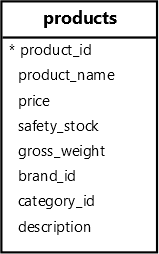
The following query uses the LOWER function to convert the product names from the products table to uppercase:
SELECT
  product_name,
  LOWER(product_name) formatted_product_name
FROM
  products
ORDER BY
product_name;Code language: SQL (Structured Query Language) (sql)Output:
        product_name        |   formatted_product_name
----------------------------+----------------------------
 Apple AirPods Pro 3        | apple airpods pro 3
 Apple iMac 24"             | apple imac 24"
 Apple iPad Pro 12.9        | apple ipad pro 12.9
...Code language: SQL (Structured Query Language) (sql)
Matching data case-insensitively #
When matching data using the equal to operator (=), PostgreSQL compares string case-sensitively.
For example, if you search for a product with the name "dell inspiron 27", PostgreSQL will return an empty set:
SELECT
  product_name,
  price
FROM
  products
WHERE
product_name = 'dell inspiron 27';Code language: SQL (Structured Query Language) (sql)To compare strings case-insensitively, you can use the LOWER function in the WHERE clause as follows:
SELECT
  product_name,
  price
FROM
  products
WHERE
LOWER(product_name) = 'dell inspiron 27';Code language: SQL (Structured Query Language) (sql)Output
   product_name   | price
------------------+--------
 Dell Inspiron 27 | 999.99Code language: SQL (Structured Query Language) (sql)
Summary #
- Use the
LOWERfunction to convert all characters of a string to lowercase.


