Summary: in this tutorial, you’ll learn how to use the PostgreSQL LPAD function to pad a string with specified characters to a certain length.
Introduction to the PostgreSQL LPAD function #
The LPAD() function pads a string to a certain length with specified characters.
Here’s the syntax of the LPAD() function:
LPAD (string, target_length [, fill])Code language: PostgreSQL SQL dialect and PL/pgSQL (pgsql)In this syntax:
string: The input string you want to pad.target_length: The length of the result string after padding.fill: is a string for padding. It defaults to a space.
The LPAD() function returns a new string whose length reaches the target length and is padded with the fill characters.
If the length of the string is less than the target_length, the LPAD() function truncates the string to the target_length.
If the length of the string is equal to the target_length, the LPAD() function won’t pad the string and returns the original string.
Basic PostgreSQL LPAD function examples #
The following statement uses the LPAD() function to pad zero on the left of the string 789 to a string of 6 characters:
SELECT
LPAD('789', 6, '0') numeric_string;Code language: PostgreSQL SQL dialect and PL/pgSQL (pgsql)Output:
 numeric_string
----------------
 000789Code language: PostgreSQL SQL dialect and PL/pgSQL (pgsql)
The following query uses the LPAD() function to truncates string 'PostgreSQL Tutorial' to the length of 10:
SELECT
LPAD('PostgreSQL Tutorial', 10);Code language: JavaScript (javascript)Output:
    lpad
------------
 PostgreSQLCode language: plaintext (plaintext)
The following example doesn’t pad string because the length of the input string is the same as the target length:
SELECT
LPAD('PostgreSQL', 10);Code language: PostgreSQL SQL dialect and PL/pgSQL (pgsql)Output:
    lpad
------------
 PostgreSQLCode language: plaintext (plaintext)
Padding IDs in the database #
We’ll use the products table from the inventory database:
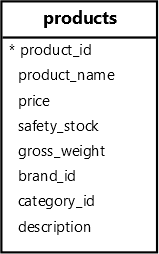
The following query retrieves product id, name from the products table and pads the product id with zero '0':
SELECT
  LPAD(product_id::TEXT, 3, '0') id,
  product_name
FROM
products;Code language: PostgreSQL SQL dialect and PL/pgSQL (pgsql)Output:
 id  |        product_name
-----+----------------------------
 001 | Samsung Galaxy S24
 002 | Apple iPhone 15
 003 | Huawei Mate 60
 004 | Xiaomi Mi 14
 005 | Sony Xperia 1 VI
...Code language: plaintext (plaintext)
In this example:
- First, cast the product id into
TEXT. - Second, pad the product id with zero (
'0') to the length of 3.
Summary #
- Use the
LPAD()function to pad specified characters on the left of a string to a certain length.


