Summary: In this tutorial, you’ll learn how to convert a value of one data type to another using the PostgreSQL CAST() function and operator.
PostgreSQL Cast Overview #
To convert a value of one data type to another, you use the CAST() function or cast operator (::).
Here’s the syntax of the CAST() function:
CAST(value AS target_type);Code language: PostgreSQL SQL dialect and PL/pgSQL (pgsql)In this syntax:
- First, specify the
valueto cast. - Second, provide the target data type (
target_type) to which you want to convert thevalue.
The CAST() function returns the value to cast to the target type.
If the cast fails, the CAST() function issues an error.
To make it more convenient, PostgreSQL offers the cast operator (::), which is more concise than the CAST function:
value::target_typeCode language: PostgreSQL SQL dialect and PL/pgSQL (pgsql)The cast operator (::) casts the value to the target type or raises an error if it fails.
Casting a String to an Integer #
The following statement uses the CAST() function to convert a string to an integer:
SELECT
CAST('10' AS INT) result;Code language: PostgreSQL SQL dialect and PL/pgSQL (pgsql)Output:
 result
--------
     10Code language: PostgreSQL SQL dialect and PL/pgSQL (pgsql)
Similarly, you can convert the string ’10’ to an integer using the cast operator:
SELECT
'10'::INT result;Code language: PostgreSQL SQL dialect and PL/pgSQL (pgsql)The following query issues an error because the CAST() function cannot convert the string ’10x’ to an integer:
SELECT
CAST('10x' AS INT) result;Code language: PostgreSQL SQL dialect and PL/pgSQL (pgsql)Output:
ERROR: invalid input syntax for type integer: "10x"Code language: PostgreSQL SQL dialect and PL/pgSQL (pgsql)Casting a String to a Double #
The following example uses the CAST() function to cast a string to a double:
SELECT
CAST('9.99' AS DOUBLE PRECISION) result;Code language: PostgreSQL SQL dialect and PL/pgSQL (pgsql)Output:
 result
--------
   9.99Code language: PostgreSQL SQL dialect and PL/pgSQL (pgsql)
Here’s how you use the cast operator(::):
SELECT
'9.99'::DOUBLE PRECISION result;Code language: PostgreSQL SQL dialect and PL/pgSQL (pgsql)Casting a String to a Boolean #
The following example uses the CAST() function to cast strings to boolean values:
SELECT
  CAST('true' AS BOOLEAN),
  CAST('false' AS BOOLEAN),
  CAST('T' AS BOOLEAN),
CAST('F' AS BOOLEAN);Code language: PostgreSQL SQL dialect and PL/pgSQL (pgsql)Output:
 bool | bool | bool | bool
------+------+------+------
 t    | f    | t    | fCode language: PostgreSQL SQL dialect and PL/pgSQL (pgsql)
Cast operator:
SELECT
  'true'::bool,
  'false'::bool,
  'T'::bool,
'F'::bool;Code language: PostgreSQL SQL dialect and PL/pgSQL (pgsql)Casting a String to a Date #
The following example uses the CAST() to convert a string to a date:
SELECT
  CAST('2025-02-14' AS DATE),
CAST('14-Feb-2025' AS DATE);Code language: PostgreSQL SQL dialect and PL/pgSQL (pgsql)Output:
    date    |    date
------------+------------
 2025-02-14 | 2025-02-14Code language: PostgreSQL SQL dialect and PL/pgSQL (pgsql)
SELECT
'2025-02-14'::DATE,
'14-Feb-2025'::DATE;Code language: PostgreSQL SQL dialect and PL/pgSQL (pgsql)Output:
    date    |    date
------------+------------
 2025-02-14 | 2025-02-14Code language: PostgreSQL SQL dialect and PL/pgSQL (pgsql)
In these examples, the CAST() function and operator convert the string '2025-02-14' and '14-Feb-2025' to dates.
Casting a String to an Interval #
The following example uses the CAST function or operator to cast a string to an interval:
SELECT
CAST('2 hours 30 minutes' AS INTERVAL) result;Code language: PostgreSQL SQL dialect and PL/pgSQL (pgsql)Output:
  result
----------
 02:30:00Code language: PostgreSQL SQL dialect and PL/pgSQL (pgsql)
SELECT '2 hours 30 minutes'::INTERVAL;Code language: PostgreSQL SQL dialect and PL/pgSQL (pgsql)Output:
 interval
----------
 02:30:00Code language: PostgreSQL SQL dialect and PL/pgSQL (pgsql)
Casting a Timestamp to a Date #
The following statement uses the CAST() function to cast a timestamp to a date:
SELECT
CAST(TIMESTAMP '2025-02-14 12:30:45' AS DATE);Code language: PostgreSQL SQL dialect and PL/pgSQL (pgsql)Output:
    date
------------
 2025-02-14Code language: PostgreSQL SQL dialect and PL/pgSQL (pgsql)
SELECT TIMESTAMP '2025-02-14 12:30:45'::DATE;Code language: PostgreSQL SQL dialect and PL/pgSQL (pgsql)Output:
    date
------------
 2025-02-14Code language: PostgreSQL SQL dialect and PL/pgSQL (pgsql)
Casting an Interval to Text #
The following statement uses the CAST() function to cast an interval to a date:
SELECT
CAST(INTERVAL '7 days' AS TEXT) result;Code language: PostgreSQL SQL dialect and PL/pgSQL (pgsql)Output:
 result
--------
 7 daysCode language: PostgreSQL SQL dialect and PL/pgSQL (pgsql)
Casting a Double Precision to an Integer #
The following statement uses the CAST() function to cast a double precision to an integer:
SELECT
CAST(9.99 AS INT);Code language: PostgreSQL SQL dialect and PL/pgSQL (pgsql)Output:
 int4
------
   10Code language: PostgreSQL SQL dialect and PL/pgSQL (pgsql)
Casting an Array to a String #
The following example uses the CAST() function to cast an array to text:
SELECT
CAST('{10, 20, 30}' AS TEXT);Code language: PostgreSQL SQL dialect and PL/pgSQL (pgsql)Output:
     text
--------------
 {10, 20, 30}Code language: PostgreSQL SQL dialect and PL/pgSQL (pgsql)
Casting a String to an Array #
The following example uses the CAST() function to cast an array to text:
SELECT CAST('{10,20,30}' AS INT[]) result;Code language: PostgreSQL SQL dialect and PL/pgSQL (pgsql)Output:
   result
------------
 {10,20,30}Code language: PostgreSQL SQL dialect and PL/pgSQL (pgsql)
SELECT
'{10,20,30}'::INT[] result;Code language: PostgreSQL SQL dialect and PL/pgSQL (pgsql)Output:
   result
------------
 {10,20,30}Code language: PostgreSQL SQL dialect and PL/pgSQL (pgsql)
Using PostgreSQL CAST Function with Table Data #
We’ll use the products table from the inventory table:
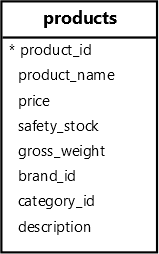
The following example uses the CAST function to cast a string to a number:
SELECT
  product_name,
  CAST((REGEXP_MATCH(product_name, '\d+')) [1] AS INT) number
FROM
products;Code language: PostgreSQL SQL dialect and PL/pgSQL (pgsql)Output:
        product_name        | number
----------------------------+--------
 Samsung Galaxy S24         |     24
 Apple iPhone 15            |     15
 Huawei Mate 60             |     60
 Xiaomi Mi 14               |     14
 Sony Xperia 1 VI           |      1
 Samsung Galaxy Z Fold 5    |      5
...Code language: PostgreSQL SQL dialect and PL/pgSQL (pgsql)
How it works
- First, extract the first occurrence of a number from the product name using the
REGEXP_MATCHfunction. - Second, use the
CASTfunction to cast a string to an integer.
Multiple Casting #
The following query extracts the product price from an XML fragment and converts it to the decimal:
SELECT
  (
    xpath(
      '/product/price/text()',
      XMLPARSE(
        CONTENT '<product> <name>Smartphone</name> <price>999.99</price> </product>'
      )
    )
) [1]::TEXT::DEC price;Code language: PostgreSQL SQL dialect and PL/pgSQL (pgsql)Output:
 price
--------
 999.99Code language: PostgreSQL SQL dialect and PL/pgSQL (pgsql)
How it Works
- The
xpathfunction extracts a text from the price element of theXMLfragment. It returns an array{999.99}. [1]returns the first element of the result array999.99. The data is anXMLvalue.::TEXTcasts theXMLvalue to a value ofTEXT.::DECcasts the value ofTEXTtoXMLvalue.
Notice that you cannot cast type XML to numeric directly. The following statement will issue an error:
SELECT
  (
    xpath(
      '/product/price/text()',
      XMLPARSE(
        CONTENT '<product> <name>Smartphone</name> <price>999.99</price> </product>'
      )
    )
  ) [1]::DEC price;Code language: PostgreSQL SQL dialect and PL/pgSQL (pgsql)
Error:
ERROR: cannot cast type xml to numericCode language: PostgreSQL SQL dialect and PL/pgSQL (pgsql)Implicit Casting #
PostgreSQL can sometimes automatically cast a value to a specific one without requiring the CAST function or operator. For example:
SELECT
1 + '2' result;Code language: PostgreSQL SQL dialect and PL/pgSQL (pgsql)Output:
 result
--------
      3Code language: PostgreSQL SQL dialect and PL/pgSQL (pgsql)
In this example, PostgreSQL automatically converts the string '2' to an integer and adds it to the number 1.
Custom casts #
You can create your cast for custom types using the CREATE CAST statement.
Here’s the basic syntax of the CREATE CAST statement:
CREATE CAST (source_type AS target_type)
WITH
  FUNCTION function_name (arguments) AS IMPLICITCode language: PostgreSQL SQL dialect and PL/pgSQL (pgsql)
Let’s see the following example.
First, create a composite type that holds product data:
CREATE TYPE product_info AS (name TEXT, price DEC);Code language: PostgreSQL SQL dialect and PL/pgSQL (pgsql)Second, create a function that converts a value of JSONB to product_info:
CREATE FUNCTION jsonb_to_product_info(data JSONB)
RETURNS product_info
AS
$$
SELECT
    (data->>'name')::TEXT,
    (data->>'price')::DEC;
$$
LANGUAGE SQL IMMUTABLE;Code language: PostgreSQL SQL dialect and PL/pgSQL (pgsql)Third, create a custom cast to convert a JSONB to product_info using the jsonb_to_product_info function:
CREATE CAST (JSONB AS product_info)
WITH
FUNCTION jsonb_to_product_info (JSONB) AS IMPLICIT;Code language: PostgreSQL SQL dialect and PL/pgSQL (pgsql)In this statement:
WITH FUNCTION jsonb_to_product_info(JSONB): Specifies the functionjsonb_to_product_infoto use for the cast.AS IMPLICIT: Allows PostgreSQL to castJSONBvalues when needed automatically.
Fourth, create a table called product_prices:
CREATE TABLE product_prices (
  id INT GENERATED ALWAYS AS IDENTITY PRIMARY KEY,
  data JSONB
);Code language: PostgreSQL SQL dialect and PL/pgSQL (pgsql)Fifth, insert some rows into the product_prices table:
INSERT INTO
  product_prices (data)
VALUES
  ('{"name": "Smartphone", "price": 999.99}'),
  ('{"name": "Smartwatch", "price": 699.49}')
RETURNING
data;Code language: PostgreSQL SQL dialect and PL/pgSQL (pgsql)Output:
                  data
-----------------------------------------
 {"name": "Smartphone", "price": 999.99}
 {"name": "Smartwatch", "price": 699.49}Code language: PostgreSQL SQL dialect and PL/pgSQL (pgsql)
Sixth, retrieve the data from the product_prices table and cast it to the product_info:
SELECT
  data::product_info
FROM
product_prices;Code language: PostgreSQL SQL dialect and PL/pgSQL (pgsql)Output:
        data
---------------------
 (Smartphone,999.99)
 (Smartwatch,699.49)Code language: PostgreSQL SQL dialect and PL/pgSQL (pgsql)
Summary #
- Use the
CAST(value AS type)function orvalue::typeoperator to explicitly cast the value to another of a different type. - Use the
CREATE CASTstatement to create a custom cast.


