Summary: in this tutorial, you’ll learn how to use the PostgreSQL EXCEPT operator to combine result sets of two queries and return the records from the first query that are not in the second.
Getting Started with the PostgreSQL EXCEPT Operator #
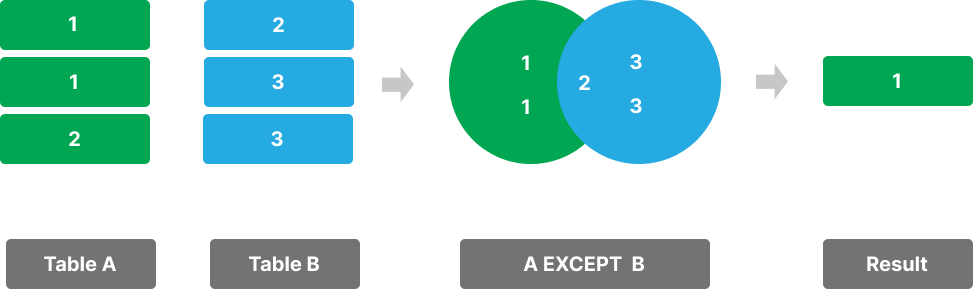
The EXCEPT operator allows you to combine two queries and find the difference between the result sets.
The EXCEPT operator returns the rows from the first result set that are not present in the second.
Here’s the syntax of the EXCEPT operator:
SELECT column1, column2
FROM tableA
EXCEPT
SELECT column1, column2
FROM tableB;Code language: PostgreSQL SQL dialect and PL/pgSQL (pgsql)
In this syntax:
- First, specify two
SELECTstatements you want to combine with their result sets. - Second, use the
EXCEPToperator between theSELECTstatements to find the difference between the result set of the queries.
To make the EXCEPT operator valid, the SELECT statements must adhere to the following rules:
- They must return result sets that have the same number of columns.
- The data types of the corresponding columns must be compatible.
The EXCEPT operator removes the duplicate rows from the final result sets.
To retain the duplicate rows in the final result set, you use the EXCEPT ALL operator:
SELECT column1, column2
FROM tableA
EXCEPT ALL
SELECT column1, column2
FROM tableB;Code language: PostgreSQL SQL dialect and PL/pgSQL (pgsql)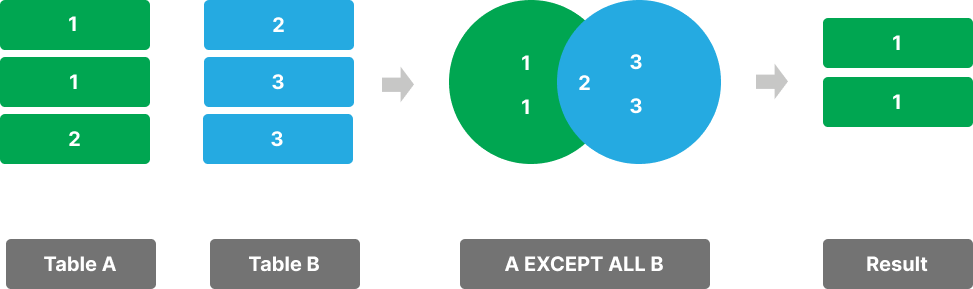
In practice, you’ll find the EXCEPT operator helpful for data comparison and analysis.
Setting up sample tables #
Suppose you have two tables:
- The
slow_movingstable stores the slow moving products. - The
flagshipstable stores the flagship products.
Here is the SQL script for creating tables and insert some rows into them:
CREATE TABLE slow_movings (
  id INT GENERATED ALWAYS AS IDENTITY PRIMARY KEY,
  name VARCHAR(255) NOT NULL,
  brand VARCHAR(50) NOT NULL
);

CREATE TABLE flagships (
  id INT GENERATED ALWAYS AS IDENTITY PRIMARY KEY,
  name VARCHAR(255) NOT NULL,
  brand VARCHAR(50) NOT NULL
);

INSERT INTO
  slow_movings (name, brand)
VALUES
  ('iPhone 16', 'Apple'),
  ('Galaxy S24', 'Samsung'),
  ('Pixel 9', 'Google'),
  ('iPhone 16 Plus', 'Apple'),
  ('Galaxy Z Flip 6', 'Samsung');

INSERT INTO
  flagships (name, brand)
VALUES
  ('iPhone 16', 'Apple'),
  ('Galaxy S24', 'Samsung'),
  ('Pixel 9', 'Google'),
  ('iPhone 16 Pro', 'Apple'),
  ('Galaxy S24 Ultra', 'Samsung');Code language: PostgreSQL SQL dialect and PL/pgSQL (pgsql)
PostgreSQL EXCEPT operator example #
The following example uses the EXCEPT operator to find the flagship products that are not slow-moving products:
SELECT
  name,
  brand
FROM
  flagships
EXCEPT
SELECT
  name,
  brand
FROM
slow_movings;Code language: PostgreSQL SQL dialect and PL/pgSQL (pgsql)Output:
       name        |  brand
-------------------+---------
 iPhone 16 Pro Max | Apple
 Galaxy S24 Ultra  | Samsung
 iPhone 16 Pro     | AppleCode language: plaintext (plaintext)
Unlike the UNION and INTERSECT operators, the order of the SELECT statements is important when using the EXCEPT operator because it will directly impact the query result.
For example, the following query flips the order of the SELECT statements to find the slow-moving products that are not flagship products:
SELECT
  name,
  brand
FROM
  slow_movings
EXCEPT
SELECT
  name,
  brand
FROM
flagships;Code language: PostgreSQL SQL dialect and PL/pgSQL (pgsql)Output:
      name       |  brand
-----------------+---------
 iPhone 16 Plus  | Apple
 Galaxy Z Flip 6 | SamsungCode language: plaintext (plaintext)
PostgreSQL EXCEPT operator with ORDER BY clause #
If you want to sort the result set returned by the EXCEPT operator, you can place the ORDER BY clause in the second SELECT statement:
SELECT
  column1,
  column2
FROM
  table1
EXCEPT
SELECT
  column1,
  column2
FROM
  table2
ORDER BY
  sort_expression;Code language: PostgreSQL SQL dialect and PL/pgSQL (pgsql)
For example, the following statement finds the flagship products that are not slow-moving and sorts the products by brands:
SELECT
  name,
  brand
FROM
  flagships
EXCEPT
SELECT
  name,
  brand
FROM
  slow_movings
ORDER BY
brand;Code language: PostgreSQL SQL dialect and PL/pgSQL (pgsql)Output:
       name        |  brand
-------------------+---------
 iPhone 16 Pro Max | Apple
 iPhone 16 Pro     | Apple
 Galaxy S24 Ultra  | SamsungCode language: plaintext (plaintext)
Summary #
- Use the PostgreSQL
EXCEPToperator to find the differences between two result sets. - Use PostgreSQL
EXCEPT ALLto keep the duplicate rows in the final result set. - Place the
ORDER BYclause in the secondSELECTstatement to sort the rows in the result set.


