Summary: in this tutorial, you’ll explore the PostgreSQL full-text search feature and how to implement it in your databases.
Introduction to PostgreSQL full-text search #
So far, you’ve learned how to find the text exactly using the WHERE clause with the equal operator (=):
SELECT
  column1,
  column2
FROM
  table_name
WHERE
  column_name = 'search_term';Code language: PostgreSQL SQL dialect and PL/pgSQL (pgsql)
And match the text based on a specified pattern using the LIKE operator:
SELECT
  column1,
  column2
FROM
  table_name
WHERE
  column_name LIKE pattern;Code language: PostgreSQL SQL dialect and PL/pgSQL (pgsql)
If the exact match and pattern matching are not sufficient, you can go with regular expressions or using the SIMILAR TO operator:
SELECT
  column1,
  column2
FROM
  table_name
WHERE
  column1 SIMILAR TO pattern;Code language: PostgreSQL SQL dialect and PL/pgSQL (pgsql)
You can use the full-text search if these options do not meet your requirements.
In PostgreSQL, full-text search is a powerful feature that allows you to carry complex searches on text. It efficiently searches and ranks text-based data by indexing their words and phrases.
For example, if you find documents that contain the word “advance,” the full-text search will return the documents with the words "advance" , "advancing" , and "advanced".
A document is the basic unit of text you want to search through in a full-text search. It can be a column of a table or a combination of columns from multiple tables.
PostgreSQL full-text search data types #
PostgreSQL provides two specific data types to support full-text searches: tsvectorand tsquery.
tsvector data type #
The tsvector is a data type that supports full-text search. It represents a document optimized for text search by storing a sorted list of distinct normalized words.
The technical terms of the normalized words are lexemes. Lexemes are words without variations, such as teaches and teaching words have the lexeme teach.
To convert a regular string to a tsvector, you use the to_tsvector function. For example:
SELECT
  to_tsvector('teaches'),
to_tsvector('teaching');Code language: PostgreSQL SQL dialect and PL/pgSQL (pgsql)Output:
 to_tsvector | to_tsvector
-------------+-------------
 'teach':1   | 'teach':1Code language: PostgreSQL SQL dialect and PL/pgSQL (pgsql)
In this example, the to_tsvector function converts the words teaches and teaching to the word teach.
The tsvector data type has the following features:
- Lexemes: normalizes the words to merge their variants into the same word.
- Sorting and deduplication: automatically sorts the lexemes and removes duplicates before storing them in the table.
- Positional information: adds positions of the lexemes in the document and then uses them for proximity ranking.
- Weights: PostgreSQL allows you to label lexemes with weights (
A,B,C, orD) to emphasize their importance.
For example, the following statement uses the to_tsvector to parse the text into tokens, reduces them to lexemes, and returns a tsvector:
SELECT
  to_tsvector(
    'The big blue elephant jumps over the lazy dog. The big blue elephant is very big'
);Code language: PostgreSQL SQL dialect and PL/pgSQL (pgsql)Output:
                           to_tsvector
------------------------------------------------------------------
 'big':2,11,16 'blue':3,12 'dog':9 'eleph':4,13 'jump':5 'lazi':8Code language: PostgreSQL SQL dialect and PL/pgSQL (pgsql)
Explanation:
- Lexemes: The function normalizes the words such as
"elephant"becomes"eleph","jumps"becomes"jump"and removes the stop words like"The"and"is". - Sorting and deduplication: The function sorts the lexemes alphabetically.
- Positional information: The function adds the position of each lexeme in the document. For example, the word
"big"appears at positions2,11and16.
To set the weights to lexemes, you can use the setweight function, which is in the scope of this tutorial.
tsquery data type #
PostgreSQL uses the tsquery data type to represent full-text search queries.
The tsquery supports the following main features:
- Boolean operators: a
tsquerysupports the logical operator AND (&), OR (|), and NOT (!). For example, you can use the boolean operators to search for documents that contain the word"elephant"and the word"blue"but not the word"dolphin". - Phrase search: Use double quotes (
") to ensure that the enclosing words must appear together in the document in the same order. For example, the search term"big elephant", the phrase"big elephant"must appear as a whole within the document. - Grouping:
tsqueryuses the parentheses()to group terms and operators, allowing you to form flexible search conditions.
For example, the following shows a text string that a tsquery represents:
"blue" & "elephant" |"dolphin"Code language: PostgreSQL SQL dialect and PL/pgSQL (pgsql)This tsquery forms a query that searches for the documents containing the words "blue" and "elephant" or the word "dolphin".
To convert a string to a tsquery value, you use the to_tsquery function. For example:
SELECT to_tsquery('"blue" & "elephant" |"dolphin"');Code language: PostgreSQL SQL dialect and PL/pgSQL (pgsql)Output:
          to_tsquery
------------------------------
 'blue' & 'eleph' | 'dolphin'Code language: PostgreSQL SQL dialect and PL/pgSQL (pgsql)
Match operator (@@) #
PostgreSQL uses the match operator (@@) to match a tsvector against a tsquery to determine if the text the tsvector represents contains the terms specified in the tsquery:
tsvector @@ tsqueryCode language: PostgreSQL SQL dialect and PL/pgSQL (pgsql)For example:
SELECT
to_tsvector('The big blue elephant jumps over the lazy dog.') @@ to_tsquery('elephant') result;Code language: PostgreSQL SQL dialect and PL/pgSQL (pgsql)Output:
 result
--------
 tCode language: PostgreSQL SQL dialect and PL/pgSQL (pgsql)
It’s possible to use a value of CHAR, VARCHAR, and TEXT with the match operator:
text @@ tsqueryCode language: PostgreSQL SQL dialect and PL/pgSQL (pgsql)In this case, PostgreSQL will implicitly convert the text to the tsvector before matching with the tsquery.
PostgreSQL full-text search examples #
Let’s explore some examples of using PostgreSQL full-text searches with description column of the products table:
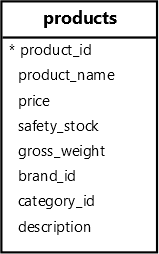
0) Creating GIN indexes #
PostgreSQL provides the GIN index explicitly designed for full-text search. GIN stands for Generalized Inverted Index.
We’ll create a GIN index for the description column of the products table to enable full-text search.
CREATE INDEX fts_products_description
ON products
USING GIN ((to_tsvector('english', description)));Code language: PostgreSQL SQL dialect and PL/pgSQL (pgsql)1) Performing a basic full-text search #
The following example searches for products whose description contains the word power and its variations such as powerful:
SELECT
  product_name,
  description
FROM
  products
WHERE
description @@ to_tsquery('power');Code language: PostgreSQL SQL dialect and PL/pgSQL (pgsql)2) Performing full-text searches with the AND operator #
The following statement uses the AND operator (&) to search for products whose descriptions contain both words “powerful” and “advanced”:
SELECT
  product_name,
  description
FROM
  products
WHERE
description @@ to_tsquery('power & large');Code language: PostgreSQL SQL dialect and PL/pgSQL (pgsql)3) Performing full-text searches with OR operator #
The following statement uses the OR operator (|) to search for products with a description containing either the word “large” or “great”:
SELECT
  product_name,
  description
FROM
  products
WHERE
description @@ to_tsquery('large| great');Code language: PostgreSQL SQL dialect and PL/pgSQL (pgsql)4) Performing phrase searches #
The following statement searches for products with a description containing the phrase “sleek design”:
SELECT
  product_name,
  description
FROM
  products
WHERE
description @@ to_tsquery('''sleek design''');Code language: PostgreSQL SQL dialect and PL/pgSQL (pgsql)5) Performing full-text searches with the NOT operator #
The following statement uses the NOT operator (!) to search for products with descriptions that do not contain the word “features”:
SELECT
  product_name,
  description
FROM
  products
WHERE
description @@ to_tsquery('!features');Code language: PostgreSQL SQL dialect and PL/pgSQL (pgsql)Summary #
- Use PostgreSQL full-text search to perform complex searches on text stored in the database.
- Use
tsvectordata type to store documents for full-text search. - Use
tsquerydata type to store full-text search queries. - Use the match operator (
@@) to match atsqueryagainst to check if the text thetsvectorrepresents contains the terms specified in thetsquery. - Use GIN indexes to index columns for full-text searches.


