Summary: in this tutorial, you’ll learn how to use PostgreSQL INNER JOIN to merge rows from two tables and select the matching rows
Introduction to PostgreSQL INNER JOIN clause #
In PostgreSQL, a database consists of multiple related tables. They link to each other via foreign keys.
To select data from two or more tables, you use the INNER JOIN clause of the SELECT statement.
Here’s the syntax for the INNER JOIN clause:
SELECT
  table1.column1,
  table2.column2,
  ...
FROM
  table1
  INNER JOIN table2 ON table1.column1 = table2.column1Code language: PostgreSQL SQL dialect and PL/pgSQL (pgsql)
In this syntax:
- First, specify the name of the first table (
table1) in theFROMclause. - Second, provide the name of the second table (
table2) you want to merge the rows with the first table in theINNER JOINclause. - Third, use a condition to match rows from the first table (
table1) with the second table (table2) in theONclause. The condition matches rows in both tables by comparing the values ofcolumn1intable1with the values ofcolumn1intable2. Note that the condition may use other comparison operators. If you want to use multiple conditions, you can use the logical operatorANDto combine them in theONclause. - Finally, list out the columns from both tables to include in the final result set in the
SELECTclause.
PostgreSQL evaluates the FROM clause first, then the INNER JOIN clause, and finally the SELECT clause.
Here’s how PostgreSQL inner join works:
- First, the
INNER JOINcompares values incolumn1of both tables. - Second, merge the matching rows in an intermediate table if they are equal.
- Third, select the columns specified in the
SELECTclause in the final result set.
Understanding PostgreSQL Inner Join #
Suppose you want to merge rows from X and Y table using an inner join:
- The
Xtable has two columns:id(key) andx. - The
Ytable also has two columns:id(key) andy.
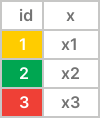
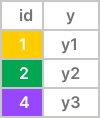
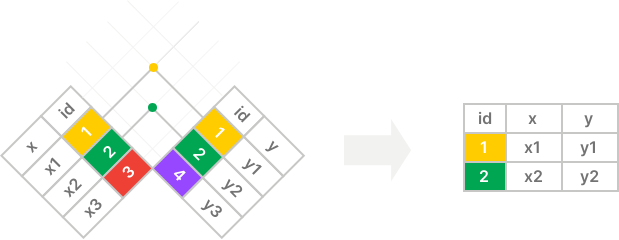
The inner join includes the rows with matching values in the id columns. It does not include unmatching rows in the result set:
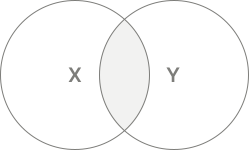
The following Venn diagram is another way to depict how an inner join works:
PostgreSQL Inner Join Example #
Suppose you have two tables: products and brands.
CREATE TABLE brands (
  brand_id INT GENERATED ALWAYS AS IDENTITY PRIMARY KEY,
  name VARCHAR(255) NOT NULL
);

CREATE TABLE products (
  product_id INT GENERATED ALWAYS AS IDENTITY PRIMARY KEY,
  name VARCHAR(100) NOT NULL,
  price DECIMAL(10, 2) NOT NULL,
  brand_id INT,
  FOREIGN KEY (brand_id) REFERENCES brands (brand_id)
);

INSERT INTO
  brands (name)
VALUES
  ('Apple'),
  ('Samsung'),
  ('Google')
RETURNING *;

INSERT INTO
  products (name, price, brand_id)
VALUES
  ('iPhone 14 Pro', 999.99, 1),
  ('iPhone 15 Pro', 1199.99, 1),
  ('Galaxy S23 Ultra', 1149.47, 2),
  ('Oppo Find Flip', 499.99, NULL)
RETURNING *;Code language: PostgreSQL SQL dialect and PL/pgSQL (pgsql)
The products table has a foreign key column, brand_id, that links to the brand_id primary key column of the brands table:
The brands table:
| brand_id | name |
|---|---|
| 1 | Apple |
| 2 | Samsung |
| 3 |
The products table:
| product_id | name | price | brand_id |
|---|---|---|---|
| 1 | iPhone 14 Pro | 999.99 | 1 |
| 2 | iPhone 15 Pro | 1299.99 | 1 |
| 3 | Galaxy S23 Ultra | 1149.47 | 2 |
| 4 | Oppo Find Flip | 499.99 | NULL |
The following statement uses an INNER JOIN to select the product name and price from the products table and the brand name from the brands table:
SELECT
  products.name,
  products.price,
  brands.name
FROM
  products
  INNER JOIN brands ON brands.brand_id = products.brand_id;Code language: PostgreSQL SQL dialect and PL/pgSQL (pgsql)
Output:
       name       |  price  |  name
------------------+---------+---------
 iPhone 14 Pro    |  999.99 | Apple
 iPhone 15 Pro    | 1199.99 | Apple
 Galaxy S23 Ultra | 1149.47 | SamsungCode language: PostgreSQL SQL dialect and PL/pgSQL (pgsql)
How the query works.
First, the FROM clause examines each row from the products table.
Second, the INNER JOIN clause compares the brand_id of each row in the products table with the brand_id of each row in the brands table. Since they have the same brand_id, the query will combine rows from both into an imagined table:
| product_id | name | price | brand_id | brand_id | name |
|---|---|---|---|---|---|
| 1 | iPhone 14 Pro | 999.99 | 1 | 1 | Apple |
| 2 | iPhone 15 Pro | 1299.99 | 1 | 1 | Apple |
| 3 | Galaxy S23 Ultra | 1149.47 | 2 | 2 | Samsung |
In more detail:
- Row with id 1 and 2 of the
productstable matches row with id 1 in thebrandstable. - Row with id 3 in the
productstable matches row with id 2 of thebrandstable. - Row with id 4 in the products table does not match any row in the
brandstable.
Third, the SELECT clause selects the name and price columns from the products table and name columns of the brands table:
| name | price | name |
|---|---|---|
| iPhone 14 Pro | 999.99 | Apple |
| iPhone 15 Pro | 1299.99 | Apple |
| Galaxy S23 Ultra | 1149.47 | Samsung |
Qualifying column names #
Since both tables products and brands have the same name and brand_id columns, we have to reference them using the following syntax:
table_name.column_nameCode language: PostgreSQL SQL dialect and PL/pgSQL (pgsql)If we don’t do so, PostgreSQL will issue an ambiguous error. For example:
SELECT
  name,
  price,
  name
FROM
  products
  INNER JOIN brands ON products.brand_id = products.brand_id;Code language: PostgreSQL SQL dialect and PL/pgSQL (pgsql)
Error:
column reference "name" is ambiguousCode language: PostgreSQL SQL dialect and PL/pgSQL (pgsql)The output has two columns with the same name (name); we can use column aliases to make it more obvious:
SELECT
  products.name product_name,
  products.price,
  brands.name brand_name
FROM
  products
INNER JOIN brands ON brands.brand_id = products.brand_id;Code language: PostgreSQL SQL dialect and PL/pgSQL (pgsql)Output:
   product_name   |  price  | brand_name
------------------+---------+------------
 iPhone 14 Pro    |  999.99 | Apple
 iPhone 15 Pro    | 1199.99 | Apple
 Galaxy S23 Ultra | 1149.47 | SamsungCode language: PostgreSQL SQL dialect and PL/pgSQL (pgsql)
Joining tables with table aliases #
Typing the same table names for every column is tedious. PostgreSQL supports temporary names for tables in a query using table aliases.
Like a column alias, you can assign an alias to a table temporarily during the query execution using the following syntax:
table_name AS table_aliasCode language: PostgreSQL SQL dialect and PL/pgSQL (pgsql)Since the AS keyword is optional, you can ignore it like this:
table_name table_aliasCode language: PostgreSQL SQL dialect and PL/pgSQL (pgsql)The following statement joins the products table with the brands table using table aliases:
SELECT
  p.name product_name,
  p.price,
  b.name brand_name
FROM
  products AS p
INNER JOIN brands AS b ON b.brand_id = p.brand_id;Code language: PostgreSQL SQL dialect and PL/pgSQL (pgsql)In this example, we assign p as the table alias for the products table and b as the table alias for the brands table. Then, we use these table aliases to reference the column’s names from both tables.
The USING syntax #
If you join two tables by comparing values from the same column names using the equal operator (=), you can use the USING clause syntax:
SELECT table1.column1, table2.column2, ...
FROM table1
INNER JOIN table2 USING (column1);Code language: PostgreSQL SQL dialect and PL/pgSQL (pgsql)
In this syntax, we replace the following ON clause:
ON table1.column1 = table2.column1Code language: PostgreSQL SQL dialect and PL/pgSQL (pgsql)with the USING clause:
USING (column1)Code language: PostgreSQL SQL dialect and PL/pgSQL (pgsql)For example, the following statement joins the products table with the brands table using the USING clause:
SELECT
  p.name product_name,
  p.price,
  b.name brand_name
FROM
  products p
INNER JOIN brands b USING (brand_id);Code language: PostgreSQL SQL dialect and PL/pgSQL (pgsql)In this statement, we don’t use the AS keyword for the table aliases and use the USING clause instead of the ON clause.
Summary #
- Use the
INNER JOINclause to merge rows from multiple tables and select the matching rows. - Table aliases are temporary table names during the query execution.
- Use the
USINGsyntax when two tables have the same column names, and you want to join them on those columns to make the statement more concise.


