Summary: in this tutorial, you’ll learn about PostgreSQL triggers and how to use them to automate some database tasks.
Introduction to PostgreSQL triggers #
In PostgreSQL, a trigger is a user-defined function or procedure invoked automatically when an event such as INSERT, UPDATE, DELETE, or TRUNCATE occurs on a table or view.
In practice, you can find the triggers helpful in the following situations:
- Logging
- Auditing
- Validating complex business rules that simple constraints cannot do.
Triggers include four key components:
- Trigger events
- Trigger timing
- Trigger function
- Trigger scope
Trigger Events #
Trigger events are events that cause the trigger to fire. In PostgreSQL, the trigger events are:
INSERTUPDATEDELETETRUNCATE
For example, inserting a new row into a table will fire a trigger.
Trigger Functions #
Trigger functions are user-defined functions or procedures that execute when triggers fire.
Trigger functions always return a TRIGGER. Inside trigger functions, you can access special variables such as TG_OP, NEW, and OLD.
- The
TG_OPvariable stores the operation that causes the trigger to fire. It can be'INSERT','UPDATE','DELETE'and'TRUNCATE'. - The
NEWvariable stores the new row. This variable is available only when the operation is'INSERT'or'UPDATE'. - The
OLDvariable stores the old row, available in the'UPDATE'or'DELETE'operation.
Trigger Timing #
Trigger timing specifies the time when the triggers fire:
BEFORE– Executes the trigger function before the triggering event.AFTER– Executes the trigger function after the triggering event.
Trigger Scope #
- Row-level: The trigger function executes for every affected row. For example, if you issue an
UPDATEstatement that updates 10 rows, the trigger will fire 10 times, each per row. - Statement-level: The trigger function executes per SQL statement. For example, if you run an
UPDATEstatement, the statement-level trigger will fire once, regardless of the number of rows updated.
Creating Triggers #
To create a trigger, you follow these steps:
- First, define a user-defined function or procedure to execute when the trigger fires.
- Second, associate the trigger function with a trigger using the
CREATE TRIGGERstatement.
The CREATE TRIGGER statement allows you to create a new trigger with key trigger components:
CREATE [OR REPLACE] TRIGGER trigger_name
{ BEFORE | AFTER }
{ INSERT | DELETE | TRUNCATE | UPDATE [OF column_name, ...] }
ON table_name
[ FOR [ EACH ] { ROW | STATEMENT } ]
EXECUTE { FUNCTION | PROCEDURE } function_name(arguments);Code language: PostgreSQL SQL dialect and PL/pgSQL (pgsql)
In this syntax:
- First, the
CREATE TRIGGERcreates a new trigger, while theCREATE OR REPLACE TRIGGERcreates a new trigger or replaces an existing one if the trigger already exists. - Second, specify the trigger’s name (
trigger_name) after theCREATE TRIGGERkeywords. - Third, indicate the trigger timing, such as
BEFOREorAFTER, and the trigger event, likeINSERT,UPDATE,DELETE, andTRUNCATE. - Fourth, specify the table name with which the trigger associates after the
ONkeyword. - Fifth, define the trigger scope, which can be
ROWorSTATEMENTafter theFOR EACHkeyword. - Finally, associate a user-defined function or procedure name with a trigger in the
EXECUTEclause.
To create a trigger function, you need to use the PL/pgSQL procedure language.
Creating Trigger Example #
We’ll create a trigger that logs the safety stock changes in the products table:
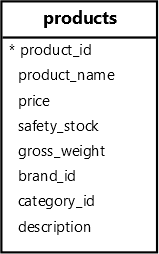
First, create a table called safety_stock_logs that stores the logging data including product id, old safety stock, new safety stock, and updated time:
CREATE TABLE IF NOT EXISTS safety_stock_logs (
  id INT GENERATED ALWAYS AS IDENTITY PRIMARY KEY,
  product_id INT NOT NULL,
  old_safety_stock INT NOT NULL,
  new_safety_stock INT NOT NULL,
  updated_at TIMESTAMPTZ NOT NULL DEFAULT NOW(),
  FOREIGN KEY (product_id) REFERENCES products (product_id) ON DELETE CASCADE
);Code language: PostgreSQL SQL dialect and PL/pgSQL (pgsql)Next, create a trigger function that captures the product id, old safety stock, and new safety stock and inserts them into the safety_stock_logs table:
CREATE OR REPLACE FUNCTION log_safety_stock_changes()
RETURNS TRIGGER
AS
$$
BEGIN
  IF NEW.safety_stock != OLD.safety_stock THEN
    INSERT INTO safety_stock_logs (product_id, old_safety_stock, new_safety_stock)
    VALUES (OLD.product_id, OLD.safety_stock, NEW.safety_stock);
  END IF;
  RETURN NEW;
END;
$$
LANGUAGE plpgsql;Code language: PostgreSQL SQL dialect and PL/pgSQL (pgsql)Then, create a trigger that invokes the log_safety_stock_changes function whenever the safety stock changes:
CREATE OR REPLACE TRIGGER safety_stock_update_trigger
AFTER UPDATE OF safety_stock
ON products
FOR EACH ROW
EXECUTE FUNCTION log_safety_stock_changes();Code language: PostgreSQL SQL dialect and PL/pgSQL (pgsql)After that, update the safety stock for the product with id 1 to 15:
UPDATE products
SET safety_stock = 15
WHERE product_id = 1;Code language: PostgreSQL SQL dialect and PL/pgSQL (pgsql)
The UPDATE statement causes the trigger to fire, which inserts a new row into the safety_stock_logs table.
Finally, retrieve the data from the safety_stock_logs table:
SELECT
  id,
  product_id,
  old_safety_stock,
  new_safety_stock
FROM
safety_stock_logs;Code language: PostgreSQL SQL dialect and PL/pgSQL (pgsql)Output:
 id | product_id | old_safety_stock | new_safety_stock |
----+------------+------------------+------------------+-
  1 |          1 |               20 |               15 |Code language: PostgreSQL SQL dialect and PL/pgSQL (pgsql)
Summary #
- Triggers are user-defined functions or procedures that are called automatically when events such as
INSERT,UPDATE,DELETE, andTRUNCATEoccur on a table or view.


