Summary: in this tutorial, you’ll learn how to use the PostgreSQL SUM() window function to calculate the sum of values within a partition.
Getting Started with the PostgreSQL SUM window function #
In PostgreSQL, the SUM() window function returns the sum of values within a partition.
Here’s the syntax of the SUM() window function:
SUM(value) OVER (
    PARTITION BY partition_expression,
    ORDER BY order_expression
)Code language: PostgreSQL SQL dialect and PL/pgSQL (pgsql)
In this syntax:
value: A column or expression from which you want to calculate the sum of values.OVER: Defines the window frame where theSUM()function applies.PARTITION BY: Divides the result set into partitions by thepartition_expression. Thepartition_expressioncan be one or more columns. If you skip thePARTITION BYclause, theSUM()function treats the whole result set as a single partition.ORDER BY: Determines the order of rows within each partition.
PostgreSQL SUM Window Function Examples #
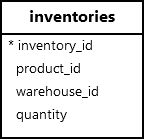
Let’s take examples of using the SUM() window function with the inventories table:
Calculating the Total Inventory Quantity #
The following statement uses the SUM window function to retrieve the inventory of a product along with the total quantity:
SELECT
  inventory_id,
  product_id,
  quantity,
  SUM(quantity) OVER () AS total_quantity
FROM
inventories;Code language: PostgreSQL SQL dialect and PL/pgSQL (pgsql)Output:
 inventory_id | product_id | quantity | total_quantity
--------------+------------+----------+----------------
            1 |          1 |      100 |           5360
            2 |          2 |      150 |           5360
            3 |          3 |      200 |           5360
            4 |          4 |      120 |           5360
            5 |          5 |      130 |           5360
            6 |          6 |      110 |           5360
            7 |          7 |      140 |           5360
            8 |          8 |      160 |           5360
            9 |          9 |      170 |           5360
           10 |         10 |      180 |           5360
           11 |         11 |      190 |           5360
           12 |         12 |      200 |           5360
           13 |         13 |      210 |           5360
           14 |         14 |      220 |           5360
           15 |         15 |      230 |           5360
           16 |         16 |      240 |           5360
           17 |         17 |      250 |           5360
           18 |         18 |      260 |           5360
           19 |         19 |      270 |           5360
           20 |         20 |      280 |           5360
           21 |         21 |      290 |           5360
           22 |         22 |      300 |           5360
           23 |         23 |      310 |           5360
           24 |         24 |      320 |           5360
           25 |         25 |      330 |           5360Code language: plaintext (plaintext)
In this example,
SUM(quantity) OVER ()returns the sum of all quantity values in theinventoriestable.
Calculating the Total Inventory Quantity for Each Warehouse #
The following SELECT statement uses the SUM window function to retrieve the inventory of products along with the total quantity for each warehouse:
SELECT
  inventory_id,
  product_id,
  quantity,
  SUM(quantity) OVER (
       PARTITION BY warehouse_id
  ) AS total_quantity
FROM
inventories;Code language: PostgreSQL SQL dialect and PL/pgSQL (pgsql)Output:
 inventory_id | product_id | quantity | total_quantity
--------------+------------+----------+----------------
           25 |         25 |      330 |           1890
            4 |          4 |      120 |           1890
            7 |          7 |      140 |           1890
           10 |         10 |      180 |           1890
           13 |         13 |      210 |           1890
           16 |         16 |      240 |           1890
           19 |         19 |      270 |           1890
           22 |         22 |      300 |           1890
            1 |          1 |      100 |           1890
           20 |         20 |      280 |           1690
           11 |         11 |      190 |           1690
           14 |         14 |      220 |           1690
           17 |         17 |      250 |           1690
            2 |          2 |      150 |           1690
            5 |          5 |      130 |           1690
           23 |         23 |      310 |           1690
            8 |          8 |      160 |           1690
            6 |          6 |      110 |           1780
            3 |          3 |      200 |           1780
           12 |         12 |      200 |           1780
           21 |         21 |      290 |           1780
           18 |         18 |      260 |           1780
           15 |         15 |      230 |           1780
           24 |         24 |      320 |           1780
            9 |          9 |      170 |           1780Code language: plaintext (plaintext)
How it works:
PARTITION BY: Divides the rows in theinventoriestable into partitions bywarehouse_id.SUM(quantity) OVER (PARTITION BY warehouse_id)returns the sum of inventory quantity within each warehouse.
Calculating Running Total #
The following SELECT statement uses the SUM() window function to retrieve the inventory of a product along with the running total for each warehouse:
SELECT
  inventory_id,
  product_id,
  warehouse_id,
  quantity,
  SUM(quantity) OVER (
     PARTITION BY warehouse_id
    ORDER BY product_id
  ) AS cumulative_quantity
FROM
inventories;Code language: PostgreSQL SQL dialect and PL/pgSQL (pgsql)Output:
 inventory_id | product_id | warehouse_id | quantity | cumulative_quantity
--------------+------------+--------------+----------+---------------------
            1 |          1 |            1 |      100 |                 100
            4 |          4 |            1 |      120 |                 220
            7 |          7 |            1 |      140 |                 360
           10 |         10 |            1 |      180 |                 540
           13 |         13 |            1 |      210 |                 750
           16 |         16 |            1 |      240 |                 990
           19 |         19 |            1 |      270 |                1260
           22 |         22 |            1 |      300 |                1560
           25 |         25 |            1 |      330 |                1890
            2 |          2 |            2 |      150 |                 150
            5 |          5 |            2 |      130 |                 280
            8 |          8 |            2 |      160 |                 440
           11 |         11 |            2 |      190 |                 630
           14 |         14 |            2 |      220 |                 850
           17 |         17 |            2 |      250 |                1100
           20 |         20 |            2 |      280 |                1380
           23 |         23 |            2 |      310 |                1690
            3 |          3 |            3 |      200 |                 200
            6 |          6 |            3 |      110 |                 310
            9 |          9 |            3 |      170 |                 480
           12 |         12 |            3 |      200 |                 680
           15 |         15 |            3 |      230 |                 910
           18 |         18 |            3 |      260 |                1170
           21 |         21 |            3 |      290 |                1460
           24 |         24 |            3 |      320 |                1780Code language: plaintext (plaintext)
How it works:
PARTITION BY: Divides the rows bywarehouse_id.ORDER BY: Sorts the rows within each partition byproduct_id.SUMreturns a running total of quantity within each warehouse, ordered byproduct_id.
Summary #
- Use the PostgreSQL
SUMwindow function to calculate the sum of values within a partition.


