Summary: in this tutorial, you’ll learn how to create a PyQt multithreading application that uses QThreadPool and QRunnable classes.
Introduction to the QThreadPool & QRunnable classes #
The QThread class allows you to offload a long-running task to a worker thread to make the application more responsive. The QThread class works fine if the application has a few worker threads.
A multithreaded program is efficient when it has a number of QThread objects that correspond to the number of CPU cores.
Also, creating threads is quite expensive in terms of computer resources. Therefore, the program should reuse created threads as much as possible.
So using the QThread class to manage worker threads has two main challenges:
- Determine the ideal number of threads for the application based on the number of CPU cores.
- Reuse and recycle the threads as much as possible.
Fortunately, PyQt has QThreadPoolQThreadPool class is often used with the QRunnable class.
- The
QRunnableclass represents a task you want to execute in a worker thread. - The
QThreadPoolexecutes aQRunnableobject, and manages and recycles threads automatically.
Each Qt application has a global QThreadPoolglobalInstance() static method of the QThreadPool
To use the QThreadPool and QRunnable classes, you follow these steps:
First, create a class that inherits from the QRunnable class and override the run() method:
class Worker(QRunnable):
    @Slot()
    def run(self):
        # place a long-running task here
        passCode language: Python (python)
Second, access the thread pool from the main window and start the worker threads:
class MainWindow(QMainWindow):
    # other methods
    # ...

    def start(self):
        """ Create and execute worker threads
        """
        pool = QThreadPool.globalInstance()
        for _ in range(1, 100):
            pool.start(Worker())Code language: Python (python)
To update the worker’s progress to the main thread, you use signals and slots. However, the QRunnable doesn’t support signal.
Therefore, you need to define a separate class that inherits from the QObject and uses that class in the Worker class. Here are the steps:
First, define the Signals class that subclasses the QObject class:
class Signals(QObject):
    completed = Signal()Code language: Python (python)
In the Signals class, we define one signal called completed. Note that you can define as many signals as needed.
Second, emit the completed signal when the job is done in the Worker class:
class Runnable(QRunnable):
    def __init__(self):
        super().__init__()
        self.signals = Signals()

    @Slot()
    def run(self):
        # long running task
        # ...
        # emit the completed signal
        self.signals.completed.emit()Code language: Python (python)
Third, connect the signal of the worker thread with a slot of the main window before submitting the worker to the pool:
class MainWindow(QMainWindow):
    # other methods
    # ...

    def start(self):
        """ Create and execute worker threads
        """
        pool = QThreadPool.globalInstance()
        for _ in range(1, 100):
            worker = Worker()
            worker.signals.completed.connect(self.update)
            pool.start(worker)

    def update(self):
        # update the worker
        passCode language: Python (python)
QThreadPool example #
The following example illustrates how to use the QThreadPool and QRunnable class:
import sys
import time
from PyQt6.QtWidgets import QApplication, QMainWindow, QPushButton, QGridLayout, QWidget, QProgressBar, QListWidget
from PyQt6.QtCore import QRunnable, QObject, QThreadPool, pyqtSignal as Signal, pyqtSlot as Slot


class Signals(QObject):
    started = Signal(int)
    completed = Signal(int)


class Worker(QRunnable):
    def __init__(self, n):
        super().__init__()
        self.n = n
        self.signals = Signals()

    @Slot()
    def run(self):
        self.signals.started.emit(self.n)
        time.sleep(self.n*1.1)
        self.signals.completed.emit(self.n)


class MainWindow(QMainWindow):
    def __init__(self, parent=None):
        super().__init__(parent)

        self.setWindowTitle('QThreadPool Demo')

        self.job_count = 10
        self.comleted_jobs = []

        widget = QWidget()
        widget.setLayout(QGridLayout())
        self.setCentralWidget(widget)

        self.btn_start = QPushButton('Start', clicked=self.start_jobs)
        self.progress_bar = QProgressBar(minimum=0, maximum=self.job_count)
        self.list = QListWidget()

        widget.layout().addWidget(self.list, 0, 0, 1, 2)
        widget.layout().addWidget(self.progress_bar, 1, 0)
        widget.layout().addWidget(self.btn_start, 1, 1)

        self.show()

    def start_jobs(self):
        self.restart()
        pool = QThreadPool.globalInstance()
        for i in range(1, self.job_count+1):
            worker = Worker(i)
            worker.signals.completed.connect(self.complete)
            worker.signals.started.connect(self.start)
            pool.start(worker)

    def restart(self):
        self.progress_bar.setValue(0)
        self.comleted_jobs = []
        self.btn_start.setEnabled(False)

    def start(self, n):
        self.list.addItem(f'Job #{n} started...')

    def complete(self, n):
        self.list.addItem(f'Job #{n} completed.')
        self.comleted_jobs.append(n)
        self.progress_bar.setValue(len(self.comleted_jobs))

        if len(self.comleted_jobs) == self.job_count:
            self.btn_start.setEnabled(True)


if __name__ == '__main__':
    app = QApplication(sys.argv)
    window = MainWindow()
    sys.exit(app.exec())


def complete(self, n):
    self.list.addItem(f'Job #{n} completed.')
    self.comleted_jobs.append(n)
    self.progress_bar.setValue(len(self.comleted_jobs))

    if len(self.comleted_jobs) == self.job_count:
        self.btn_start.setEnabled(True)Code language: Python (python)
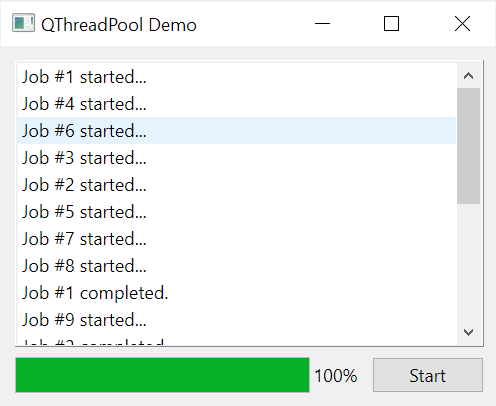
Output:
Signals class #
Define the Signals class that inherits from the QObject class to support signals. In the Signals class, we define two signals:
- The
startedsignal will be emitted when a worker is started. - The
completedsignal will be emitted when a worker is completed.
Both signals accept an integer that identifies the job number:
class Signals(QObject):
    started = Signal(int)
    completed = Signal(int)Code language: Python (python)
Worker class #
The Worker class inherits from the QRunnable class. The Worker class represents a long-running task that we offload to a worker thread:
class Worker(QRunnable):
    def __init__(self, n):
        super().__init__()
        self.n = n
        self.signals = Signals()

    @Slot()
    def run(self):
        self.signals.started.emit(self.n)
        time.sleep(self.n*1.1)
        self.signals.completed.emit(self.n)Code language: Python (python)
First, initialize the job number (n) and Signals object in the __init__() method.
Second, override the run() method of the QRunnable class. To simulate a long-running task, we use the sleep() function of the time module. Before starting the timer, we emit the started signal; after the timer completes, we emit the completed signal.
MainWindow class #
The MainWindow class defines the UI for the application:
class MainWindow(QMainWindow):
    def __init__(self, parent=None):
        super().__init__(parent)

        self.setWindowTitle('QThreadPool Demo')

        self.comleted_jobs = []
        self.job_count = 10

        widget = QWidget()
        widget.setLayout(QGridLayout())
        self.setCentralWidget(widget)

        self.btn_start = QPushButton('Start', clicked=self.start_jobs)
        self.progress_bar = QProgressBar(minimum=0, maximum=self.job_count)
        self.list = QListWidget()

        widget.layout().addWidget(self.list, 0, 0, 1, 2)
        widget.layout().addWidget(self.progress_bar, 1, 0)
        widget.layout().addWidget(self.btn_start, 1, 1)

        self.show()

    def start_jobs(self):
        self.restart()

        pool = QThreadPool.globalInstance()
        for i in range(1, self.job_count+1):
            runnable = Worker(i)
            runnable.signals.completed.connect(self.complete)
            runnable.signals.started.connect(self.start)
            pool.start(runnable)

    def restart(self):
        self.progress_bar.setValue(0)
        self.comleted_jobs = []
        self.btn_start.setEnabled(False)

    def start(self, n):
        self.list.addItem(f'Job #{n} started...')

    def complete(self, n):
        self.list.addItem(f'Job #{n} completed.')
        self.comleted_jobs.append(n)
        self.progress_bar.setValue(len(self.comleted_jobs))

        if len(self.comleted_jobs) == self.job_count:
            self.btn_start.setEnabled(True)Code language: Python (python)
First, initialize the number of jobs (job_count) and completed_jobs list in the __init__() method of the MainWindow class:
self.job_count = 10
self.comleted_jobs = []Code language: Python (python)
Second, define the start_jobs() method that will be executed when the user clicks the start button:
def start_jobs(self):
    self.restart()
    pool = QThreadPool.globalInstance()
    for i in range(1, self.job_count+1):
        worker = Worker(i)
        worker.signals.completed.connect(self.complete)
        worker.signals.started.connect(self.start)
        pool.start(worker)Code language: Python (python)
The restart() resets the completed_jobs, updates the progress bar to zero, and disables the start button:
def restart(self):
    self.progress_bar.setValue(0)
    self.comleted_jobs = []
    self.btn_start.setEnabled(False)Code language: Python (python)
To get the QThreadPoolglobalInstance() of the QThreadPool
pool = QThreadPool.globalInstance()Code language: Python (python)We create a number of workers, connect their signals to the methods of the MainWindow class, and start worker threads using the start() method of the QThreadPool object.
The start() method adds the message that starts a worker thread to the QListWidget:
def start(self, n):
    self.list.addItem(f'Job #{n} started...')Code language: Python (python)
The completed() method runs each time a worker thread is completed. It adds a message to the QListWidget, updates the progress bar, and enables the start button if all worker threads are completed:
def complete(self, n):
    self.list.addItem(f'Job #{n} completed.')
    self.comleted_jobs.append(n)
    self.progress_bar.setValue(len(self.comleted_jobs))

    if len(self.comleted_jobs) == self.job_count:
        self.btn_start.setEnabled(True)Code language: Python (python)
Using QThreadPool to get stock prices #
The following Stock Listing program reads stock symbols from symbols.txt file and uses QThreadPool to get the stock prices from Yahoo Finance website:
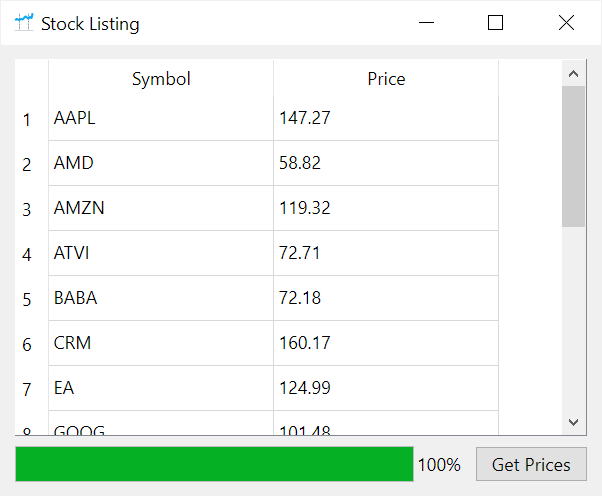
Stock Listing Program:
import sys
from pathlib import Path

from PyQt6.QtCore import QRunnable, Qt, QObject, QThreadPool, pyqtSignal as Signal, pyqtSlot as Slot
from PyQt6.QtWidgets import QApplication,  QMainWindow, QPushButton, QWidget, QGridLayout, QProgressBar, QTableWidget, QTableWidgetItem
from PyQt6.QtGui import QIcon

from lxml import html
import requests


class Signals(QObject):
    completed = Signal(dict)


class Stock(QRunnable):
    BASE_URL = 'https://finance.yahoo.com/quote/'

    def __init__(self, symbol):
        super().__init__()
        self.symbol = symbol
        self.signal = Signals()

    @Slot()
    def run(self):
        stock_url = f'{self.BASE_URL}{self.symbol}'
        headers = {"User-Agent": "Mozilla/5.0 (Windows NT 10.0; Win64; x64) AppleWebKit/537.36 (KHTML, like Gecko) Chrome/114.0.0.0 Safari/537.36"}
        response = requests.get(stock_url, headers=headers)

        if response.status_code != 200:
            self.signal.completed.emit({'symbol': self.symbol, 'price': 'N/A'})
            return

        tree = html.fromstring(response.text)
        price_text = tree.xpath(
            '//*[@id="quote-header-info"]/div[3]/div[1]/div[1]/fin-streamer[1]/text()'
        )

        if not price_text:
            self.signal.completed.emit({'symbol': self.symbol, 'price': 'N/A'})
            return

        price = float(price_text[0].replace(',', ''))

        self.signal.completed.emit({'symbol': self.symbol, 'price': price})


class Window(QMainWindow):
    def __init__(self, filename, *args, **kwargs):
        super().__init__(*args, **kwargs)

        self.symbols = self.read_symbols(filename)

        self.results = []

        self.setWindowTitle('Stock Listing')
        self.setGeometry(100, 100, 400, 300)
        self.setWindowIcon(QIcon('./assets/stock.png'))

        widget = QWidget()
        widget.setLayout(QGridLayout())
        self.setCentralWidget(widget)

        # set up button & progress bar
        self.btn_start = QPushButton('Get Prices', clicked=self.get_prices)
        self.progress_bar = QProgressBar(minimum=1, maximum=len(self.symbols))

        # set up table widget
        self.table = QTableWidget(widget)
        self.table.setColumnCount(2)
        self.table.setColumnWidth(0, 150)
        self.table.setColumnWidth(1, 150)

        self.table.setHorizontalHeaderLabels(['Symbol', 'Price'])

        widget.layout().addWidget(self.table, 0, 0, 1, 2)
        widget.layout().addWidget(self.progress_bar, 1, 0)
        widget.layout().addWidget(self.btn_start, 1, 1)

        # show the window
        self.show()

    def read_symbols(self, filename):
        """
        Read symbols from a file
        """
        path = Path(filename)
        text = path.read_text()
        return [symbol.strip() for symbol in text.split('\n')]

    def reset_ui(self):
        self.progress_bar.setValue(1)
        self.table.setRowCount(0)

    def get_prices(self):
        # reset ui
        self.reset_ui()

        # start worker threads
        pool = QThreadPool.globalInstance()
        stocks = [Stock(symbol) for symbol in self.symbols]
        for stock in stocks:
            stock.signal.completed.connect(self.update)
            pool.start(stock)

    def update(self, data):
        # add a row to the table
        row = self.table.rowCount()
        self.table.insertRow(row)
        self.table.setItem(row, 0, QTableWidgetItem(data['symbol']))
        self.table.setItem(row, 1, QTableWidgetItem(str(data['price'])))

        # update the progress bar
        self.progress_bar.setValue(row + 1)

        # sort the list by symbols once completed
        if row == len(self.symbols) - 1:
            self.table.sortItems(0, Qt.SortOrder.AscendingOrder)


if __name__ == '__main__':
    app = QApplication(sys.argv)
    window = Window('symbols.txt')
    sys.exit(app.exec())Code language: Python (python)
How it works.
Signals class #
We define the Signals class that is a subclass of the QObject. The Signals class has one class variable completed which is an instance of the Signal class.
The completed signal holds a dictionary and is emitted once the program completes getting the stock price.
class Signals(QObject):
    completed = Signal(dict)Code language: Python (python)
Stock class #
The STock class inherits from the QRunnable class. It overrides the run() method that gets the stock price from the Yahoo Finance website.
Once completed, the run() method emits the completed signal with the stock symbol and price.
If an error occurs like the symbol is not found or the website changes the way it displays the stock price, the run() method returns the symbol with the price as a N/A string.
class Stock(QRunnable):
    BASE_URL = 'https://finance.yahoo.com/quote/'

    def __init__(self, symbol):
        super().__init__()
        self.symbol = symbol
        self.signal = Signals()

    @Slot()
    def run(self):
        stock_url = f'{self.BASE_URL}{self.symbol}'
        headers = {"User-Agent": "Mozilla/5.0 (Windows NT 10.0; Win64; x64) AppleWebKit/537.36 (KHTML, like Gecko) Chrome/114.0.0.0 Safari/537.36"}
        response = requests.get(stock_url, headers=headers)
        if response.status_code != 200:
            self.signal.completed.emit({'symbol': self.symbol, 'price': 'N/A'})
            return

        tree = html.fromstring(response.text)
        price_text = tree.xpath(
            '//*[@id="quote-header-info"]/div[3]/div[1]/div[1]/fin-streamer[1]/text()'
        )

        if not price_text:
            self.signal.completed.emit({'symbol': self.symbol, 'price': 'N/A'})
            return

        price = float(price_text[0].replace(',', ''))

        self.signal.completed.emit({'symbol': self.symbol, 'price': price})Code language: Python (python)
Note that Yahoo Finance may change its structure. To make the program works, you need to change the XPath of the price of the new one:
//*[@id="quote-header-info"]/div[3]/div[1]/div[1]/fin-streamer[1]/text()Code language: Python (python)MainWindow Class #
First, read the symbols from a file and assign them to the self.symbols variables:
self.symbols = self.read_symbols(filename)Code language: Python (python)The read_symbols() method looks like this:
def read_symbols(self, filename):
    path = Path(filename)
    text = path.read_text()
    return [symbol.strip() for symbol in text.split('\n')]Code language: Python (python)
The text file (symbols.txt) contains each symbol per line:
AAPL
MSFT
GOOG
AMZN
TSLA
META
NVDA
BABA
CRM
INTC
PYPL
AMD
ATVI
EA
TTD
ORCLCode language: Python (python)
Second, define the get_prices that uses the QThreadPool to create worker threads for getting stock prices:
def get_prices(self):
    # reset ui
    self.reset_ui()

    # start worker threads
    pool = QThreadPool.globalInstance()
    stocks = [Stock(symbol) for symbol in self.symbols]
    for stock in stocks:
        stock.signal.completed.connect(self.update)
        pool.start(stock)Code language: Python (python)
The reset_ui() method clear all rows of the QTableWidget and set the progress bar to its minimum value:
def reset_ui(self):
    self.table.setRowCount(0)
    self.progress_bar.setValue(1)Code language: Python (python)
Third, define the update()update()
def update(self, data):
    # add a row to the table
    row = self.table.rowCount()
    self.table.insertRow(row)
    self.table.setItem(row, 0, QTableWidgetItem(data['symbol']))
    self.table.setItem(row, 1, QTableWidgetItem(str(data['price'])))

    # update the progress bar
    self.progress_bar.setValue(row + 1)

    # sort the list by symbols once completed
    if row == len(self.symbols) - 1:
        self.table.sortItems(0, Qt.SortOrder.AscendingOrder)Code language: Python (python)
Summary #
- Use the
QRunnableclass to represent a long-running task that will be offloaded to a worker thread. - Use the
QThreadPoolclass to manage worker threads automatically. - Each PyQt application has one
QThreadPoolglobalInstance()method to get the globalQThreadPool - Use the
start()method of theQThreadPoolobject to start a worker thread.


