Summary: In this tutorial, you’ll learn how to use the Tkinter DoubleVar objects to link widgets with Python variables.
Introduction to the Tkinter DoubleVar #
In Tkinter, the DoubleVar class allows you to create float variable objects.
A DoubleVar object holds an float value. Tkinter links an DoubleVar object with a widget, such as an Entry or Scale. Through DoubleVar objects, you can dynamically handle the widget’s values.
Creating DoubleVar objects #
To create a DoubleVar object, you can follow these steps:
First, import the tkinter module:
import tkinter as tkCode language: Python (python)Second, create a new DoubleVar object:
amount_var = tk.DoubleVar()Code language: Python (python)Note that the DoubleVar() constructor has three optional parameters:
masteris the master widget.valueis an initial value that defaults to0.0.nameis an optional Tcl name that defaults toPY_VARnum.
Linking DoubleVar objects with widgets #
The following shows how to associate a DoubleVar object with a widget (Entry):
amount_entry = ttk.Entry(root, textvariable=amount_var)Code language: Python (python)Accessing and Changing DoubleVar Value #
If a DoubleVar object associates with a widget, you can get the current value of the widget using the get() method:
current_value = double_var.get()Code language: Python (python)Additionally, you can change the value of the widget via the DoubleVar object using the set function:
double_var.set(20)Code language: Python (python)Tracing Values #
To automatically execute a function when the value of an DoubleVar changes, you can use the trace_add method:
double_var.trace_add(mode, callback)Code language: Python (python)The trace_add() method accepts two parameters:
mode: Determines when theDoubleVarobject should execute the callback function. The mode can be'write','read', and'unset', or a tuple of these strings. For example, if you set the mode to'write', theDoubleVarobject will execute the callback when its value changes.callback: A function that theDoubleVarwill execute according to themode.
If you want to stop tracing values, you can use the trace_remove() method:
double_var.trace_remove(mode, callback)Code language: Python (python)The trace_remove() method removes the callback from executing for specified modes.
Using DoubleVar with Entry Widgets #
The following program shows how to use an DoubleVar object with the entry widget:
import tkinter as tk
from tkinter import ttk
from tkinter.messagebox import showinfo


root = tk.Tk()
root.geometry('400x300')
root.title('DoubleVar Demo')


amount_var = tk.DoubleVar()

label = ttk.Label(root, text='Amount:')
label.pack(side=tk.LEFT, padx=5, pady=10, anchor=tk.W)

amount_entry = ttk.Entry(root, textvariable=amount_var)
amount_entry.pack(side=tk.LEFT, padx=5, pady=10, anchor=tk.W)


button = ttk.Button(
    root,
    text='Submit',
    command=lambda: showinfo(title='Amount', message=amount_var.get()))

button.pack(side=tk.LEFT, padx=5, pady=10, anchor=tk.W)


root.mainloop()Code language: Python (python)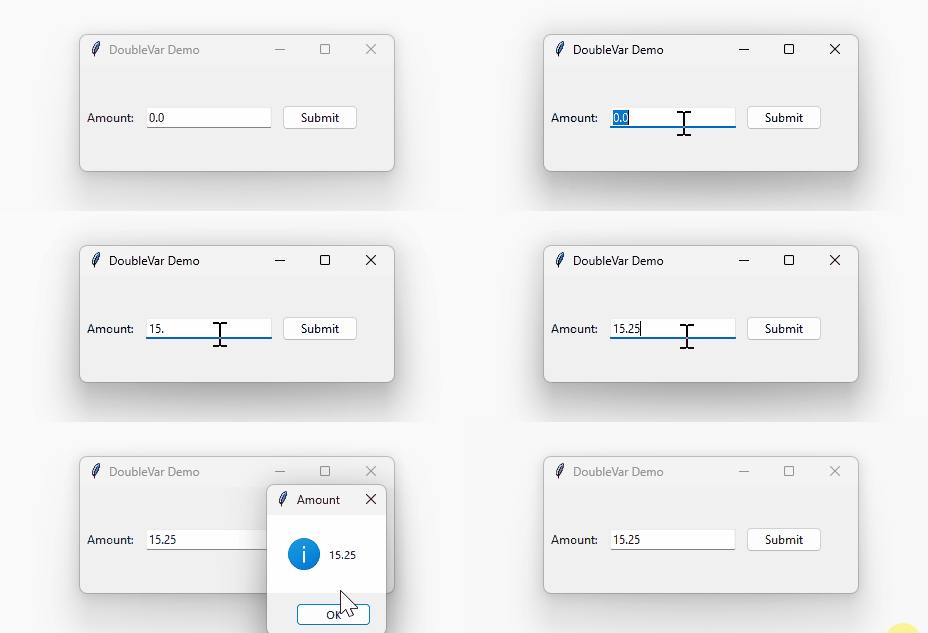
How the program works:
First, create a new DoubleVar object:
amount_var = tk.DoubleVar()Code language: Python (python)Second, link the DoubleVar object with an Entry widget:
amount_entry = ttk.Entry(root, textvariable=amount_var)Code language: Python (python)Third, show the current value of the entry widget via the amount_var object when the button is clicked:
button = ttk.Button(
    root,
    text='Submit',
    command=lambda: showinfo(title='Amount', message=amount_var.get())
)Code language: Python (python)
Summary #
- Use the
DoubleVarclass to create float variable objects. - Associate
DoubleVarobjects with widgets to manage float values.


