Summary: in this tutorial, you’ll learn how to use the Tkinter Separator widget to display a thin horizontal or vertical rule between groups of widgets.
Introduction to the Tkinter Separator widget #
A Separator widget places a thin horizontal or vertical rule between two groups of widgets.
To create a separator widget, you follow these steps:
First, import tkinter as ttk:
from tkinter import ttkCode language: Python (python)Second, create a separator using the Separator constructor:
sep = ttk.Separator(master=None, orient=tk.HORIZONTAL)Code language: Python (python)The Separator constructor accepts two main parameters:
masteris the container widget where you want to place theSeparator.orientdetermines the orientation of the separator. It can can be eithertk.VERTICALortk.HORIZONTAL.
Horizontal separator #
The following program illustrates how to use a Separator widget to separate two frames:
import tkinter as tk
from tkinter import ttk

root = tk.Tk()
root.geometry('300x200')
root.title('Separator Widget Demo')

# top frame
top_frame = tk.Frame(root)
top_frame.pack(side=tk.TOP, fill=tk.BOTH, expand=True)
ttk.Label(top_frame, text="Top frame").pack(pady=20)

# create a horizontal separator
separator = ttk.Separator(root, orient=tk.HORIZONTAL)
separator.pack(side=tk.TOP, fill=tk.X, pady=5)

# bottom frame
bottom_frame = tk.Frame(root)
bottom_frame.pack(side=tk.BOTTOM, fill=tk.BOTH, expand=True)
ttk.Label(bottom_frame, text="Bottom frame").pack(pady=20)

root.mainloop()Code language: Python (python)
Output:
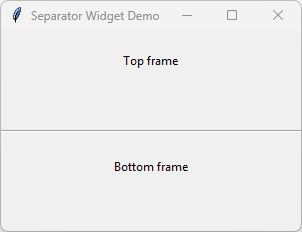
How it works:
First, create a horizontal Separator widget by passing the tk.HORIZONTAL to the Separator constructor:
separator = ttk.Separator(root, orient=tk.HORIZONTAL)Code language: Python (python)Second, pack the Separator on the main window:
separator.pack(side=tk.TOP, fill=tk.X, pady=5)Code language: Python (python)We set the fill to tk.X to expand the separator horizontally. If you don’t do this, you won’t see the Separator widget.
Vertical Separator #
The following program shows how to create a veritcal Separator widget:
import tkinter as tk
from tkinter import ttk

root = tk.Tk()
root.geometry('300x200')
root.title('Separator Widget Demo')

# left frame
left_frame = tk.Frame(root)
left_frame.pack(side=tk.LEFT, fill=tk.BOTH, expand=True)
ttk.Label(left_frame, text="Left frame").pack(pady=20)

# right frame
right_frame = tk.Frame(root)
right_frame.pack(side=tk.RIGHT, fill=tk.BOTH, expand=True)
ttk.Label(right_frame, text="Right frame").pack(pady=20)

# create a vertical separator
separator = ttk.Separator(root, orient=tk.HORIZONTAL)
separator.pack(side=tk.LEFT, fill=tk.Y, padx=5)


root.mainloop()Code language: Python (python)
Output:
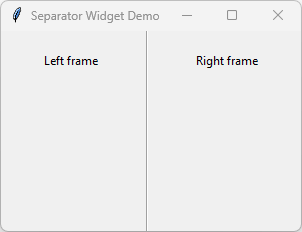
How it works:
First, create a vertical Separator widget by passing the tk.HORIZONTALto the Separator constructor:
separator = ttk.Separator(root, orient=tk.HORIZONTAL)Code language: Python (python)Second, pack the Separator on the main window:
separator.pack(side=tk.LEFT, fill=tk.Y, padx=5)Code language: Python (python)In this example, we set the fill to tk.X to expand the separator horizontally.
Summary #
- Use a separator widget to place a thin horizontal or vertical rule between two groups of widgets.


