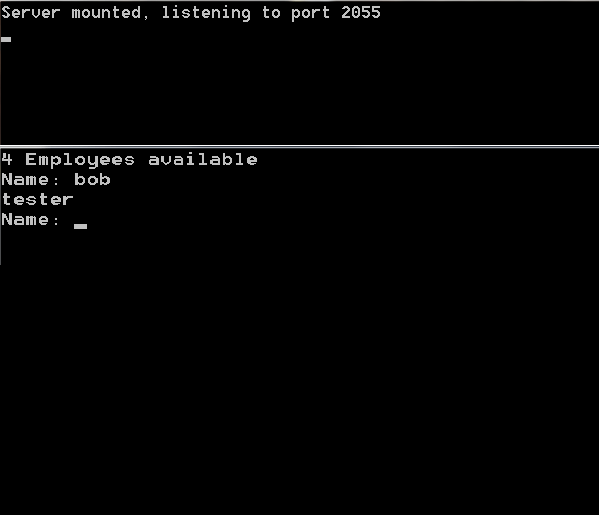
This C# Program Implements UDP. Here name of the employee is entered in the client side window and the job the specified employee is displayed.
Here is source code of the C# Program to Implement UDP. The C# program is successfully compiled and executed with Microsoft Visual Studio. The program output is also shown below.
/** C# Program to Implement UDP*///SERVER SIDE PROGRAMusing System;
using System.Net;
using System.Net.Sockets;
using System.Text;
using System.Configuration;
class EmployeeUDPServer{public static void Main()
{UdpClient udpc = new UdpClient(2055);
Console.WriteLine("Server started, servicing on port 2055");
IPEndPoint ep = null;
while (true)
{byte[] rdata = udpc.Receive(ref ep);
string name = Encoding.ASCII.GetString(rdata);
string job = ConfigurationSettings.AppSettings[name];
if (job == null) job = "No such employee";
byte[] sdata = Encoding.ASCII.GetBytes(job);
udpc.Send(sdata, sdata.Length, ep);
}}}//XML CODING
<?xml version="1.0" encoding="utf-8" ?>
<configuration>
<appSettings>
<add key = "mickey" value="manager"/>
<add key = "bob" value="tester"/>
<add key = "tom" value="clerk"/>
<add key = "jerry" value="manager"/>
</appSettings>
</configuration>
//CLIENT SIDE PROGRAMusing System;
using System.Net;
using System.Net.Sockets;
using System.Text;
class EmployeeUDPClient{public static void Main(string[] args)
{UdpClient udpc = new UdpClient("Win7-PC", 2055);
IPEndPoint ep = null;
while (true)
{Console.Write("Name: ");
string name = Console.ReadLine();
if (name == "") break;
byte[] sdata = Encoding.ASCII.GetBytes(name);
udpc.Send(sdata, sdata.Length);
byte[] rdata = udpc.Receive(ref ep);
string job = Encoding.ASCII.GetString(rdata);
Console.WriteLine(job);
}}}
Here is the output of the C# Program:
Sanfoundry Global Education & Learning Series – 1000 C# Programs.
If you wish to look at all C# Programming examples, go to 1000 C# Programs.
Related Posts:
- Apply for Computer Science Internship
- Apply for C# Internship
- Check MCA Books
- Check Computer Science Books
- Check C# Books

