


In this article, we explain the process of effectively testing E-Commerce websites. Online shopping is the way to go and there is nobody who hasn’t visited an e-commerce website. It should be on-par with the physical store.
In today’s world, there is hardly anyone who hasn’t shopped online. E-commerce/retail is a business that thrives on its online customers. Shopping online comes with a lot of advantages such as convenience, time-saving and easy access to products worldwide, etc.
A good e-commerce/retail site is key to its success. It must be a worthy counterpart to the storefront. Because, when you go shopping at a physical store, the customer has already made a commitment to visit and might give the brand a chance.
There are many choices online. So, unless there is engagement from the beginning, the user might just leave.
Table of Contents:
Testing E-Commerce Websites

It is important to note that the better the website is, the better the business will be. Since the application is so crucial, it is essential that it undergoes thorough proper testing.
E-commerce applications/sites include web applications and mobile applications too. So, they undergo all the typical test types.
- Functional Testing
- Usability Testing
- Security Testing
- Performance Testing
- Database Testing
- Mobile Application Testing
- A/B testing.
For a quick look at the most often performed tests on a typical web application, check out:
=> 180+ Sample Test Cases for Testing Web and Desktop Applications
However, retail sites are highly dynamic in nature. There are always some new offers, new products, new bestsellers, sales, etc. This means the site doesn’t stay the same for too long. It can get quite overwhelming for a lot of people.
The trick is to divide and conquer.
Please see with the examples of how to test and eCommerce Site:
E-Commerce Testing Checklist
We have listed important segments and test cases for eCommerce website testing below.
#1) Homepage – Hero Image
Homepages of retail sites are busy. They have a lot going on. But almost all of them have a Hero Image:

This is the kind of clickable image (a slideshow of sorts) that occupies the majority of the page.
The following are a few things to test:
- Is it going to auto scroll?
- If yes, at what interval will the image be refreshed?
- When the user hovers over it, is it still going to scroll to the next one?
- Can it be hovered on?
- Can it be clicked on?
- If yes, is it taking you to the right page and right deal?
- Is it loading along with the rest of the page or does it load last in comparison to the other elements on the page?
- Can the rest of the content be viewed?
- Does it render the same way in different browsers and different screen resolutions?
#2) Search
Search algorithms are very important for the success of a retail site because we can’t always place what the users want to see right in front of their eyes.
Common tests are:
- Search based on the Product name, brand name, or something more broadly, the category. For example Camera, Canon EOS 700D, electronics, etc.
- Search Results have to be relevant
- Different sorts of options have to be available- based on Brand, Price, and Reviews/ratings etc.
- How many results are displayed per page?
- For the multi-page results, are there options to navigate to them
- Also, searches happen in many places. Please take the search drilling down to multiple levels into consideration when validating this functionality. For example: When I search on the home page, I might see something like the following:

When I navigate to categories and go to a sub-category, maybe movies, this is what I am going to see:

#3) Product Details Page
Once a user finds a product either through search or by browsing or by clicking on it from the homepage, the user will be taken to the product information page.
Check:
- Image or image of the product
- Price of the product
- Product specifications
- Reviews
- Check out options
- Delivery options
- Shipping information
- In-stock/Out of stock
- Multiple color and variation options
- Breadcrumb navigation for the categories (highlighted in red below). If navigation such as this is displayed, make sure every element of it is functional.

#4) Shopping Cart

This is the penultimate stage before the user commits to the purchase.
Test the following:
- Add items to your cart and continue shopping
- If the user adds the same item to the cart while continuing to shop, the item count in the shopping cart should get incremented
- All items and their totals should be displayed in the cart
- Taxes as per location should be applied
- The user can add more items to the cart and the total should reflect the same
- Update the content added to the cart which should also reflect in the total
- Remove items from the cart
- Proceed to checkout
- Calculate Shipping costs with different shipping options
- Apply coupons
- Don’t check out, close the site, and come back later. The site should retain the items in the cart
#5) Payments
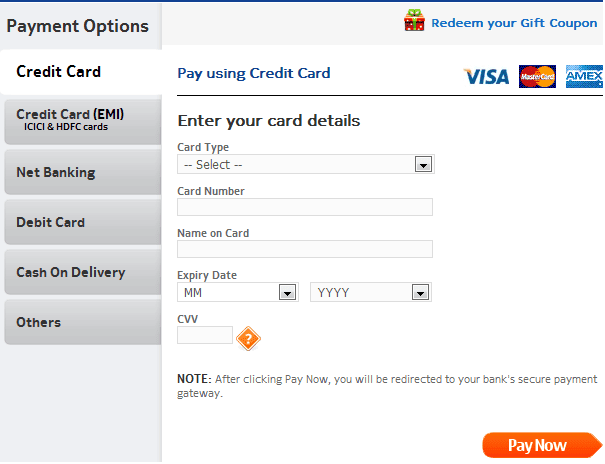
- Check for different payment options
- If allowing you to check out as a Guest, simply finish the purchase and provide an option to register at the end
- Returning customers – Login to check out
- User sign up
- If you are storing a customer’s credit card or any other financial information, perform security testing around this to make sure it is secure.(PCI compliance is a must)
- If the user is signed up for a long time, make sure the session is timed out or not. Every site has a different threshold. For some, it is 10 minutes. For some, it might be different.
- Email/Text confirmation with the order number generated
#6) Categories/Featured Products/Related or Recommended Products
The most popular FAQ I get from e-commerce testers is: Do I have to test every category/every product?
The answer is NO.
If you are a returning customer you will be shown some recommended products on the home page or in your shopping cart.

Featured products also change almost every day.

Since these are dynamic elements, the best way to test these parts of the application is to test the algorithm based on which these sections are populated.
Check your Data Mining/BI systems and check from the backend the queries that populate these sections.
#7) After-Order Tests

Check:
- Change the Order
- Cancel the Order
- Track the Order
- Returns
#8) Other Tests
- Login
- FAQs
- Contact Us page
- Customer Service page, etc.
Challenges Automating E-commerce Websites
To remain on Safer Edge and deliver the desired results to the client, you need to shift the focus to the quality and performance of your e-commerce website while shrinking the timeline as much as possible
Automation Testing starts by selecting right test automation framework which directly impacts the results of the test automation project. The framework must include test scripts and scenarios for various automated processes.
Based on the framework, the testers can easily execute the tests and obtain relevant results by generating test reports. However, selecting the right tool to automate the e-commerce website depends on many key parameters. It is always important to compare the available tools based on key parameters like features, performance, extensibility, licensing cost, maintenance cost, and Training and support.
You must take advantage of many open source test automation tools to automate more testing efforts without investing additional funds.
#1) E-commerce websites are very entangled in nature, automating each action is not possible because we cannot assume the nature of the customer.
#2) Continuous changes for e-commerce demands Regression so run regression test suit every day to keep track of the effects of change.
#3) Always go with the Automated Integration type of scenarios that should be covered from selecting a link on the home page to the checkout and payment gateway page. Hereby, you can at least cover the maximum user experience with an e-commerce website, so that adequate testing can be achieved by automating regression cycle.
#4) Never waste time automating unstable applications. A simple change will affect your whole test suit and you have to recreate it.
#5) Homepage of E-commerce Website is very important and the content has a lot of information and 1000 of links associated with each product and these links grow up every day as new offers or product is added to a page. So before proceeding to regression testing, it’s best to verify every link on the page using the HTTP status code.
#6) When you are executing test scripts on a different browser at the same time. If a product is added to a shopping cart or removed, that information should be reflected in other browsers too.
#7) When you running test parallel this will obviously fail your script in such a scenario that you have to periodically refresh your page to retain cart information. In real-time you may come across this scenario such as a user may sometimes use mobile e-commerce app and also a mobile e-commerce web application.
#8) Don’t neglect to verify each product details and pricing details whether it is 10 products or 1000 products it should be as per the seller requirement. This is the phase where you can make or break a customer’s slight mistake which will lead to a big loss.
#9) Create yourself a lot of interrupted scenarios that usually users come across to design your script very robustly so that your script can afford it and still run and pass the script.
For example, you stored all the card information and clicked on submit due to low charge or network issue application stuck. If a user is notified about their transaction status through email or message to phone, you should validate this email or message in a test script.
#10) Web element of the e-commerce website keeps changing so always Create a manual xpath. Some Web Elements attributes will be the same so there will be no unique way of distinguishing in such scenario use contains() method of xpaths or scroll into view.
#11) Automate Accessibility Testing with keyboard actions without using mouse action you will definitely come across some of the problems and fix them. This plays a significant role in user interface testing.
#12) Tester should carefully design the scenario and add initiate checkpoint and insert login script whenever it is required.
#13) Maintain different scripts for different modes of payment to avoid confusion. Check if what happens if an order is canceling after payment.
#14) Performance testing on the other hand plays a very crucial role. The factors you need to test here request per second, Transaction Per minute, Execution per click, a Response time of page load, duration of the task, Length of time between click and page display and DNS lookup.
#15) Security Testing is where customer trust is gained on which e-commerce is built so here you have to spend a lot of time testing on DENIAL OF SERVICE ATTACK, User Account security, Data confidentiality, content security, credit card security, disabled non-essential services. SSL Certificate Validation.
#16) Automating Localization testing is very challenging in e-commerce because of Compliance with accessibility standards to support multi-lingual markets and business regions.
Conclusion
Now that we have a few tests listed out, let’s move on to a couple of finishing thoughts on eCommerce Testing.
A website should work not just on computers but on mobile devices too. You need to be responsive and secure. Databases should be optimized and ETL processes should help maintain a Data Warehouse that aids OLAP and BI. E-commerce testing should focus on all of that.
However, the most important part of E-Commerce Testing is whether the visitors are converting into paying customers or not. The number of visits that are becoming the customer is called “Conversion Rate”.
So does one feature promote better conversion as opposed to another? That is why A/B testing and Usability Engineering for E-Commerce sites are gaining prominence.
Check out this article: The $300 Million Button
Here are the tools that are targeted at helping E-Commerce sites analyze their design for better conversion rates:
- Optimizely: A personal favorite. Very affordable and very insightful for E-Commerce A/B testing
- Unbounce: You can build your own landing pages and do a quick split or A/B testing
- Concept Feedback: You can submit your website and get expert feedback on your site’s design and strategy.
Any usability testing tool can be used here, but the above three are my favorite.
For more tools, check out the following:
- 16+ TOP Usability Testing Tools to Test Your Web Application
- A Complete Guide to Usability Testing – It’s Like Trying to Read Minds!
About the Author: This article was written by STH team member Swati S. If you want to write and help the testing community, let us know here.
As always, we hope this article has served you well.
I can’t wait to hear your feedback and questions. Also, please do share your best and worst online shopping experiences in the comments section below. We would love to hear from you.
Was this helpful?
Recommended Reading
-

Alpha and Beta testing are Customer Validation methodologies (Acceptance Testing types) that help in building confidence to launch the product and thereby result in the success of the product in the market. Even though they both rely on real users and different team feedback, they are driven by distinct processes,…
-
This knowledge quiz is an attempt to test your Software Testing basic knowledge with a simple 20-question test. The following Software Testing quiz is designed to test your ability to meet Software Testing requirements. This Software Testing quiz will help you with self-assessment and prepare for other certification exams, as…
-

Definition - What is Compliance Testing? "Compliance testing" also known as Conformance testing is non-functional. testing technique which is done to validate, whether the system developed meets the organization’s prescribed standards or not. There is a separate category of testing known as “Non-Functional Testing”. Nonfunctional testing, as the name suggests,…
-
Along with Alpha and Beta testing, there is one more phase of testing which is usually not performed in most projects. Yes, you guessed it right. It is the Gamma Testing Phase..!! The Gamma Test phase is considered the Trend of the past. This mainly focuses on Security checks and…


Very Imp Article
it is really helpful. Can you share the sanity test cases needs to be performed after each build for ecommerce site
Super
Good and informative..
good coverage on what should be considered
I have read this it is very helpful. We have same website that you suggest for the people.
You are testing an online shopping application.
you browse the site and choose a product and add to the cart.
You navigate to the cart and find the product you just added is not showing.
What steps you would take to identify and isolate the software defect?
@Swati – Thanku Swati for your support to understand the testing process.
One thing i would like to ask here is “How a tester can check for the Conversion rate”
Waiting for the revert.
Thank You
Nice,It’s useful to us
This is great thanks.
Great article. E-commerce websites are generally very complex in nature. There are lots of processes going on in the back of the website. One-click can trigger different algorithms and processes. Maintaining and testing an E-commerce platform may become difficult.
@Keyur Makwana- Yes. I agree. The article does mention these test types as a ‘must undergo’ list in the beginning. Thank you for sharing your ideas 🙂
Nice
It is recognised by me that it is a well organised guide for testing.
Swati has one of the best articles on this site.
In this most of the discussion is around the functionality. It would be great if you can link it to automation as most of the things can always be automated in web.
i am expecting an advance level of article on ecommerce testing. This article has some very basic pointers.
Great, Its a very informative blog, here’s list of essential ecommerce automation tools on magenticians, those tools really did add great value to the ecommerce store management activities. I found them very useful.
Very very helpful Article
very very awesome and helpful article…
Nice article!
its very helpful for testing of e-commerce site. Thank you for this tutorial.
Thanks for sharing the informative article here.
does Amazon and flipkart do this all process of Testing manually before making there build live ??
@All- Thanks everyone for stopping by and commenting! Happy to know that the article was useful.
@Swati – Nice article. Here I would like to add one thing one area is missed out that is performance testing, load testing & stress testing. It is crucial part while testing e-commerce application. Do you agree or not ?
Great Information and useful. Greetings from Perú.
QA is my passion.
This article is complete and comprehensive, especially what comes to design of test cases, usability and functional testing of e-commerce sites. But for e-commerce sites, the performance testing is as important, as other testing types are. And it means development of test data, performance intensive use cases, in order to implement these tests in a performance testing tool (e.g. Jmeter), that is selected to conduct performance testing. Besides performance testing tool, functional testing tools and frameworks (e.g. Selenium) are used to run functional tests and CI tools to manage test launches. To find what tools to use and how to use them efficiently navigate to Blazemeter.com/blog that has all necessary information about it, that helps to implement your tests for e-commerce web sites.
Very helpful topic, Thanks Swati
Want to see more topic related to Big Data testing with examples.
It’s a helpful topic. Thanks for sharing!
Nice article.
Very insightful.
Excellent article! Very helpful!
awesome. It would have been great if security and performance tests also listed.
Nice Article swathi.
I have one query like where and how to test if the payment process got failed due to session expired or network issues. what are the areas we have to test in this scenario? could you please explain it.
Very useful article.
Thanks.
Its really helpful
Thank you for this kind of help very helpful to
It is very helpful and thank you for posting this
nice article , I mentioned couple of test cases (search , product details) in interview that I did in my last case, but interviewer asked me how I automated those features. what would be appropriate answer. please suggest .
Good One!!!
Superb article!!! . Well explained.
Highlighted very good points.
indeed a very good piece of literature on e-commerce web application testing
There is a subctegory which has double entry.what should be the test case for that.
Very helpful article .
Nice content!
Comprehensively written…Very resourceful indeed.Thank you
The post is complete and comprehensive, especially in relation to functional testing, usability and test design. But as a rule, e-commerce sites suggest being visited by a number of customers, so performance testing for these sites becomes more important, than any other testing. It means using specific tools, like jmeter or Taurus for example to launch these tests, it means development of test data and performance intensive use cases to implement these tests. Besides performance testing tools, functional testing tools and frameworks are used to conduct functional tests (e.g. Selenium) and CI tool (e.g. Jenkins) are used to conduct tests and manage tests launches and deliver QA faster.
This is awesome.. love you STH 🙂
Do you have any recommendations for an approach to performing testing on a retail site that requires constant pricing updates to stay competitive in the market? How do you control the test without placing a freeze on content, which is sometimes unrealistic over the ample test time?
Excellent!
Great Article Swati!
Just a quick one, In testing e-commerce sites/apps how can a testing professional contribute to the “conversion rates”. Anything to keep in mind while performing the tests?
Thanks in advance Swathi!
Very helpfull article. Well explained. Highlighted very good points.
Good work, Thanks
I like it, thanks
Nice content! Very helpful.
Very nice content
this is very basic knowledge. can only be used for juniors, who see eCom for the first time in their life
Great Article! As we all know an eCommerce site have lots of data so it is very important to do the testing of website. Also the various features on an eCommerce website must be tested.
This setion was helpfull,,,thank you….