The SQLite length() function returns the number of characters of a string. If the argument is a BLOB, the length() function returns the number of bytes.
Syntax
length(data)Code language: SQL (Structured Query Language) (sql)Arguments
The length function accepts one argument which can be a string or a BLOB.
data
The string or a BLOB argument.
If data is NULL, the length function returns NULL. If data is not a text value, the length function will convert it to a text value first.
Return Type
INTEGER
Examples
1) Basic length() function example
The following statement returns the number of characters in the SQLite string:
SELECT length('SQLite');Code language: SQL (Structured Query Language) (sql)Output:
length('SQLite')
----------------
6Code language: JavaScript (javascript)
2) Using the length function with Unicode
The following example uses the length() function with a string that contains Unicode characters:
SELECT length('Äpfel') length;Code language: JavaScript (javascript)Output:
length
------
5
3) Using the length() function with table data
We’ll use the albums table from the sample database:
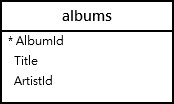
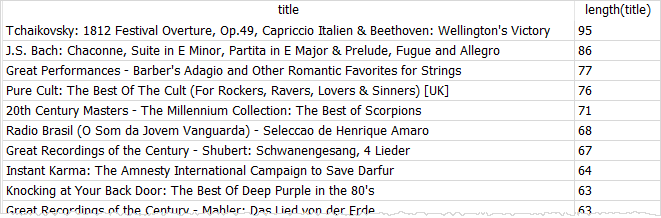
The following query uses the length() function to get the lengths of the album titles and sort the titles by the title length in descending order:
SELECT
  title,
  length (title)
FROM
  albums
ORDER BY
  length (title) DESC;Code language: SQL (Structured Query Language) (sql)
Here’s the partial output:
The following example uses the length() function to find the album titles that have 10 characters:
SELECT title, length(title) AS title_length
FROM albums
WHERE length(title) = 10;Code language: PHP (php)
Output:
Title       title_length
----------  ------------
Audioslave  10
Body Count  10
Bongo Fury  10
Angel Dust  10
One By One  10
Blue Moods  10
...

