The SQLite substr function returns a substring from a string starting at a specified position with a predefined length.
Syntax
substr( string, start, length )Code language: SQL (Structured Query Language) (sql)The starting position of the substring is determined by the start argument and its length is determined by the length argument.
Arguments
The substr() function accepts three arguments.
string
The string to be used to extract the substring.
start
The start argument is an integer that specifies the starting position of the returned substring. The start argument can be a positive or negative integer
- If
startis a positive integer, thesubstr()function returns a substring starting from the beginning of the string. The first character has an index of 1. - If the
startis a negative integer, the returned substring consists of thelengthnumber of characters starting from the end of thestring. The last character has an index of -1.
See the following picture of a sample string with the positive and negative start

length
The length argument determines the length of the substring. The length argument is optional. If it is omitted, it is assumed to be the maximum positive integer.
If any argument is NULL, the substr() function will return NULL.
Return Type
TEXT
Examples
See the following string:
The following statement extracts and returns a substring from the SQLite substr string:
SELECT
  substr ('SQLite substr', 1,6);Code language: SQL (Structured Query Language) (sql)
Output:
substr('SQLite substr', 1, 6)
-----------------------------
SQLiteCode language: JavaScript (javascript)
The following statement returns a substring from a string using a negative start argument.
SELECT
  substr ('SQLite substr', - 6,6);Code language: SQL (Structured Query Language) (sql)
substr('SQLite substr', -6, 6)
-----------------------------
substrCode language: SQL (Structured Query Language) (sql)The following statement illustrates how to use the substr() function with a negative length argument.
SELECT substr('SQLite substr', 7, -6)Code language: SQL (Structured Query Language) (sql)substr('SQLite substr', 7, -6)
-----------------------------
SQLiteCode language: SQL (Structured Query Language) (sql)The following statement demonstrates how to use the substr function with only the first two arguments, the length argument is omitted.
SELECT substr('SQLite substr', 8);Code language: SQL (Structured Query Language) (sql)substr('SQLite substr', 8)
-----------------------------
substrCode language: SQL (Structured Query Language) (sql)The following statement returns all track names from the tracks table in the sample database. It sorts the track names by their lengths:
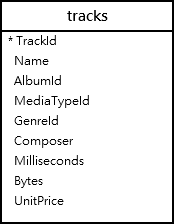
SELECT
  Name
FROM
  tracks
ORDER BY
  LENGTH (name) DESC;Code language: SQL (Structured Query Language) (sql)
Here is the partial output:
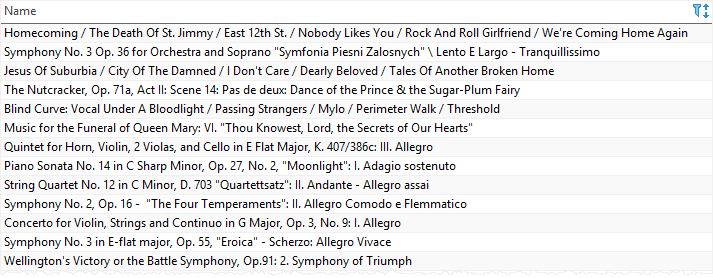
The following statement uses the substr() function to get only the first 20 characters of the track names if the lengths of the names are more than 20; otherwise, it returns the whole names:
SELECT
  CASE
    WHEN LENGTH (Name) > 20 THEN substr (Name, 1, 20) || '...'
    ELSE Name
  END ShortName
FROM
  tracks
ORDER BY
  LENGTH (name) DESC;Code language: SQL (Structured Query Language) (sql)
This picture illustrates the partial output:
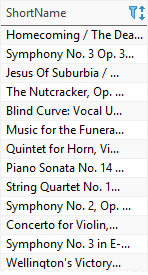
Note that if the lengths of track names are greater than 20, they are concatenated with the string "...".


