Summary: in this tutorial, you will learn how to update data in the SQLite database from a Python program using the sqlite3 module.
Updating data in SQLite using Python
To update data in a table from a Python program, you follow these steps:
First, open a database connection to an SQLite database file by calling the connect() function of the sqlite3 module:
conn = sqlite3.connect(database)Code language: Python (python)The connect() function returns a Connection object that represents a database connection to a specified SQLite database.
Next, create a cursor object from Connection object by calling the cursor() method:
cur = conn.cursor()Code language: Python (python)Then, execute an UPDATE statement by calling the execute() method of the Cursor object:
cur.execute(update_sattement)Code language: Python (python)If you want to bind the arguments to the UPDATE statement, use a question mark (?) for each argument. For example:
UPDATE table_name
SET column1 = ?, column2 = ?
WHERE id = ?Code language: SQL (Structured Query Language) (sql)
In this syntax, the question marks (?) are the placeholders that will be replaced by actual values for the column1, column2, and id.
In this case, you need to pass the second argument as a tuple to the execute() method:
cur.execute(update_statement, (value2, value2, id,))Code language: Python (python)After that, call the commit() method of the Connection object to apply the change to the database permanently:
conn.commit()Code language: Python (python)Finally, close the database connection by calling the close() method of the Connection object:
conn.close()Code language: Python (python)Here are the complete steps:
update_statement = 'UPDATE sample_table SET column1=?, column2=? WHERE id = ?'

conn = sqlite3.connect(database)
cur = conn.cursor()
cur.execute(update_statement, (value1, value2, id,))
conn.commit()
conn.close()Code language: Python (python)
If you use a context manager, you can implicitly close the database connection:
import sqlite3

sql = 'UPDATE sample_table SET column1=?, column2=? WHERE id = ?'

with sqlite3.connect(database) as conn:
    cur = conn.cursor()
    cur.execute(sql, (value1, value2, id,))
    conn.commit()Code language: Python (python)
An error may occur when deleting the data. To handle it, you can use the try…except statement:
import sqlite3

sql  = 'UPDATE sample_table SET column1=?, column2=? WHERE id = ?'

try:
    with sqlite3.connect(database) as conn:
        cur = conn.cursor()
        cur.execute(sql, (value1, value2, id,))
        conn.commit()
except sqlite3.OperationalError as e:
    print(e)Code language: Python (python)
Updating data examples
We’ll use the tasks table with the following contents:
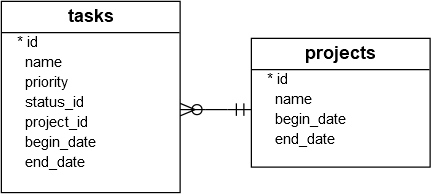
Output:
id  name                                          priority  project_id  status_id  begin_date  end_date
--  --------------------------------------------  --------  ----------  ---------  ----------  ----------
1   Analyze the requirements of the app           1         1           1          2015-01-01  2015-01-02
2   Confirm with user about the top requirements  1         1           1          2015-01-03  2015-01-05Code language: plaintext (plaintext)
1) Updating one field of one row in a table
The following program updates the task id 1 with a new priority 2:
import sqlite3

sql = 'UPDATE tasks SET priority = ? WHERE id = ?'

try:
    with sqlite3.connect('my.db') as conn:
        cursor = conn.cursor()
        cursor.execute(sql, (2,1) )
        conn.commit()
except sqlite3.OperationalError as e:
    print(e)Code language: Python (python)
How it works.
First, import the sqlite3 module:
import sqlite3Code language: Python (python)Second, construct an UPDATE statement that updates the priority of a task specified by an id:
sql = 'UPDATE tasks SET priority = ? WHERE id = ?'Code language: Python (python)The ? is a placeholder that will be substituted by a value.
Third, create a connection to the SQLite database file my.db:
with sqlite3.connect('my.db') as conn:Code language: Python (python)Fourth, create a Cursor object by calling the cursor() method:
cursor = conn.cursor()Code language: Python (python)Fifth, execute the UPDATE statement with the priority and id:
cursor.execute(sql, (2,1) )Code language: Python (python)Sixth, call the commit() method of the Connection object to apply the change permanently to the database:
conn.commit()Code language: Python (python)2) Updating multiple columns of one row in a table
The following program updates the priority and status_id of the task with a specified id:
import sqlite3

sql = 'UPDATE tasks SET priority = ?, status_id = ? WHERE id = ?'

try:
    with sqlite3.connect('my.db') as conn:
        cursor = conn.cursor()
        cursor.execute(sql, (3,2,1) )
        conn.commit()
except sqlite3.OperationalError as e:
    print(e)Code language: Python (python)
In this example, we update the task id 1 with priority 3 and status_id 2.
The following query retrieves the task with id 1:
SELECT
  id,
  name,
  priority,
  status_id
FROM
  tasks
WHERE
  id = 1;Code language: SQL (Structured Query Language) (sql)
Output:
id  name                                 priority  status_id
--  -----------------------------------  --------  ---------
1   Analyze the requirements of the app  3         2Code language: plaintext (plaintext)
3) Updating multiple columns of multiple rows in a table
The following program illustrates how to update the end_date columns of all the tasks to 2015-02-03:
import sqlite3

sql = 'UPDATE tasks SET end_date = ?'

try:
    with sqlite3.connect('my.db') as conn:
        cursor = conn.cursor()
        cursor.execute(sql, ('2015-02-03',) )
        conn.commit()
except sqlite3.Error as e:
    print(e)Code language: Python (python)
Verify the update:
SELECT
  id,
  name,
  end_date
FROM
  tasks;Code language: SQL (Structured Query Language) (sql)
Output:
id  name                                          end_date
--  --------------------------------------------  ----------
1   Analyze the requirements of the app           2015-02-03
2   Confirm with user about the top requirements  2015-02-03Code language: plaintext (plaintext)
The output indicates that the end_date has been updated to 2015-02-03.
Summary
- Use the
execute()method of theCursorobject to execute anUPDATEstatement to update data in a table.


