Summary: in this tutorial, you will learn to import data from a CSV file into the SQL Server database using a Node.js program.
This tutorial begins where the Inserting data into a table from Node.js tutorial left off.
We’ll import author data from a CSV file into the Authors table.
Step 1. Open the terminal and install the csv-parse package:
npm install csv-parseCode language: JavaScript (javascript)The csv-parse package allows you to parse a CSV input into JavaScript arrays or objects.
Step 2. Create a new directory called data within the project directory:
mkdir dataCode language: JavaScript (javascript)Step 3. Create a new CSV file called authors.csv that contains author data inside the data directory:
FirstName,LastName,BirthDate
Agatha,Christie,1890-09-15
Mark,Twain,1835-11-30
George,Orwell,1903-06-25
Jane,Austen,1775-12-16
Charles,Dickens,1812-02-07
F. Scott,Fitzgerald,1896-09-24
Ernest,Hemingway,1899-07-21
Leo,Tolstoy,1828-09-09
Virginia,Woolf,1882-01-25
J.K.,Rowling,1965-07-31
J.R.R.,Tolkien,1892-01-03
Stephen,King,1947-09-21
Harper,Lee,1926-04-28
H.G.,Wells,1866-09-21
Herman,Melville,1819-08-01
Mary,Shelley,1797-08-30
Oscar,Wilde,1854-10-16
Emily,Bronte,1818-07-30
J.D.,Salinger,1919-01-01
Kurt,Vonnegut,1922-11-11Code language: JavaScript (javascript)
The CSV file has three columns first name, last name, and birth date with 20 authors.
Step 4. Create a new file read-csv.js that stores the code to parse the authors.csv data:
import { createReadStream } from 'fs';
import { parse } from 'csv-parse';

export async function readCSV(filePath) {
  const results = [];

  return new Promise((resolve, reject) => {
    // Create a read stream for the CSV file
    createReadStream(filePath)
      // Use columns option to automatically map CSV headers to object keys
      .pipe(parse({ columns: true }))
      .on('data', (data) => {
        results.push({
          firstName: data.FirstName,
          lastName: data.LastName,
          birthDate: data.BirthDate,
        });
      })
      .on('end', () => resolve(results))
      .on('error', (error) => reject(error));
  });
}Code language: JavaScript (javascript)
How it works.
First, import createReadStream and parse functions from the fs and csv-parse respectively:
import { createReadStream } from 'fs';
import { parse } from 'csv-parse';Code language: JavaScript (javascript)
Second, create a new function readCSV that reads data from a CSV file specified by a file path:
export async function readCSV(filePath) {
// ...Code language: JavaScript (javascript)
Also, export the function using the export statement.
Third, parse the CSV file using the parse function. The { columns: true } argument instructs the parse function to map CSV headers to object keys automatically:
.pipe(parse({ columns: true }))Code language: JavaScript (javascript)Once having data, we manually create an author object with three keys firstName, lastName, and birthDate that map to the FirstName, LastName, and BirthDate properties respectively:
.on('data', (data) => {
        results.push({
          firstName: data.FirstName,
          lastName: data.LastName,
          birthDate: data.BirthDate,
        });
      })Code language: JavaScript (javascript)
Step 5. Modify the insert-many.js to export the insertAuthors function using the named export:
import sql from 'mssql';
import { config } from './config.js';

const insertAuthors = async (authors) => {
  try {
    // Connect to the database
    await sql.connect(config);

    // Construct the insert query
    let query = 'INSERT INTO Authors (FirstName, LastName, BirthDate) VALUES ';

    // Build the values part of the query
    const values = authors
      .map(
        ({ firstName, lastName, birthDate }) =>
          `('${firstName}', '${lastName}', '${birthDate}')`
      )
      .join(', ');

    // Complete the query
    query += values;

    // Execute the query
    await sql.query(query);

    console.log(`${authors.length} authors were inserted successfully!`);
  } catch (err) {
    console.error('Error inserting authors:', err);
  } finally {
    // Close the database connection
    await sql.close();
  }
};

export { insertAuthors };Code language: JavaScript (javascript)
Step 6. Modify the index.js file that reads data from the ./data/authors.csv file and inserts it into the Authors table:
import { readCSV } from './read-csv.js';
import { insertAuthors } from './insert-many.js';

const filePath = 'data/authors.csv';

try {
  const authors = await readCSV(filePath);
  await insertAuthors(authors);
} catch (err) {
  console.error(err);
}Code language: JavaScript (javascript)
How it works.
First, import the readCSV function file from the read-csv.js module and insertAuthors function from the insert-many.js module:
import { readCSV } from './read-csv.js';
import { insertAuthors } from './insert-many.js';Code language: JavaScript (javascript)
Second, read data from the authors.csv file by calling the readCSV() function:
const authors = await readCSV(filePath);Code language: JavaScript (javascript)The readCSV() function returns an array of author objects
Third, insert authors from the array into the Authors table by calling the insertAuthors function:
await insertAuthors(authors);Code language: JavaScript (javascript)Step 7. Open the terminal and run the following command to import data from data/authors.csv file into the Authors table:
npm startCode language: JavaScript (javascript)Verify the inserts #
Step 1. Open SQL Server Management Studio (SSMS) and connect to the SQL Server.
Step 2. Execute the following SELECT statement to query data from the Authors table:
SELECT * FROM Authors;Code language: JavaScript (javascript)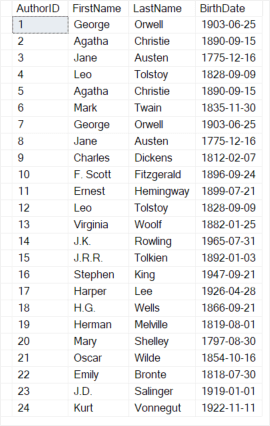
The output indicate the data from the CSV file has been imported into the Authors table successfully.
Download the project source code #
Download the project source code
Summary #
- Use the
csv-parsepackage to read data from a CSV file and execute anINSERTstatement to insert rows into a table in the SQL Server database.


