Summary: in this tutorial, you’ll learn how to use the SQL Server BULK INSERT statement to import a data file into a database table.
Introduction to the SQL Server BULK INSERT statement #
The BULK INSERT statement allows you to import a data file into a table or view in SQL Server. The following shows the basic syntax of the BULK INSERT statement:
BULK INSERT table_name
FROM path_to_file
WITH options;Code language: SQL (Structured Query Language) (sql)
In this syntax:
- First, specify the name of the table in the
BULK INSERTclause. Note that you can use the fully qualified table name such asdatabase_name.schema_name.table_name. - Second, provide the path to the file in the
FROMclause. - Third, use one or more options after the
WITHkeyword.
For the details of the BULK INSERT statement, you can read it here.
SQL Server BULK INSERT statement example #
Let’s take an example of using the BULK INSERT statement to load data from a comma-separated value (CSV) file into a table.
First, create a database called HR:
CREATE DATABASE HR;
GOCode language: SQL (Structured Query Language) (sql)
Next, create a new table Employees in the HR database:
USE HR;

CREATE TABLE Employees (
  Id int IDENTITY PRIMARY KEY,
  FirstName varchar(50) NOT NULL,
  LastName varchar(50) NOT NULL
);Code language: SQL (Structured Query Language) (sql)
The Employees table has three columns Id, FirstName, and LastName.
Then, prepare a CSV file with the path D:\data\employees.csv, which contains the following contents:
Id,First name,Last name
1,John,Doe
2,Jane,Doe
3,Lily,BushCode language: SQL (Structured Query Language) (sql)
The employees.csv file has four rows. The first row contains the heading of the file and the three last rows contain the actual data. In practice, the data file typically contains lots of rows.
After that, load the data from the employees.csv file into the Employees table:
BULK INSERT Employees
FROM 'D:\data\employees.csv'
WITH (
  FIELDTERMINATOR = ',',
  ROWTERMINATOR = '\n',
  FIRSTROW = 2
);Code language: SQL (Structured Query Language) (sql)
In this statement:
- The table name is
Employees. If you connect to themasterdatabase, you need to specify the full table name likeHR.dbo.Employees - The path to the data file is
D:\data\employees.csv. - The
WITHclause has three options: The comma (,) as theFIELDTERMINATOR, which is a separator between columns. The newline ('\n') as theROWTERMINATOR, which separates between rows. The first row (FIRSTROW) starts at two, not one because we won’t load the heading into theEmployeestable.
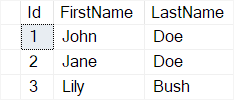
Finally, query the data from the Employees table:
SELECT * FROM employees;Code language: SQL (Structured Query Language) (sql)Output:
Summary #
- Use the
BULK INSERTstatement to import data from a file into a table.


