Summary: in this tutorial, you’ll learn about SQL Server contained databases and how to create a contained database using T-SQL.
Introduction to the SQL Server contained database #
A contained database is a self-contained database that has its own metadata, database settings, and configurations and does not depend on the SQL Server instance that hosts it.
By using a contained database, you can move it to another server without creating any security issues as well as orphan SQL logins.
To create a user to a regular database, you need to first create a login that connects to the master database:
CREATE LOGIN login_name
WITH PASSWORD = 'strong_password';Code language: SQL (Structured Query Language) (sql)
And then create a user that connects to the user database:
CREATE USER 'user_name'
FOR LOGIN 'login_name';	Code language: SQL (Structured Query Language) (sql)
If you want to change the password of the user, you need to change the login’s password:
ALTER LOGIN login_name
WITH PASSWORD = 'strong_password';	Code language: SQL (Structured Query Language) (sql)
When you move the database to another SQL Server instance, you need to create the same login_name from the current SQL Server instance in the new SQL Server instance and map the user with the newly created login.
However, if you use a contained database, you can directly create a user that connects to the user database:
CREATE USER user_name
WITH PASSWORD = 'strong_password';Code language: SQL (Structured Query Language) (sql)
When you move the database to another SQL Server instance, you need to use the same user_name to connect to the database.
To change the password, you can directly change the user’s password like this:
ALTER USER user_name
WITH PASSWORD = 'strong_password';Code language: SQL (Structured Query Language) (sql)
Creating a contained database #
First, enable the containment feature at the SQL Server instance level using the sp_configure stored procedure:
USE master
GO

sp_configure 'show advanced options', 1
GO
RECONFIGURE
GO

sp_configure 'CONTAINED DATABASE AUTHENTICATION', 1
GO
RECONFIGURE
GO

sp_configure 'show advanced options', 0
GO
RECONFIGURE
GOCode language: SQL (Structured Query Language) (sql)
Second, create a contained database using the CREATE DATABASE statement with the containment set to partial:
CREATE DATABASE CRM
	CONTAINMENT = PARTIAL;Code language: SQL (Structured Query Language) (sql)
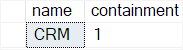
To verify if a database is a contained database, you can use the sys.databases view. The following statement checks if the CRM database is a contained database:
SELECT
  name,
  containment
FROM sys.databases
WHERE name = 'CRM';Code language: SQL (Structured Query Language) (sql)
Output:
Third, create a user that connects to the CRM contained database:
USE CRM;

CREATE USER bob
WITH PASSWORD = 'UixoJN72.';Code language: SQL (Structured Query Language) (sql)
To list all users of a contained database, you use the sys.database_principals view:
SELECT
  name,
  type_desc,
  authentication_type_desc
FROM sys.database_principals
WHERE authentication_type = 2;Code language: SQL (Structured Query Language) (sql)
Output:

Connect to the contained database using SSMS #
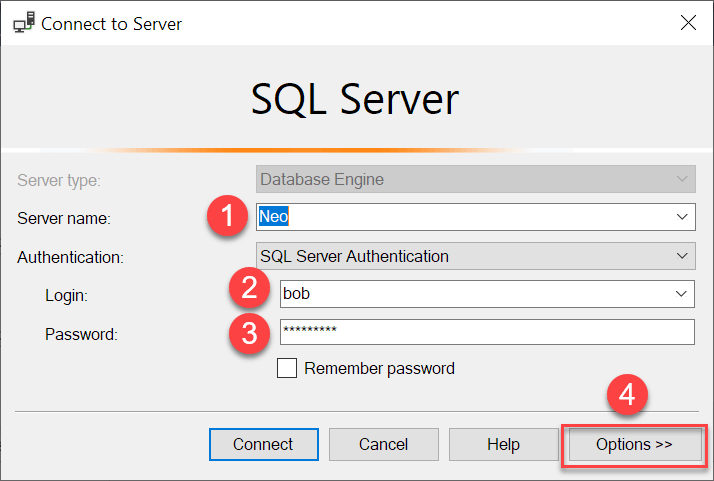
First, enter the server name, user, and password and click the Option >> button:
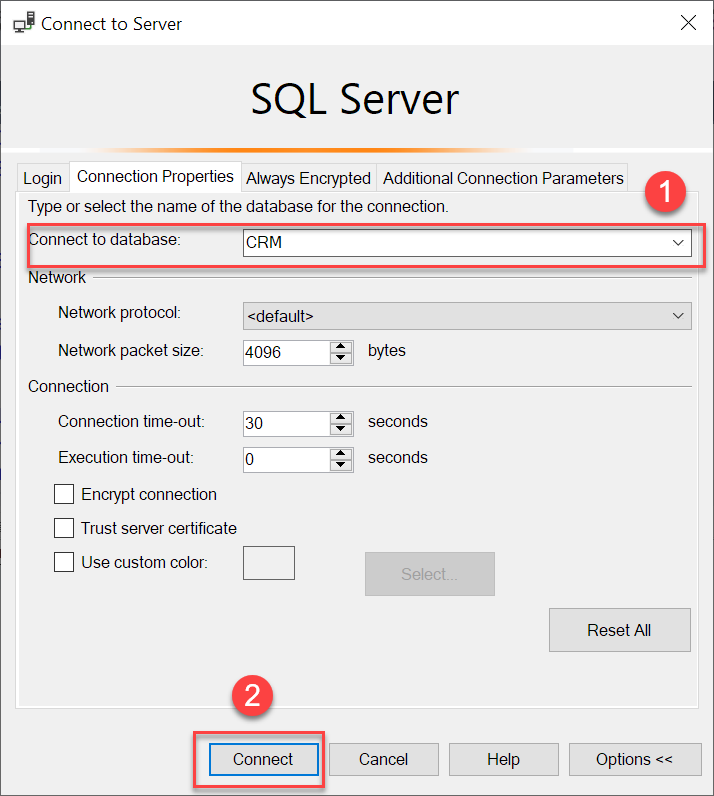
Second, enter the contained database that you want to connect in the connection properties tab and click the Connect button:
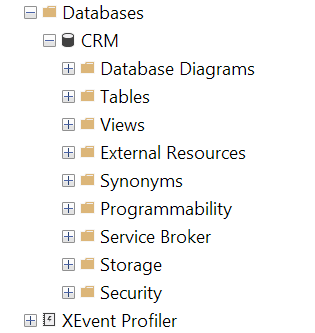
If you connect to the CRM contained database successfully, you’ll see that the user bob only can see the CRM database:
Converting a regular database to a contained database #
First, create a database inventory with a login cat and a user bobcat for the demonstration:
CREATE DATABASE inventory;

CREATE LOGIN cat
WITH PASSWORD = 'AhudnmX9!';

USE inventory;

CREATE USER bobcat
FOR LOGIN cat;Code language: SQL (Structured Query Language) (sql)
Second, convert the inventory database to a contained database using the ALTER DATABASE statement:
ALTER DATABASE inventory
SET CONTAINMENT = PARTIAL WITH NO_WAIT;Code language: SQL (Structured Query Language) (sql)
Third, convert a database user bobcat, which is mapped to a SQL Server login cat, to a contained database user with a password using the sp_migrate_user_to_contained system stored procedure:
EXEC sp_migrate_user_to_contained
    @username = N'bobcat' ,
    @rename = N'keep_name',
    @disablelogin =N'disable_login'; Code language: SQL (Structured Query Language) (sql)
This stored procedure call converts the database user bobcat to a contained database user. It keeps the same username.
If you want to change to copy the login name to the contained database user, you can pass the N'copy_login_name' to the @rename parameter.
The N'disable_login' argument instructs the stored procedure to disable the login bob to the master database. If you don’t want to disable the login, you can use the N'do_not_disable_login' argument.
Summary #
- A contained database is a self-contained database that has its own metadata, database settings, and configurations and does not depend on the SQL Server instance.


