Summary: in this tutorial, you will learn about the SQL Server SUM IF function to calculate the sum of values based on a condition.
Introduction to SQL Server SUM IF #
In SQL Server, the SUM is an aggregate function that allows you to calculate the total of values in a set. Here’s the syntax of the SUM function:
SUM(expresion)Code language: SQL (Structured Query Language) (sql)The IIF function allows you to return a value when a condition is true or another value when the condition is false. The following shows the syntax for the IIF function:
IIF(condition, value_if_true, value_if_false)Code language: SQL (Structured Query Language) (sql)When combining the SUM function with the IIF function, you can calculate the sum of values based on a condition.
The following shows how to use the SUM function with the IIF function:
SUM(IIF(condition, value_to_sum_when_true, value_to_sum_when_false))Code language: SQL (Structured Query Language) (sql)In this expression:
condition: Specify the condition that you want to include values for calculating the total.value_to_sum_when_true: Specify the value that you want to calculate the total if the condition is true.value_to_sum_when_false: Specify the value that you want to calculate the total when the condition is false.
SQL Server SUM IF example #
Let’s explore an example of using the SUM IF.
We’ll use the sales.orders and sales.order_items tables from the sample database:
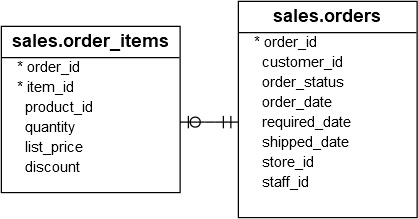
1) Basic SUM IF example #
The following example uses the SUM function with the IIF function to calculate the total amount of pending orders with the order status 1:
SELECT
  SUM(
    IIF(
      o.order_status = 1,
      quantity * list_price * (1 - discount),
      0
    )
  ) total_pending_amount
FROM
  sales.order_items i
  INNER JOIN sales.orders o ON o.order_id = i.order_id;Code language: SQL (Structured Query Language) (sql)
Output:
total_pending_amount
--------------------
388739.5422Code language: plaintext (plaintext)
The output indicates that the total pending amount is about 388,739.
2) Using multiple SUM IF example #
The following example uses the SUM with the IIF function to calculate the total amount of pending and rejected orders with the order status 1 and 3 respectively:
SELECT
  SUM(
    IIF(
      o.order_status = 1,
      quantity * list_price * (1 - discount),
      0
    )
  ) total_pending_amount,
  SUM(
    IIF(
      o.order_status = 3,
      quantity * list_price * (1 - discount),
      0
    )
  ) total_rejected_amount
FROM
  sales.order_items i
  INNER JOIN sales.orders o ON o.order_id = i.order_id;Code language: SQL (Structured Query Language) (sql)
Output:
total_pending_amount | total_rejected_amount
---------------------+----------------------
388739.5422          | 208579.4531Code language: plaintext (plaintext)
Summary #
- Use the
SUMfunction with theIIFfunction to form aSUM IFfunction that returns the total values based on a condition.


