Summary: in this tutorial, you will learn how to use the SQL Server BETWEEN operator to specify a range to test.
Overview of the SQL Server BETWEEN operator #
The BETWEEN operator is a logical operator that allows you to specify a range to test.
The following illustrates the syntax of the BETWEEN operator:
column | expression BETWEEN start_expression AND end_expression
Code language: SQL (Structured Query Language) (sql)
In this syntax:
- First, specify the column or expression to test.
- Second, place the
start_expressionandend_expressionbetween theBETWEENand theANDkeywords. Thestart_expression,end_expressionand theexpressionto test must have the same data type.
The BETWEEN operator returns TRUE if the expression to test is greater than or equal to the value of the start_expression and less than or equal to the value of the end_expression.
You can use the greater than or equal to (>=) and less than or equal to (<=) to substitute the BETWEEN operator as follows:
column | expression <= end_expression AND column | expression >= start_expression
Code language: SQL (Structured Query Language) (sql)
The condition that uses the BETWEEN operator is much more readable than the one that uses the comparison operators >=, <= and the logical operator AND.
To negate the result of the BETWEEN operator, you use NOT BETWEEN operator as follows:
column | expression NOT BETWEEN start_expression AND end_expresion
Code language: SQL (Structured Query Language) (sql)
The NOT BETWEEN returns TRUE if the value in the column or expression is less than the value of the start_expression and greater than the value of the end_expression. It is equivalent to the following condition:
column | expression < start_expression AND column | expression > end_expression
Code language: SQL (Structured Query Language) (sql)
Note that if any input to the BETWEEN or NOT BETWEEN is NULL, then the result is UNKNOWN.
SQL Server BETWEEN examples #
Let’s take some examples of using the BETWEEN operator to understand how it works.
A) Using SQL Server BETWEEN with numbers example #
See the following products table from the sample database:
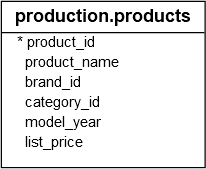
The following query finds the products whose list prices are between 149.99 and 199.99:
SELECT
    product_id,
    product_name,
    list_price
FROM
    production.products
WHERE
    list_price BETWEEN 149.99 AND 199.99
ORDER BY
    list_price;
Code language: SQL (Structured Query Language) (sql)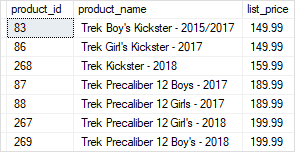
To get the products whose list prices are not in the range of 149.99 and 199.99, you use the NOT BETWEEN operator as follows:
SELECT
    product_id,
    product_name,
    list_price
FROM
    production.products
WHERE
    list_price NOT BETWEEN 149.99 AND 199.99
ORDER BY
    list_price;
Code language: SQL (Structured Query Language) (sql)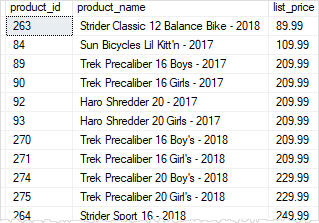
B) Using SQL Server BETWEEN with dates example #
Consider the following orders table:
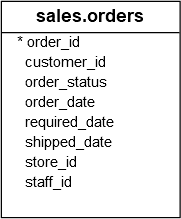
The following query finds the orders that customers placed between January 15, 2017 and January 17, 2017:
SELECT
    order_id,
    customer_id,
    order_date,
    order_status
FROM
    sales.orders
WHERE
    order_date BETWEEN '20170115' AND '20170117'
ORDER BY
    order_date;
Code language: SQL (Structured Query Language) (sql)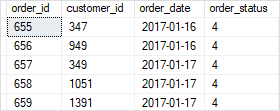
Notice that to specify a literal date, you use the format ‘YYYYMMDD‘ where YYYY is 4-digit year e.g., 2017, MM is 2-digits month e.g., 01 and DD is 2-digits day e.g., 15.
In this tutorial, you have learned how to use the SQL Server BETWEEN operator to form a condition that tests against a range of values.


