Summary: in this tutorial, you will learn how to insert multiple rows into a table using a single SQL Server INSERT statement.
In the previous tutorial, you have learned how to add one row at a time to a table by using the INSERT statement.
To add multiple rows to a table at once, you use the following form of the INSERT statement:
INSERT INTO table_name (column_list)
VALUES
    (value_list_1),
    (value_list_2),
    ...
    (value_list_n);
Code language: SQL (Structured Query Language) (sql)
In this syntax, instead of using a single list of values, you use multiple comma-separated lists of values for insertion.
The number of rows that you can insert at a time is 1,000 rows using this form of the INSERT statement. If you want to insert more rows than that, you should consider using multiple INSERT statements, BULK INSERT or a derived table.
Note that this INSERT multiple rows syntax is only supported in SQL Server 2008 or later.
To insert multiple rows returned from a SELECT statement, you use the INSERT INTO SELECT statement.
SQL Server INSERT multiple rows – examples #
We will use the sales.promotions table created in the previous tutorial for the demonstration.
If you have not yet created the sales.promotions table, you can use the following CREATE TABLE statement:
CREATE TABLE sales.promotions (
    promotion_id INT PRIMARY KEY IDENTITY (1, 1),
    promotion_name VARCHAR (255) NOT NULL,
    discount NUMERIC (3, 2) DEFAULT 0,
    start_date DATE NOT NULL,
    expired_date DATE NOT NULL
);
Code language: SQL (Structured Query Language) (sql)
1) Inserting multiple rows example #
The following statement inserts multiple rows to the sales.promotions table:
INSERT INTO sales.promotions (
    promotion_name,
    discount,
    start_date,
    expired_date
)
VALUES
    (
        '2019 Summer Promotion',
        0.15,
        '20190601',
        '20190901'
    ),
    (
        '2019 Fall Promotion',
        0.20,
        '20191001',
        '20191101'
    ),
    (
        '2019 Winter Promotion',
        0.25,
        '20191201',
        '20200101'
    );
Code language: SQL (Structured Query Language) (sql)
SQL server issued the following message indicating that three rows have been inserted successfully.
(3 rows affected)
Code language: SQL (Structured Query Language) (sql)
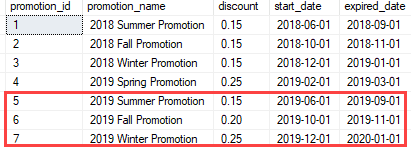
Let’s verify the insert by executing the following query:
SELECT
    *
FROM
    sales.promotions;
Code language: SQL (Structured Query Language) (sql)
Here is the output:
2) Inserting multiple rows and returning the inserted id list example #
This example inserts three rows into the sales.promotions table and returns the promotion identity list:
INSERT INTO
	sales.promotions (
		promotion_name, discount, start_date, expired_date
	)
OUTPUT inserted.promotion_id
VALUES
	('2020 Summer Promotion',0.25,'20200601','20200901'),
	('2020 Fall Promotion',0.10,'20201001','20201101'),
	('2020 Winter Promotion', 0.25,'20201201','20210101');

Code language: SQL (Structured Query Language) (sql)
In this example, we added the OUTPUT clause with the column that we want to return using the inserted.column_name syntax. If you want to return values from multiple columns, you can use the following syntax:
OUTPUT inserted.column1, inserted.column2...
Code language: SQL (Structured Query Language) (sql)
In this tutorial, you have learned how to use another form of the SQL Server INSERT statement to insert multiple rows into a table using one INSERT statement.


