Summary: in this tutorial, you will learn how to use the SQL Server ORDER BY clause to sort the result set of a query by one or more columns.
Introduction to the SQL Server ORDER BY clause #
The ORDER BY clause is an option clause of the SELECT statement. The ORDER BY clause allows you to sort the result set of a query by one or more columns.
Here’s the syntax of the ORDER BY clause:
SELECT
    select_list
FROM
    table_name
ORDER BY
    column_name | expression [ASC | DESC ];Code language: SQL (Structured Query Language) (sql)
In this syntax:
First, specify a column name or an expression you want to sort in the ORDER BY clause.
If you use multiple columns, the ORDER BY clause will sort rows by the first column first, then sort the sorted rows by the second column, and so on.
The columns in the ORDER BY clause must match either column in the select list or columns defined in the table specified in the FROM clause.
Second, specify the sort order by using either the ASC or DESC keyword.
The ASC keyword sorts rows from low to high, while the DESC keyword sorts the rows from high to low.
Both ASC and DESC are optional. If you don’t explicitly specify either ASC or DESC, the ORDER BY clause defaults to ASC.
Additionally, SQL Server treats NULL as the lowest value. This means that it will place NULL before other values after sorting.
When processing the SELECT statement that has an ORDER BY clause, SQL Server processes the ORDER BY clause last.
SQL Server ORDER BY clause example #
We will use the customers table in the sample database from the demonstration.
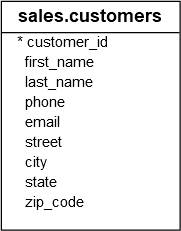
1) Sort a result set by one column in ascending order #
The following statement uses the ORDER BY clause to sort customers by their first names in ascending order:
SELECT
    first_name,
    last_name
FROM
    sales.customers
ORDER BY
    first_name;Code language: SQL (Structured Query Language) (sql)
Output:
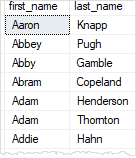
In this example, we don’t specify ASC or DESC, the ORDER BY clause defaults to ASC. Therefore, the above query is equivalent to the following query:
SELECT
    first_name,
    last_name
FROM
    sales.customers
ORDER BY
    first_name ASC;Code language: CSS (css)
2) Sort a result set by one column in descending order #
The following statement uses the ORDER BY clause to sort customers by their first names in descending order:
SELECT
    firstname,
    lastname
FROM
    sales.customers
ORDER BY
    first_name DESC;Code language: SQL (Structured Query Language) (sql)
Output:
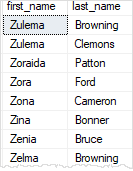
In this example, we explicitly use the DESC option, so the ORDER BY clause sorts the rows by values in the first_name column in descending order.
3) Sort a result set by multiple columns #
The following statement uses the ORDER BY clause to sort customers by cities first and then by first names:
SELECT
    city,
    first_name,
    last_name
FROM
    sales.customers
ORDER BY
    city,
    first_name;Code language: SQL (Structured Query Language) (sql)
Output:
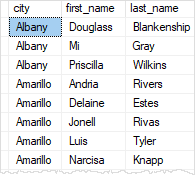
4) Sort a result set by multiple columns in different orders #
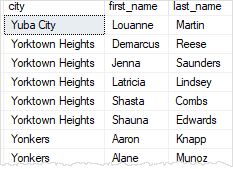
The following statement uses the ORDER BY clause to sort customers by cities in descending order and then sort the customers by their first names in alphabetical order:
SELECT
    city,
    first_name,
    last_name
FROM
    sales.customers
ORDER BY
    city DESC,
    first_name ASC;Code language: SQL (Structured Query Language) (sql)
Output:
5) Sort a result set by a column that is not in the select list #
SQL Server allows you to sort a result set by columns specified in a table, even if those columns do not appear in the select list.
For example, the following statement uses the ORDER BY clause to sort customers by states, even though the state column does not appear on the select list:
SELECT
    city,
    first_name,
    last_name
FROM
    sales.customers
ORDER BY
    state;Code language: SQL (Structured Query Language) (sql)
Output:
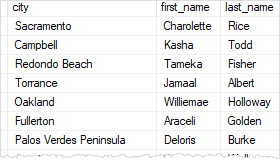
Note that the state column is defined in the customers table. If it doesn’t, then you’ll have an invalid query.
6) Sort a result set by an expression #
The LEN() function returns the number of characters in a string.
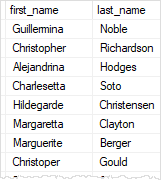
The following statement uses the LEN() function in the ORDER BY clause to sort customers by the lengths of their first names:
SELECT
    first_name,
    last_name
FROM
    sales.customers
ORDER BY
    LEN(first_name) DESC;Code language: SQL (Structured Query Language) (sql)
Output:
7) Sort by ordinal positions of columns #
SQL Server allows you to sort the result set based on the ordinal positions of columns that appear in the select list.
The following statement sorts the customers by first and last names. But instead of specifying the column names explicitly, it uses the ordinal positions of the columns:
SELECT
    first_name,
    last_name
FROM
    sales.customers
ORDER BY
    1,
    2;Code language: SQL (Structured Query Language) (sql)
In this example, the numbers 1 and 2, which appear after the ORDER BY clause, denote the first_name and last_name columns respectively.
Using the ordinal positions of columns in the ORDER BY clause is not recommended for several reasons:
- First, the columns in a table don’t have ordinal positions and should be referenced by names.
- Second, if you modify the select list, you might forget to update the ORDER BY clause accordingly.
Therefore, it is best practice to always specify column names explicitly in the ORDER BY clause.
Summary #
- Use the
ORDER BYclause to sort the result set by columns in ascending or descending order. - Use the
ASCkeyword to sort rows in ascending order. - Use the
DESCkeyword to sort rows in descending order.


