Summary: in this tutorial, you will learn how to use SQL Server DATEDIFF() function to calculate the number of years, months, weeks, days,etc., between two dates.
SQL Server DATEDIFF() overview #
To calculate the difference between two dates in years, months, weeks, etc., you use the DATEDIFF() function:
DATEDIFF( date_part , start_date , end_date)
Code language: SQL (Structured Query Language) (sql)
The DATEDIFF() function accepts three arguments: date_part, start_date, and end_date.
date_partis the part of date e.g., a year, a quarter, a month, a week that you want to compare between thestart_dateandend_date. See the valid date parts in the table below.start_dateandend_dateare the dates to be compared. They must be resolved to values of typeDATE,DATETIME,DATETIMEOFFSET,DATETIME2,SMALLATETIME, orTIME.
The following table lists the valid values of date_part:
| date_part | abbreviations |
|---|---|
| year | yy, yyyy |
| quarter | qq, q |
| month | mm, m |
| dayofyear | dy, y |
| day | dd, d |
| week | wk, ww |
| hour | hh |
| minute | mi, n |
| second | ss, s |
| millisecond | ms |
| microsecond | mcs |
| nanosecond | ns |
The DATEDIFF() function returns a value of integer indicating the difference between the start_date and end_date, with the unit specified by date_part.
The DATEDIFF() function returns an error if the result is out of range for integer (-2,147,483,648 to +2,147,483,647). In this case, you should use the DATEDIFF_BIG() function instead.
SQL Server DATEDIFF() function examples #
Let’s take some examples of using the DATEDIFF() function to understand it better.
A) Using DATEDIFF() function to compare the differences between two date values #
This example uses the DATEDIFF() function to compare the difference between two dates in various date parts:
DECLARE
    @start_dt DATETIME2= '2019-12-31 23:59:59.9999999',
    @end_dt DATETIME2= '2020-01-01 00:00:00.0000000';

SELECT
    DATEDIFF(year, @start_dt, @end_dt) diff_in_year,
    DATEDIFF(quarter, @start_dt, @end_dt) diff_in_quarter,
    DATEDIFF(month, @start_dt, @end_dt) diff_in_month,
    DATEDIFF(dayofyear, @start_dt, @end_dt) diff_in_dayofyear,
    DATEDIFF(day, @start_dt, @end_dt) diff_in_day,
    DATEDIFF(week, @start_dt, @end_dt) diff_in_week,
    DATEDIFF(hour, @start_dt, @end_dt) diff_in_hour,
    DATEDIFF(minute, @start_dt, @end_dt) diff_in_minute,
    DATEDIFF(second, @start_dt, @end_dt) diff_in_second,
    DATEDIFF(millisecond, @start_dt, @end_dt) diff_in_millisecond;
Code language: SQL (Structured Query Language) (sql)
Here is the output:

B) Using DATEDIFF() function with table column example #
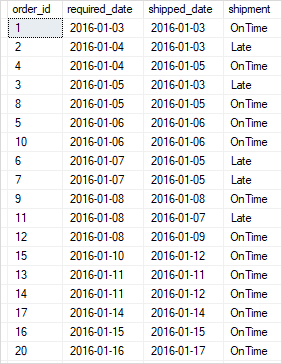
The following example uses the DATEDIFF() function to compare the requested delivery date with the ship date in days and return if the order is on-time or late:
SELECT
    order_id,
    required_date,
    shipped_date,
    CASE
        WHEN DATEDIFF(day, required_date, shipped_date) < 0
        THEN 'Late'
        ELSE 'OnTime'
    END shipment
FROM
    sales.orders
WHERE
    shipped_date IS NOT NULL
ORDER BY
    required_date;
Code language: SQL (Structured Query Language) (sql)
Here is the output:
In this tutorial, you have learned how to use the SQL Server DATEDIFF() function to compute the difference between two date values.


