Summary: in this tutorial, you will learn how to rename an index using the system stored procedure sp_rename and SQL Server Management Studio.
Renaming an index using the system stored procedure sp_rename #
The sp_rename is a system stored procedure that allows you to rename any user-created object in the current database including table, index, and column.
The statement renames an index:
EXEC sp_rename
    index_name,
    new_index_name,
    N'INDEX';
Code language: SQL (Structured Query Language) (sql)
or you can use the explicit parameters:
EXEC sp_rename
    @objname = N'index_name',
    @newname = N'new_index_name',
    @objtype = N'INDEX';
Code language: SQL (Structured Query Language) (sql)
For example, the following statement renames the index ix_customers_city of the sales.customers table to ix_cust_city:
EXEC sp_rename
        @objname = N'sales.customers.ix_customers_city',
        @newname = N'ix_cust_city' ,
        @objtype = N'INDEX';
Code language: SQL (Structured Query Language) (sql)
or in short:
EXEC sp_rename
        N'sales.customers.ix_customers_city',
        N'ix_cust_city' ,
        N'INDEX';
Code language: SQL (Structured Query Language) (sql)
Renaming an index using the SQL Server Management Studio (SSMS) #
To change the name of an index to the new one using the SSMS, you follow these steps:
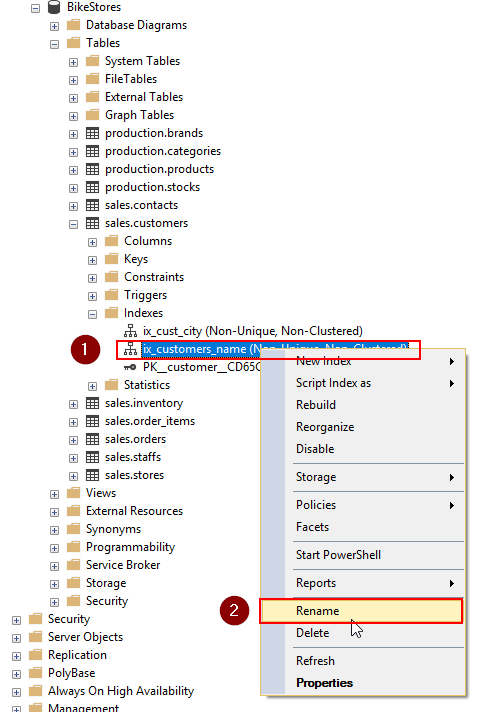
First, navigate to the database, table name, and indexes:
Second, right-click on the index to which you want to change the name and choose the rename menu item. In the following picture, we will rename the index ix_customers_name of the sales.customers table:
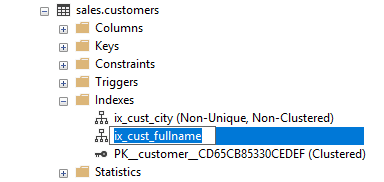
Third, type the new name and press enter. The following picture shows the ix_customers_name index change to ix_cust_fullname:
In this tutorial, you have learned how to rename an index using sp_rename stored procedure and SQL Server Management Studio.


