Summary: in this tutorial, you will learn how to use the SQL Server LOWER() function to convert a string to lowercase.
The LOWER() function converts a string into lowercase. The following illustrates the syntax of the LOWER() function:
LOWER(input_string)
Code language: SQL (Structured Query Language) (sql)
In this syntax, the input_string can be a literal character string, variable, character string expression, or table column.
The type of the input_string must be implicitly convertible to VARCHAR. Otherwise, you must use the CAST() function to convert the input_string explicitly.
The LOWER() function returns the lowercase of the input_string.
SQL Server LOWER() function examples #
Let’s take some examples of using the LOWER() function.
A) Using the LOWER() function with literal strings #
This example uses the LOWER() function to convert the string 'TEST' to 'test':
SELECT
    LOWER('TEST') result;
Code language: SQL (Structured Query Language) (sql)
Here is the output:
result
------
test

(1 row affected)
B) Using the LOWER() function with table column #
We’ll use the customers table from the sample database in this example:
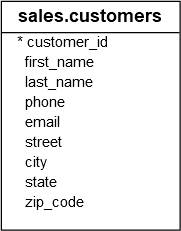
The following statement uses the LOWER() function to convert the first and last names of customers to lowercase before concatenation:
SELECT
    first_name,
    last_name,
    CONCAT_WS(
        ' ',
        LOWER(first_name),
        LOWER(last_name)
    ) full_name_lowercase
FROM
    sales.customers
ORDER BY
    first_name,
    last_name;
Code language: SQL (Structured Query Language) (sql)
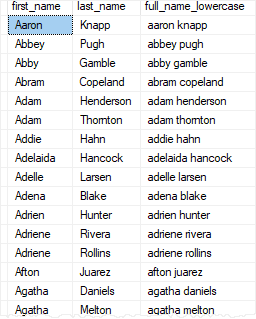
The following picture illustrates the partial output:
In this tutorial, you have learned how to use the SQL Server LOWER() function to convert a string to lowercase.


