Summary: in this tutorial, you will learn how to use the SQL Server SUBSTRING() function to extract a substring from a string.
SQL Server SUBSTRING() function overview #
The SUBSTRING() extracts a substring with a specified length starting from a location in an input string.
The following shows the syntax of the SUBSTRING() function:
SUBSTRING(input_string, start, length);
Code language: SQL (Structured Query Language) (sql)
In this syntax:
input_stringcan be a character, binary, text, ntext, or image expression.startis an integer that specifies the location where the returned substring starts. Note that the first character in theinput_stringis 1, not zero.lengthis a positive integer that specifies the number of characters of the substring to be returned. TheSUBSTRING()function raises an error if thelengthis negative. Ifstart+length> the length ofinput_string, the substring will begin at thestartand include the remaining characters of theinput_string.
SQL Server SUBSTRING() examples #
Let’s take some examples of using the SUBSTRING() function to understand how it works.
A) Using SUBSTRING() function with literal strings #
This example extracts a substring with the length of 6, starting from the fifth character, in the 'SQL Server SUBSTRING' string.
SELECT
    SUBSTRING('SQL Server SUBSTRING', 5, 6) result;
Code language: SQL (Structured Query Language) (sql)
Here is the output:
result
------
Server

(1 row affected)
B) Using SUBSTRING() function with table columns #
We will use the sales.customers table in the sample database for the demonstration.
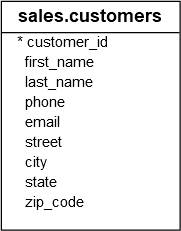
This example uses the SUBSTRING() function to extract domain from email addresses of customers:
SELECT
    email,
    SUBSTRING(
        email,
        CHARINDEX('@', email)+1,
        LEN(email)-CHARINDEX('@', email)
    ) domain
FROM
    sales.customers
ORDER BY
    email;
Code language: SQL (Structured Query Language) (sql)
The following picture shows the partial output:
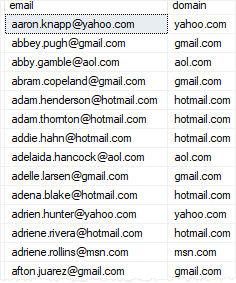
How it works.
First, we used the CHARINDEX() function to search for the ‘@’ character in the email. The domain will start from the @ character plus one.
Then, we used the result of the CHARINDEX() function to determine:
- The starting location of the domain:
CHARINDEX('@', email) + 1 - The length of the domain:
LEN(email)-CHARINDEX('@', email)
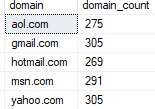
To count the number of emails per domain, you can use the following query:
SELECT
    SUBSTRING(
        email,
        CHARINDEX('@', email)+1,
        LEN(email)-CHARINDEX('@', email)
    ) domain,
    COUNT(email) domain_count
FROM
    sales.customers
GROUP BY
    SUBSTRING(
            email,
            CHARINDEX('@', email)+1,
            LEN(email)-CHARINDEX('@', email)
        );
Code language: SQL (Structured Query Language) (sql)
Here is the output:
In this tutorial, you have learned how to used the SQL Server SUBSTRING() function to extract characters from a string.


