Summary: in this tutorial, you will learn how to use the SQL Server IIF() function to add if-else logic to queries.
Introduction to SQL Server IIF() function #
The IIF() function accepts three arguments. It evaluates the first argument and returns the second argument if the first argument is true; otherwise, it returns the third argument.
The following shows the syntax of the IIF() function:
IIF(boolean_expression, true_value, false_value)
Code language: SQL (Structured Query Language) (sql)
In this syntax:
boolean_expressionis an expression to be evaluated. It must be a valid Boolean expression, or the function will raise an error.true_valueis the value to be returned if theboolean_expressionevaluates to true.false_valueis the value to be returned if theboolean_expressionevaluates to false.
In fact, the IIF() function is shorthand of a CASE expression:
CASE
    WHEN boolean_expression
        THEN true_value
    ELSE
        false_value
END
Code language: SQL (Structured Query Language) (sql)
SQL Server IIF() function examples #
Let’s take some examples of using the SQL Server IIF() function.
A) Using SQL Server IIF() function with a simple example #
This example uses the IIF() function to check if 10 < 20 and returns the True string:
SELECT
    IIF(10 < 20, 'True', 'False') Result ;
Code language: SQL (Structured Query Language) (sql)
Here is the result:
Result
------
True

(1 row affected)Code language: PHP (php)
B) Using SQL Server IIF() function with table column example #
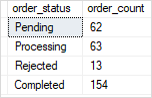
The following example nests IIF()function inside IIF() functions and returns the corresponding order status based on the status number:
SELECT
    IIF(order_status = 1,'Pending',
        IIF(order_status=2, 'Processing',
            IIF(order_status=3, 'Rejected',
                IIF(order_status=4,'Completed','N/A')
            )
        )
    ) order_status,
    COUNT(order_id) order_count
FROM
    sales.orders
WHERE
    YEAR(order_date) = 2018
GROUP BY
    order_status;
Code language: SQL (Structured Query Language) (sql)
The following picture shows the output:
C) Using SQL Server IIF() function with aggregate functions #
This example uses the IIF() function with the SUM() function to get the number of orders by order status in 2018.
SELECT
    SUM(IIF(order_status = 1, 1, 0)) AS 'Pending',
    SUM(IIF(order_status = 2, 1, 0)) AS 'Processing',
    SUM(IIF(order_status = 3, 1, 0)) AS 'Rejected',
    SUM(IIF(order_status = 4, 1, 0)) AS 'Completed',
    COUNT(*) AS Total
FROM
    sales.orders
WHERE
    YEAR(order_date) = 2017;
Code language: SQL (Structured Query Language) (sql)
In this example, the IIF() function returns 1 or zero if the status is matched. The SUM() function returns the number of orders for each status.
Here is the output:

In this tutorial, you have learned how to use the SQL Server IIF() function to return one of two values, based on the result of the first argument.


