Summary: in this tutorial, you will learn how to list all views in the SQL Server database by querying the system catalog view.
To list all views in a SQL Server Database, you query the sys.views or sys.objects catalog view. Here is an example:
SELECT
	OBJECT_SCHEMA_NAME(v.object_id) schema_name,
	v.name
FROM
	sys.views as v;Code language: SQL (Structured Query Language) (sql)
The query returns the following list of schema names and view names:
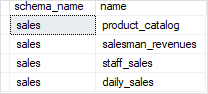
In this example, we used the OBJECT_SCHEMA_NAME() function to get the schema names of the views.
The following query returns a list of views through the sys.objects view:
SELECT
	OBJECT_SCHEMA_NAME(o.object_id) schema_name,
	o.name
FROM
	sys.objects as o
WHERE
	o.type = 'V';
Code language: SQL (Structured Query Language) (sql)
Creating a stored procedure to show views in SQL Server Database #
The following stored procedure wraps the query above to list all views in the SQL Server Database based on the input schema name and view name:
CREATE PROC usp_list_views(
	@schema_name AS VARCHAR(MAX)  = NULL,
	@view_name AS VARCHAR(MAX) = NULL
)
AS
SELECT
	OBJECT_SCHEMA_NAME(v.object_id) schema_name,
	v.name view_name
FROM
	sys.views as v
WHERE
	(@schema_name IS NULL OR
	OBJECT_SCHEMA_NAME(v.object_id) LIKE '%' + @schema_name + '%') AND
	(@view_name IS NULL OR
	v.name LIKE '%' + @view_name + '%');Code language: SQL (Structured Query Language) (sql)
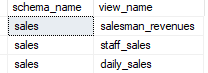
For example, if you want to know the views that contain the word sales, you can call the stored procedure usp_list_views:
EXEC usp_list_views @view_name = 'sales'Code language: SQL (Structured Query Language) (sql)Here is the result:
In this tutorial, you have learned various ways to list views in a SQL Server Database by querying data from the system catalog views.


