Summary: in this tutorial, you will learn how to use the SQL Server CUME_DIST() function to calculate a cumulative distribution of a value within a group of values.
Introduction to SQL Server CUME_DIST() function #
Sometimes, you want to make a report that contains the top or bottom x% values from a data set e.g., top 5% sales staffs by net sales. One way to achieve this with SQL Server is to use the CUME_DIST() function.
The CUME_DIST() function calculates the cumulative distribution of a value within a group of values. Simply put, it calculates the relative position of a value in a group of values.
The following shows the syntax of the CUME_DIST() function:
 CUME_DIST() OVER (
    [PARTITION BY partition_expression, ... ]
    ORDER BY sort_expression [ASC | DESC], ...
)
Code language: SQL (Structured Query Language) (sql)
Let’s examine this syntax in detail.
PARTITION BY clause #
The PARTITION BY clause distributes rows into multiple partitions to which the CUME_DIST() function is applied.
The PARTITION BY clause is optional. The CUME_DIST() function will treat the whole result set as a single partition if you omit the PARTITION BY clause.
ORDER BY clause #
The ORDER BY clause specifies the logical order of rows in each partition to which the CUME_DIST() function is applied. The ORDER BY clause considers NULL values as the lowest possible values.
Return value #
The result of CUME_DIST() is greater than 0 and less than or equal to 1.
0 < CUME_DIST() <= 1
Code language: SQL (Structured Query Language) (sql)
The function returns the same cumulative distribution values for the same tie values.
SQL Server CUME_DIST() examples #
Let’s take some examples of using the CUME_DIST() function.
Using SQL Server CUME_DIST() function over a result set example #
The following statement calculates the sales percentile for each sales staff in 2017:
SELECT
    CONCAT_WS(' ',first_name,last_name) full_name,
    net_sales,
    CUME_DIST() OVER (
        ORDER BY net_sales DESC
    ) cume_dist
FROM
    sales.vw_staff_sales t
INNER JOIN sales.staffs m on m.staff_id = t.staff_id
WHERE
    year = 2017;
Code language: SQL (Structured Query Language) (sql)
Here is the result:
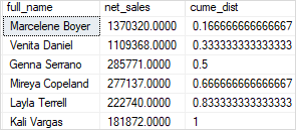
As shown in the output, 50% of the sales staff have net sales greater than 285K.
Using SQL Server CUME_DIST() function over a partition example #
This example uses the CUME_DIST() function to calculate the sales percentile for each sales staff in 2016 and 2017.
SELECT
    CONCAT_WS(' ',first_name,last_name) full_name,
    net_sales,
    year,
    CUME_DIST() OVER (
        PARTITION BY year
        ORDER BY net_sales DESC
    ) cume_dist
FROM
    sales.vw_staff_sales t
INNER JOIN sales.staffs m on m.staff_id = t.staff_id
WHERE
    year IN (2016,2017);
Code language: SQL (Structured Query Language) (sql)
Here is the output:
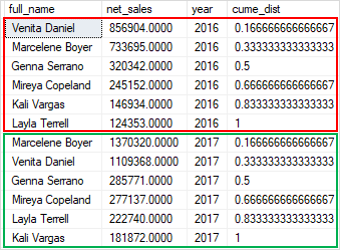
In this example:
- The
PARTITION BYclause distributed the rows into two partitions by year, 2016 and 2017. - The
ORDER BYclause sorted rows in each partition by net sales from high to low to which theCUME_DIST()function is applied.
To get the top 20% of sales staff by net sales in 2016 and 2017, you use the following query:
WITH cte_sales AS (
    SELECT
        CONCAT_WS(' ',first_name,last_name) full_name,
        net_sales,
        year,
        CUME_DIST() OVER (
            PARTITION BY year
            ORDER BY net_sales DESC
        ) cume_dist
    FROM
        sales.vw_staff_sales t
        INNER JOIN sales.staffs m
            ON m.staff_id = t.staff_id
    WHERE
        year IN (2016,2017)
)
SELECT
    *
FROM
    cte_sales
WHERE
    cume_dist <= 0.20;
Code language: SQL (Structured Query Language) (sql)
The following picture shows the output:

In this tutorial, you have learned how to use the SQL Server CUME_DIST() function to calculate the cumulative distribution of a value in a group of values.


