Summary: in this tutorial, you will learn how to use the SQL Server ROW_NUMBER() function to assign a sequential integer to each row of a result set.
Introduction to SQL Server ROW_NUMBER() function #
The ROW_NUMBER() is a window function that assigns a sequential integer to each row within the partition of a result set. The row number starts with 1 for the first row in each partition.
The following shows the syntax of the ROW_NUMBER() function:
ROW_NUMBER() OVER (
    [PARTITION BY partition_expression, ... ]
    ORDER BY sort_expression [ASC | DESC], ...
)Code language: SQL (Structured Query Language) (sql)
Let’s examine the syntax of the ROW_NUMBER() function in detail.
PARTITION BY #
The PARTITION BY clause divides the result set into partitions (another term for groups of rows). The ROW_NUMBER() function is applied to each partition separately and reinitialized the row number for each partition.
The PARTITION BY clause is optional. If you skip it, the ROW_NUMBER() function will treat the whole result set as a single partition.
ORDER BY #
The ORDER BY clause defines the logical order of the rows within each partition of the result set. The ORDER BY clause is mandatory because the ROW_NUMBER() function is order-sensitive.
SQL Server ROW_NUMBER() function examples #
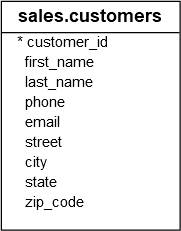
We’ll use the sales.customers table from the sample database to demonstrate the ROW_NUMBER() function.
Using SQL Server ROW_NUMBER() function over a result set example #
The following statement uses the ROW_NUMBER() to assign each customer row a sequential number:
SELECT
   ROW_NUMBER() OVER (
	ORDER BY first_name
   ) row_num,
   first_name,
   last_name,
   city
FROM
   sales.customers;Code language: SQL (Structured Query Language) (sql)
Here is the partial output:
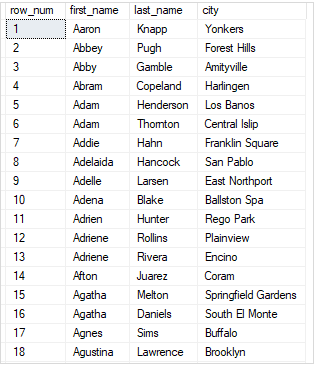
In this example, we skipped the PARTITION BY clause, therefore, the ROW_NUMBER() treated the whole result set as a single partition.
Using SQL Server ROW_NUMBER() over partitions example #
The following example uses the ROW_NUMBER() function to assign a sequential integer to each customer. It resets the number when the city changes:
SELECT
   first_name,
   last_name,
   city,
   ROW_NUMBER() OVER (
      PARTITION BY city
      ORDER BY first_name
   ) row_num
FROM
   sales.customers
ORDER BY
   city;Code language: SQL (Structured Query Language) (sql)
The following picture shows the partial output:
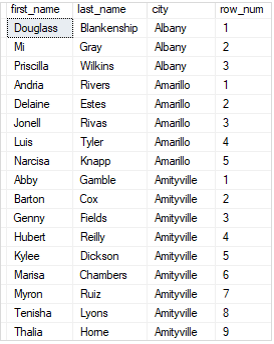
In this example, we used the PARTITION BY clause to divide the customers into partitions by city. The row number was reinitialized when the city changed.
Using SQL Server ROW_NUMBER() for pagination #
The ROW_NUMBER() function is useful for pagination in applications. For example, you can display a list of customers by page, where each page has 10 rows.
The following example uses the ROW_NUMBER() to return customers from rows 11 to 20, which is the second page:
WITH cte_customers AS (
    SELECT
        ROW_NUMBER() OVER(
             ORDER BY
                first_name,
                last_name
        ) row_num,
        customer_id,
        first_name,
        last_name
     FROM
        sales.customers
) SELECT
    customer_id,
    first_name,
    last_name
FROM
    cte_customers
WHERE
    row_num > 10 AND
    row_num <= 20;
Code language: SQL (Structured Query Language) (sql)
The output is as follows:
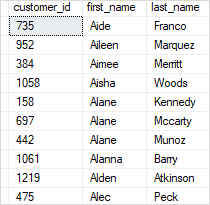
In this example:
- First, the CTE used the
ROW_NUMBER()function to assign every row in the result set to a sequential integer. - Second, the outer query returned the rows of the second page, which have row numbers between 11 and 20.
Summary #
- Use the
ROW_NUMBER()function to assign a sequential integer to each row within a partition of a query.


