
The async pipe allows us to subscribe to an Observable or Promise from the template and returns the value emitted. The async pipes subscribe to the observable when the component loads. It unsubscribes when the component gets destroyed. In this tutorial we will show you how to use async pipe. Its Syntax & example using observable, Also we will show you how to use it with ngIf & ngFor. How to make use of the ShareReplay to share the subscription. Use the as operator to store the result. using it with the httpclient & HTTP get request etc.
Table of Contents
Syntax of Async Pipe
The following is the syntax of the async pipe. expression must return an observable or promise. It is followed by | (pipe character) and the keyword async. We are using the async pipe with interpolation syntax.
1 2 3 | {{expression | async}} |
Async Pipe Example with Observables
The following example creates an observable. It returns 1000 after an delay. The obsValue variable stores the observable.
1 2 3 4 5 6 | obsValue = new Observable((observer) => { console.log("Observable starts") setTimeout(() => { observer.next("90000") }, 1000); }) |
We can use it in the template as shown below.
1 2 3 | {{ obsValue | async}} |
When the components load, the angular automatically subscribes to the obsValue observable.
The observable returns the value 1000 after a delay. When the value arrives, async pipe automatically triggers change detection. Hence you will see the return value on the screen.
The observable is automatically unsubscribed when the component is destroyed. Thus avoiding any potential memory leaks
Use the async pipe with ngIf
We above example uses the async pipe with interpolation. We can also use it with the ngIf or ngFor etc.
The following example shows how NOT to use the observable with ngIf directive.
The condition (obsValue | async) becomes true, when the observable returns a value. Until then the elseBlock is shown, which we use to display the loading indicator. In the example, it displays the message Observable is loading. Please wait.
1 2 3 4 5 6 7 8 9 | <div *ngIf="(obsValue | async); else elseBlock"> {{ obsValue | async}} </div> <ng-template #elseBlock> Observable is loading. Please wait </ng-template> |
When the observable returns with a value the ngIf condition becomes true and the pipe displays the returned value.
You can see it from the following image.
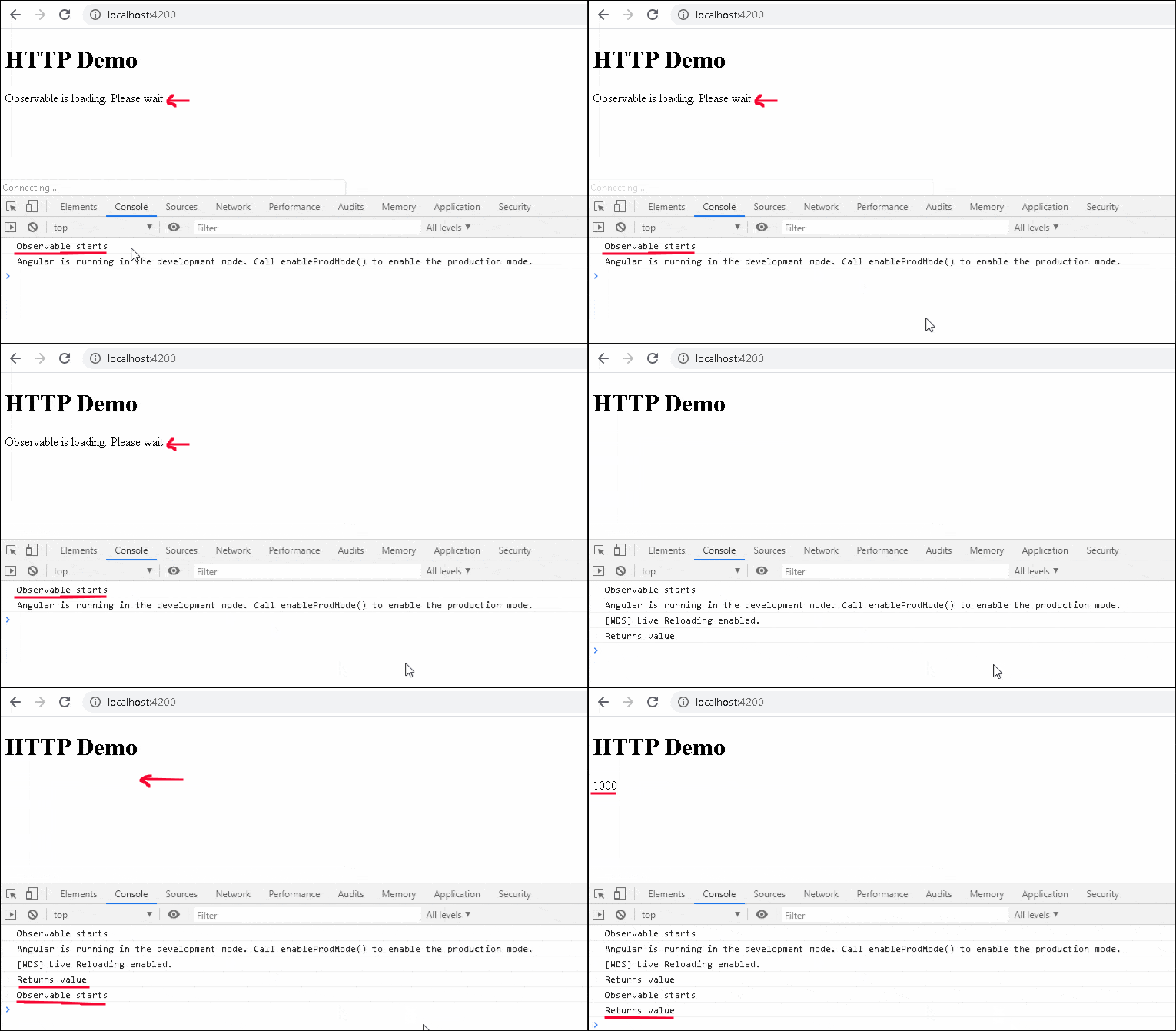
As you can see from the above image, you can see that the observable fires twice.
i.e because we are using the async pipe twice. one in if condition and the other inside the if block
1 2 3 4 5 | <div *ngIf="(obsValue | async); else elseBlock"> //obsValue Subscribed here {{ obsValue | async}} //obsValue Subscribed here again </div> |
There are two ways in whcih you can solve this problem. One is using the ShareReplay rxjs operator
We use the shareReplay when you want subscribers to share the observable and access previously emitted values. i.e. the observable is subscribed only once and for every subsequent subscription, the previously received value is used.
The updated observable, with shareReplay is as shown below. We need to use the pipe operator
1 2 3 4 5 6 7 8 9 | obsValue = new Observable((observer) => { console.log("Observable starts") setTimeout(() => { console.log("Returns value") observer.next("1000") }, 5000); }).pipe(shareReplay()); |
There is no need to make any changes in component code. But for this example, we have one more if block. making the total async pipe to three
1 2 3 4 5 6 7 8 9 10 11 12 13 | <div *ngIf="(obsValue | async); else elseBlock"> {{ obsValue | async}} </div> <ng-template #elseBlock> Observable is loading. Please wait </ng-template> <div *ngIf="(obsValue | async);"> observable has recevied data </div> |
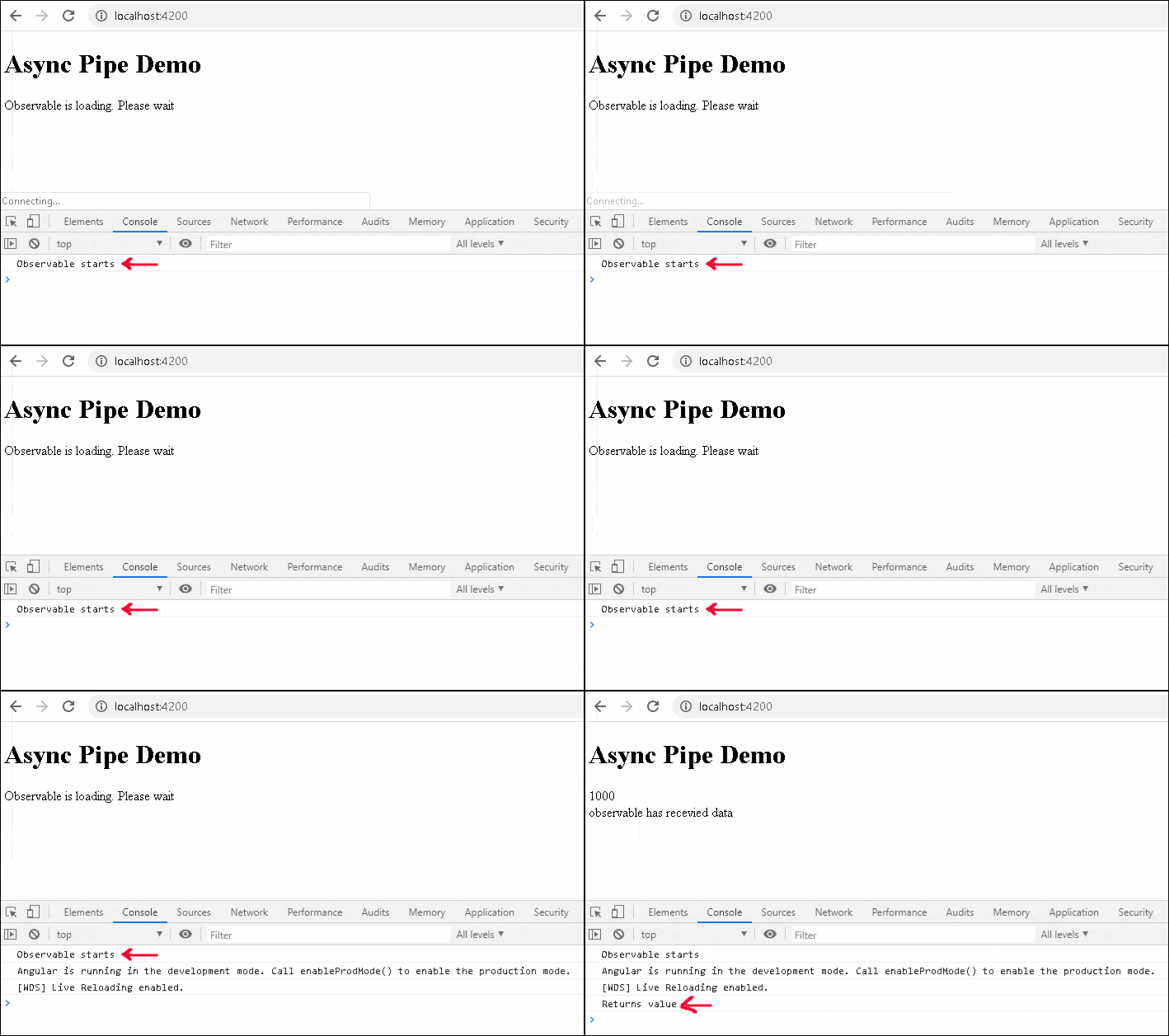
As you can see from the following, in spite of having three subscriptions, the observable is subscribed only once.
Using ngIf “as” syntax
We can use the as keyword to store the result in a template local variable. Once we assign the result to a variable, then we can use it anywhere inside the ngIf block as shown below.
1 2 3 4 5 6 7 8 9 10 11 | <div *ngIf="(obsValue | async) as value; else elseBlock"> {{ value}} //works only inside the If Block </div> <ng-template #elseBlock> Observable is loading. Please wait </ng-template> {{ value}} // will not work |
Remove the shareReplay from the observable and check it.
1 2 3 4 5 6 7 8 9 | obsValue = new Observable((observer) => { console.log("Observable starts") setTimeout(() => { console.log("Returns value") observer.next("1000") }, 5000); }); |
Use the async pipe with ngfor
Now we will see how to use the async pipe with ngFor. For this example, we will make use of httpclient library to make HTTP get request and display the results using the ngFor
For this example, let use the free HTTP end point https://dog.ceo/dog-api/documentation/. It returns the array of hound breeds as shown below (in the message array)
1 2 3 | {"message":["afghan","basset","blood","english","ibizan","plott","walker"],"status":"success"} |
1 2 3 4 5 6 7 | hounds: Observable<any> = this.getHoundList(); getHoundList(): Observable<any> { return this.http.get<any>("https://dog.ceo/api/breed/hound/list") } |
In the template use the (hounds | async) to subscribe to the hounds observable. We are using a safe navigation operator ? before the property name message. i.e because initially, it is null until the result arrives and without ? you will see errors in your console
1 2 3 4 5 | <ul> <li *ngFor="let breed of (hounds | async)?.message">{{breed}}</li> </ul> |
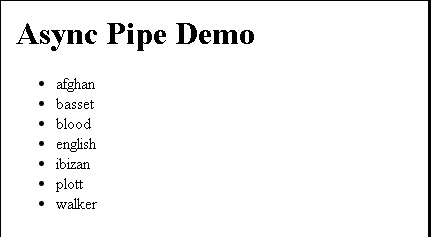
You can also make use of combination of ngIf & ngFor and using the as to store the result in breeds.
1 2 3 4 5 6 7 | <div *ngIf="(hounds | async) as breeds"> <ul> <li *ngFor="let breed of breeds.message">{{breed}}</li> </ul> </div> |
The following code displays the a random image of the dog using ngIf
1 2 3 4 5 6 7 8 9 | //component randomPic: Observable<any> = this.getRandom(); getRandom(): Observable<any> { return this.http.get<any>("https://dog.ceo/api/breeds/image/random") } |
1 2 3 4 5 | //Template <img src="{{ (randomPic | async)?.message}}"> |
References
Read More


ji
Thank you for the great explanation,
One note regarding the first snippet of code that had both 9000 in the next() method alongside the delay time (1000). I think the description may need some fixing as it should output 9000 rather than 1000
To use shareReplay, you will need to import it:
import { shareReplay } from 'rxjs/operators';And to make http requests, you need to look at his linked article https://www.tektutorialshub.com/angular/angular-httpclient/
But in short:
1) Add
HttpClientModuleinapp.module.ts> @NgModule > imports2) Stop your terminal command
ng serveand start it again. If you don’t, you will probably get this error:error NG6002: Appears in the NgModule.imports of AppModule, but could not be resolved to an NgModule class.3) Add this import to the {name}.component.ts file you’re working in:
import { HttpClient } from '@angular/common/http';4) Change the component’s constructor to:
constructor(private http: HttpClient) { }You should be able to use
this.http.getafter that.ji