
In this guide, we will show you how to create and organize multiple apps in one Project or Workspace. The Angular CLI since version 6 allows us to create a multi-project workspace to manage multiple Angular apps. We do that first by creating an empty workspace. A Workspace is a collection of Angular apps, projects, or libraries. Later we can add multiple projects to the workspace.
Table of Contents
Advantages
There are several advantages of having Multiple Angular Apps in One Project.
- One is you do not have to run the time consuming
npm installfor every app. - The
node_modulesfolder is shared with all the other apps saving disk space. - All the apps can be updated to the next version easily.
- A single source-control repository (such as git).
Create the Empty Workspace
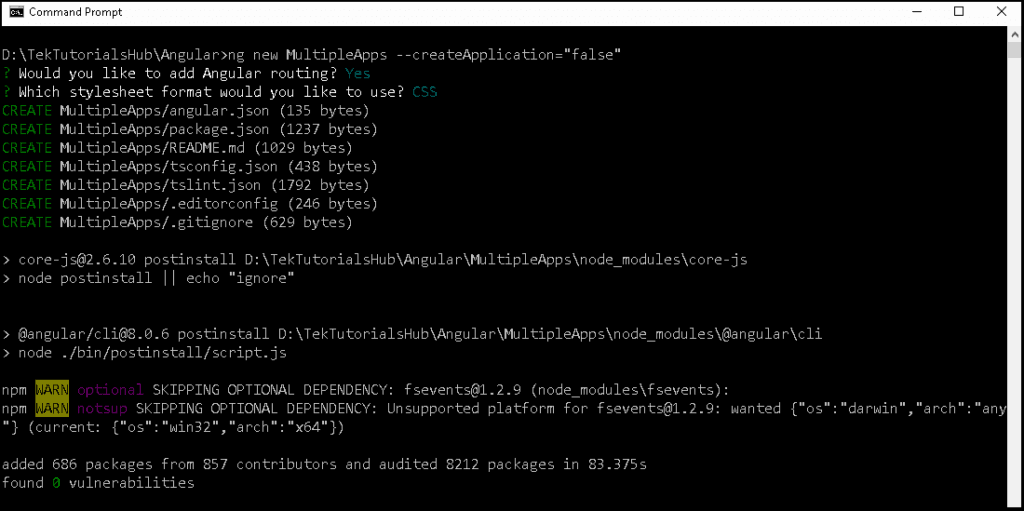
We create a new app using the ng new <new> Angular CLI command. It creates and workspace with an initial Angular app with the name <new> in the src folder. The createApplication="false" option introduced in Angular 7 now stops the creation of the initial app. It only creates the workspace
1 2 3 4 | ng new MultipleApps --create-application="false" cd MultipleApps |
The above command creates a folder with the name MultipleApps and configures the workspace. It does not create any apps.
Add a new Project to the Workspace
Now, to create a new app under the workspace, we need to use the ng generate application command The first app created is marked as the default app.
1 2 3 | ng generate application gettingStarted |
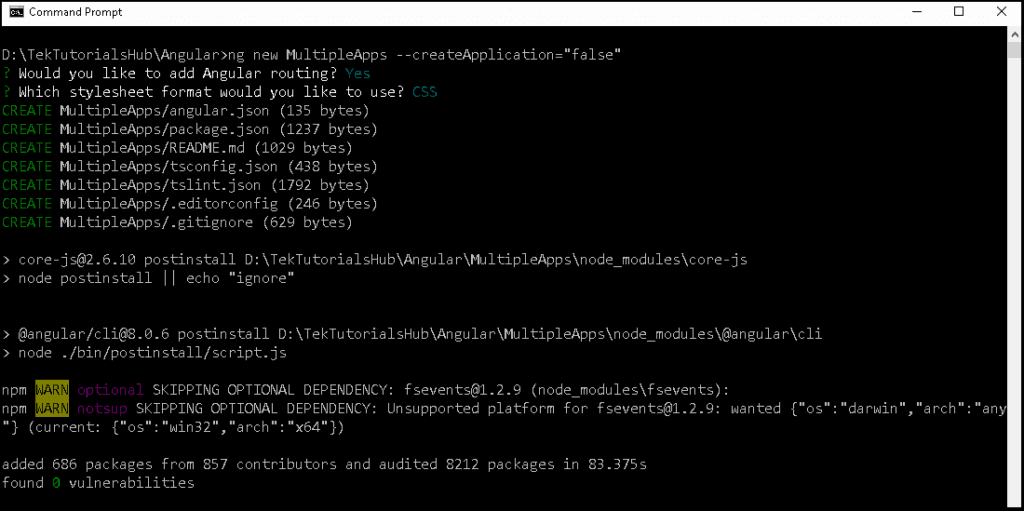
If you use the ng new inside the workspace, it will throw the following error.
The new command requires to be run outside of a project, but a project definition was found at “D:\MultipleApps\angular.json”
Run the App
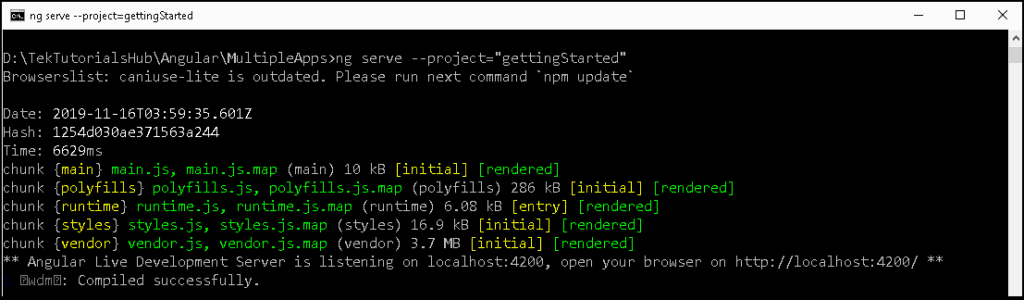
There are three ways in which you can run the app.
- Use the
ng serve gettingStarted - Use the
--projectflagng serve --project="gettingStarted" - Open the
angular.jsonand locate thedefaultProjectand change the name of the project togettingStartedand runng serve
Add Another Project to the workspace
To create another app, run the ng generate application again.
1 2 3 | ng generate application exampleApp |
Run the App
And use the ng serve to run it
1 2 3 4 5 | ng serve exampleApp OR ng serve --project="exampleApp" |
Building the App for Production
Use ng build to build the app with --project option.
1 2 3 4 | ng build --prod --project="gettingStarted" ng build --prod --project="exampleApp" |
Folder Structure
The folder structure is similar to the Single App workspace, except for the following
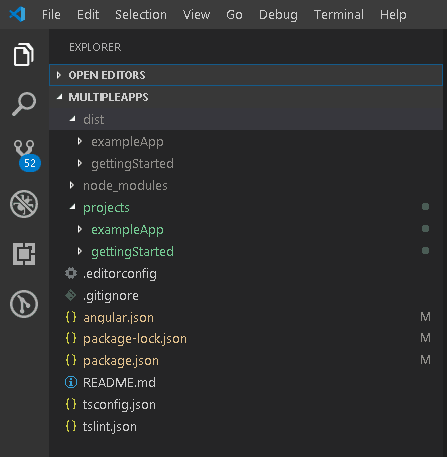
projects folder
The src folder is gone. Instead, we have a projects folder. Each app we create gets its folder under the projects folder.
dist folder
The dist folder now has a folder for each of the new apps.
Angular.json
The angular.json, contains the configuration settings for the workspace. Here is the shortened version of Angular.json for the above code.
1 2 3 4 5 6 7 8 9 10 11 12 13 14 15 | { "$schema": "./node_modules/@angular/cli/lib/config/schema.json", "version": 1, "newProjectRoot": "projects", <== location of the apps "projects": { "gettingStarted": { //This section contains the setting for the gettingStarted project }, "exampleApp": { //This section contains the setting for the exampleApp project }}, "defaultProject": "gettingStarted" <== name of the default project } |
newProjectRoot: node points to the location of the projects folder.
projects: contain a section for each app in the workspace. Each section contains configuration for the compiler.
defaultProject: The default project used, when you run the ng serve, ng build etc.
References
Source Code
https://github.com/tekTutorialsHub/Angular-MultipleApps
Summary
In this guide, we learned how to organize multiple apps in one single workspace/Project in Angular.



Unknown argument: createApplication--createApplicationis now deprecated. Newer versions ofnguse--create-applicationinstead.thanks for sharing
Is it possible to share NgRx store between the two apps?
No you cannot share it.
The NX app is specifically designed for handling such cases. https://nx.dev/latest/react/getting-started/intro
can i use one project components in another project?
Yes, with Module Federation
Yes you can!
Project A has Module Foo
Project B imports Module Foo
You can use the exported Components. I used it in several projects without problems.
(MainPage several landing pages which use only a subset of components)
Could you please share some light how to deploy them in firestore both application sitting on same database
and accesses with their own url like app1.com and app2.com
regards,
Jayram
I too am trying to find an answer to this. Did you ever find a solution?
While both projects are build into dist folder you can just use your pipeline or manually move them wherever you want to. Also there is build option to make them building into another folder. What else you need is to configure your server/domain to point at that folders.
Hope this help someone else run into such a problem.
Firebase support multiple apps per project, every application is built to a different folder on dist, so you can define in the firebase.json where to deploy, check this articles https://firebase.googleblog.com/2018/08/one-project-multiple-sites-plus-boost.html, https://fireship.io/lessons/deploy-multiple-sites-to-firebase-hosting/