✨ A Festive Gift for You — Claim Your 25% Lifetime Discount Today! Use code: LIFETIME25 

The #1 AI-Powered File Manager and Document Library Plugin for WordPress

Forget using FTP or cPanel! Try Advanced File Manager to organize all directory files from the WordPress dashboard. Also, manage and display document libraries on the front end.

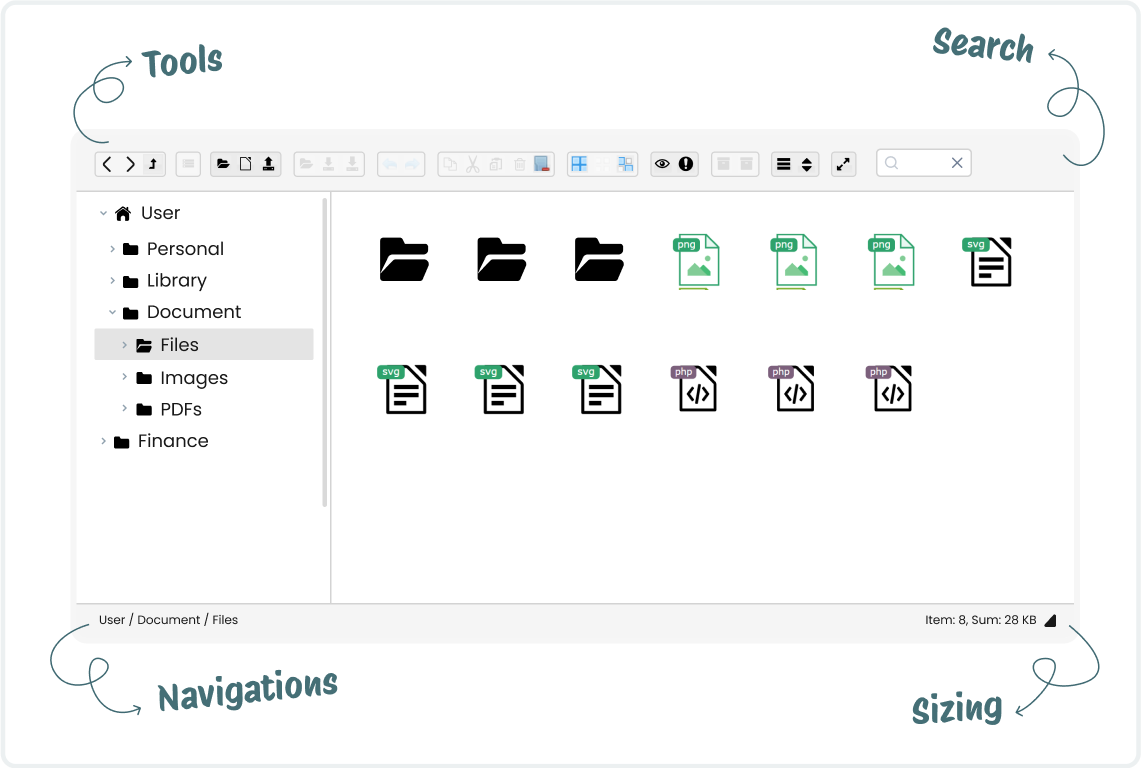
Screenshot of an intuitive WordPress file manager interface

Intuitive WP file manager

Image

File operations & management

Graphic representing easy frontend file accessibility

Frontend file accessibility

Icon representing media editing capabilities and file previews

Media editing & previews

Image

File Manager UI Styling

Image

Document library creation

Shield icon symbolizing security and protection

Trusted by 200K+
website owners

Star icon representing featured or top-rated functionality

4.8/5 stars on
wordpress.org

Dollar badge icon representing cost-effective or premium features

14-day money
back guarantee

Multiple Document library Layouts That Fits Your Theme!!!

Image showing Windows 10 compatibility
Screenshot of the Advanced File Manager in dark mode view
light
Logo representing Bootstrap framework compatibility

Featured On

UltraHost
Hostinger
MilesWeb
TemplateToster
Colorlib
CodeExpert
Kinsta
WBCOM

Finally, a WordPress File Manager Plugin With All The Features You Need! 😀

Icon showing customizable access to root directories

Customizable Root Directory Access

Easily configure and modify the root directory path to access specific files based on your project needs.

Graphic showing access capabilities to both internal and external directories

Access to Internal and External Directories

Manage files effortlessly across both internal and external directories without limitations.

Icon illustrating Gutenberg block and shortcode support in WordPress

Gutenberg Block & Shortcode Support

Embed your document library or file manager anywhere on your site using Gutenberg blocks or shortcodes.

Graphic showing user-friendly frontend file control features

User-Friendly Frontend File Control

Set permissions based on roles to ensure secure and customized file access.

Graphic representing an all-in-one file operations solution

All-in-One File Operations Suite

Perform all file operations such as copy, delete, upload, download, & more directly from the WP dashboard.

Icon illustrating instant previews of media and PDF files

Instant Media & PDF Previews

Preview PDFs, images, audio, and video files instantly without downloading them.

Dropbox

5+ Cloud Integrations For Advanced File Manager

Effortlessly connect your favorite cloud app with WordPress, including Google Drive, OneDrive, Amazon SES, Dropbox, and more.

Image
Image
Image
Image

See Why Over 200,000 Website Owners Use Advanced File Manager Daily

Reason #1

Easy File Management

Manage all your files directly from the WordPress dashboard.
Perform copy, paste, rename, delete, and archive operations.
Use an intuitive interface with both grid and list views.
Organize files efficiently without any technical expertise.
User interface showcasing simple and intuitive file management tools
Visual representing file access without FTP or cPanel

Reason #2

No FTP or cPanel Required

Manage files without relying on FTP or hosting control panels.
Access, upload, and edit files directly from the WordPress admin.
Simplify workflow with an easy-to-use interface.
Enjoy a secure alternative to traditional file management.

Reason #3

Robust Security & Access Control

Restrict file access based on user roles and permissions.
Keep sensitive files hidden from unauthorized users.
Set private folders for exclusive user access.
Prevent accidental file modifications with controlled user actions.
Visual representation of strong security and granular file access control
Illustration showing a highly customizable user experience in a file manager interface

Reason #4

Highly Customizable User Experience

Choose from multiple themes to match your website’s style.
Enable multilingual support for global accessibility.
Switch between grid and list views for better navigation.
Use shortcodes to limit actions and provide a tailored file manager experience.
Official logo of Advanced File Manager plugin

Ready to Organize Your WordPress Files & Document Libraries?

Reason #5

Advanced Features for Developers

Access files from both internal and external directories.
Search, filter, and sort files quickly for better organization.
Create and extract archives in different formats.
Upload large files and folders effortlessly with chunked uploads.
Screenshot highlighting advanced features for developers
Screenshot of a fast, responsive, and user-friendly file manager interface

Reason #6

Fast, Responsive & User-Friendly Interface

Enjoy smooth file management, even on large websites.
Use a fully responsive design that works on all devices.
Drag and drop files for quick uploads and organization.
Preview, edit, and manage media files without extra plugins.

Reason #7

Display Private Document Libraries

Restrict access to specific users or roles.
Create private libraries for teams or clients.
Protect categories with passwords or user roles.
Prevent unauthorized file access to non-members.
Interface preview of private document library display

Use Cases of Creating Private Document Libraries

Client File Sharing

Share confidential project files securely with clients.
Restrict access to only authorized users.
Allow clients to upload and manage their files.
Prevent public access to sensitive documents.
Icon illustrating secure client file sharing

Team Collaboration & File Storage

Store and share internal documents within your team.
Assign role-based access for different departments.
Enable secure file uploads and edits.
Icon representing file storage and sharing for team collaboration

Membership Site Resources

Offer exclusive content to paid members.
Restrict access based on membership levels.
Allow members to download guides, eBooks, and videos.
Keep premium resources hidden from non-members.
Icon showing file management for membership site resources

Educational Course Materials

Provide course files, PDFs, and videos to students.
Restrict access based on user roles or enrollment status.
Allow instructors to upload and manage materials.
Keep copyrighted educational content secure.
Icon representing educational course materials file sharing

Secure Legal & Financial Document Storage

Share confidential project files securely with clients.
Restrict access to only authorized users.
Allow clients to upload and manage their files.
Prevent public access to sensitive documents.
Icon illustrating secure client file sharing

HR & Employee Document Storage

Securely store employee contracts, policies & payroll documents.
Restrict access to HR personnel and relevant staff.
Allow employees to access their own files securely.
Maintain compliance with company and legal regulations.
Icon representing HR and employee document storage solutions

Private Client Portals

Create personalized document access for each client.
Allow clients to view, download, and upload files.
Ensure privacy with password-protected folders.
Simplify document sharing without emails.
Icon showing secure private portals for clients

Connect 🔗 Advanced File Manager with Cloud Storage Apps

Don’t Just Take Our Word for It

See What Our Users Have To Say

swillard

“It took the bland file manager within my hosting provider to a new level. I easily downloaded all of my image files to my computer. There is a limit of 1,000 images per download. With over 3,500 images it only took a few minutes. Very glad I found this plugin.”

hectorjosebarcelona

“Excellent in every way. Indispensable when you don’t have access to the server and, in many cases, don’t even have an FTP account.”

cognizant201

“It’s a quickest way to get the access without login to cPanel, doing everything we want. Thank you for creating such as wonderful plugin, I even seen in my life.”

myveryownwebsite

“This is a great way to grant freelance (temp) developers quick access to the back-end files from the WP Dashboard without needing to create and managed FTP/SFTP access credentials as well. You simply add in a temp WP login plugin to your site and you’re all set.”

danielsteel

“This plugin has saved me a lot of work. I was having a problem with file permissions and I was recommended to install this plugin to fix the issue. I don’t have any coding experience as I was told that changing the permission rules could be dangerous to my website. Using this plugin I located the folder easily and deleted it with no problems at all. A great plugin, 10 out 10.”

Help & Support

Got Ideas for Advanced File Manager?

Have a feature in mind that could make file management even better? Share your suggestions – we’re always listening and improving!

Need Help? We’ve Got Your Back!

Our expert support team is ready to assist you. Get instant solutions and keep your workflow smooth! 🚀

Frequently Asked Questions

If you still have any questions in mind, check out our frequently asked questions, or feel free to contact us directly.

Icon representing live chat or communication feature

Do you still have questions?

Ask our friendly and knowledgeable team.

Official logo of Advanced File Manager plugin

Ready to Organize Your WordPress Files & Document Libraries?

Scroll to Top