
Download AnyTrans for Windows: Syncing with ease
AnyTrans for Windows, developed by iMobie Inc., is a robust tool that facilitates the transfer, backup, and organization of content between iOS devices and Windows computers. The software allows users to manage music, photos, messages, and apps through an intuitive interface. It supports full data migration among iPhones, iPads, and iPods, and offers flexible backup options, including full and incremental backups.
AnyTrans for Windows also provides access to iCloud data, acting as a central hub for managing digital content. Download AnyTrans for Windows to streamline your data management tasks efficiently. The program is designed to accommodate users with varying levels of technical knowledge, delivering reliable performance for everyday needs with consistent results.
AnyTrans for Windows: Your Comprehensive iOS Organizer
Download AnyTrans for Windows to access a powerful data management solution designed for users who need to handle content between iOS devices and Windows PCs. The program provides an all-in-one platform to transfer, backup, and organize files efficiently.
Data transfer and backup
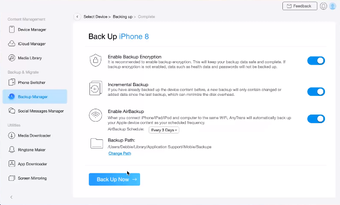
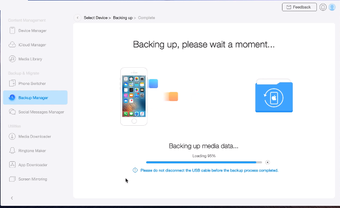
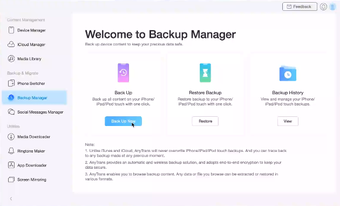
AnyTrans for Windows enables smooth migration of data across iPhones, iPads, and iPods. The software allows full transfers of photos, music, messages, and applications, so it's easiest to move content between devices. It supports full and incremental backup options, offering users a way to preserve important data securely. The backup process is straightforward, allowing restoration of data when needed without complications.
Media and app management
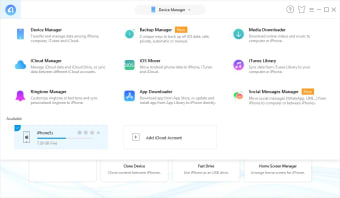
AnyTrans for Windows provides a user-friendly interface that simplifies the organization of media files and apps. The program integrates with iTunes and iCloud services, so users have the ability to manage their cloud-stored data along with locally stored files. The ability to access and handle iCloud content within the application distinguishes it from many competitors.
Notable integrations and similar software
The application stands out by combining data transfer, backup, and media organization into one solution. Similar tools available on Softonic for Windows include iMazing and Dr. Fone, both of which cater to users needing comprehensive management solutions.
AnyTrans for Windows offers a centralized approach that makes it easier to maintain and update content across multiple devices while providing a reliable platform for daily digital management tasks.
Windows Compatibility Overview and System Criteria
Platform Support
AnyTrans for Windows by iMobie Inc. operates on a range of Windows operating systems, including Windows Vista, Windows 7, Windows 8, Windows 8.1, Windows 10, and Windows 11. The software is designed to manage data on iOS devices, such as iPhones and iPads, by creating a bridge between mobile content and desktop organization. Although iMobie offers products for other platforms, this version concentrates on providing a stable and direct solution for Windows users.
Minimum Technical Criteria
AnyTrans for Windows requirements:
- A computer with a processor running at a minimum speed of 1.0 GHz and at least 2 GB of memory.
- A 64-bit processor is recommended to take full advantage of the software’s capabilities.
- The installation process calls for a minimum of 200 MB of free storage space to accommodate the application and its update files.
- The display should support a resolution of 1024 by 768 pixels to present the interface.
An active Internet connection is necessary to download updates and access certain cloud-related functions, like managing iCloud data. These criteria are established to offer a stable and efficient environment for data transfer, backup, and overall management of iOS content on a Windows device.
The documented system requirements encourage a user experience that accommodates a range of hardware capabilities while maintaining stability in day-to-day operations. The focus on widely used Windows versions gives users a clear understanding of compatibility and technical expectations for running AnyTrans for Windows.
Digital Access Unlocked
AnyTrans for Windows by iMobie Inc. is available for users who want to manage and transfer data between their iOS devices and Windows computers. The software can be downloaded directly from iMobie’s official website and is featured on recognized download sites like Softonic. A free trial version offers limited functionality for users to evaluate its capabilities before buying a full license.
The digital download gives you immediate access after registration, with periodic updates delivered online. Widely recognized by technology reviewers, the application has a steady download count and is seen by many as a reliable tool for data management with credibility.
Reflections on Data Management Excellence
AnyTrans for Windows by iMobie Inc. is a comprehensive solution for managing data across iOS devices and Windows platforms. The software's compatibility spans from older operating systems like Windows Vista to the latest Windows 11, accommodating a broad spectrum of hardware.
It delivers essential functions, including data transfer, backup management, and even the migration of content from Android devices to iOS. The application’s system requirements are modest, relying on a minimum processor speed of 1.0 GHz and 2 GB of memory, so it's accessible to a wide range of users. Its availability through reputable download platforms like Softonic makes sure users get a legitimate and up-to-date version with every download. The trial version, although limited, provides a realistic preview of its capabilities.
Practical data management without unnecessary frills is the main point of this software. The balance of intuitive design and comprehensive functionality addresses the everyday challenges of iOS device management on Windows computers.
Ultimately, AnyTrans for Windows offers us a reliable tool that helps you organize and safeguard your digital content. Its capacity to simplify data transfer tasks while keeping its compatibility with a variety of systems is why it's a sought-after choice for those looking to streamline their data management process.