
A Dive into AppLocker for Windows - Prevent access to programs of your choice
It often feels like there's a never-ending parade of apps fighting for our attention. It gets chaotic, right? Trying to focus on work can feel like a mission impossible. Well, that's where AppLocker steps in – it's like a superhero for your computer, helping you lock down certain apps or features so you can actually get things done.
Do you want to limit what applications can be used on your system? Application Locker is a simple program that prevents specified programs from being opened.
What is AppLocker?
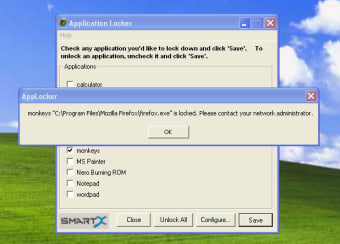
Now, let’s talk about what AppLocker really does. It lets you put a leash on those distracting apps. There's a ready-made list that includes usual suspects like Notepad, MS Paint, Internet Explorer, and Microsoft Office tools. Taming these apps is as easy as checking a box and hitting "Save." And if you're feeling rebellious, there's a button to unleash them all at once.
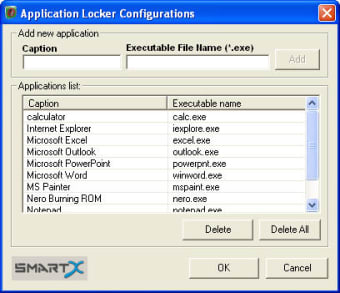
AppLocker isn’t about bossing you around with its default list. Nope, it's all about letting you pick the apps you want to keep in check. You can add your own apps to the list. Just type in the name and the file type, and you're good to go. One thing to remember: be a bit careful with the names; AppLocker needs the right names to do its job. It might not hold your hand with an explorer, but it's still pretty straightforward.
Application Locker is really useful for parents who want to restrict their children's use of your computer, or just to keep certain programs out of reach of other users. It's limited to locking .EXE files, so you can't use it to lock the control panel, which is a shame. However, things like Firefox and IE can easily be locked, restricting internet access.
AppLocker's Quick Setup
Getting started with AppLocker is a piece of cake. You set it up in a jiffy with just a few clicks, and you're good to go. The interface is simple and easy to figure out. No fancy instruction manual needed – AppLocker is designed to be user-friendly from the get-go.
As AppLocker makes locking apps a breeze, a tiny bit of attention is your secret sauce. You need to be precise with the app names for AppLocker to work its magic. It’s a bit of a bummer that there's no fancy file explorer, but don't worry – just type in the name and the file type, and you're golden.
There is no security on Application Locker, so anyone who opens it can unlock locked programs. However, if you install it with administrator rights on your PC, and set it to be only usable by an administrator, it will be effective.
To add an application to the lock list, you just need to paste in the .EXE filename, which is not difficult, but you can't search for applications to add.
Is AppLocker for Windows 10?
Now, here's the big question: Is AppLocker cool with the latest Windows, Windows 10? Heck yes! AppLocker not only gets along with Windows 10 but also gives it a high-five. And guess what? If you're hanging out in the digital world of Windows 11, 8, or 7, AppLocker has got your back too. It's like the superhero that works across the block – on both 32-bit and 64-bit systems. No need for a separate download if you're rocking the 64-bit vibes.
Compatibility and license: AppLocker sets you free with freeware
Now, the best part – AppLocker is totally free! No need to reach for your wallet; AppLocker is all about breaking the chains without asking for a penny. The latest and greatest version, 1.3.0.15, is up for grabs. Go ahead, download it, install it – it’s all on the house. AppLocker isn't just a tool; it's your sidekick in boosting performance and keeping you focused without any price tags attached.
Do you want to limit what applications can be used on your system? Application Locker is a simple program that prevents specified programs from being opened.
In a world full of digital noise, AppLocker is like your personal zen master. It's not just about locking down apps; it's about giving you back control. So, the next time your computer feels like a circus, let AppLocker be the ringmaster, guiding you towards a calmer and more productive digital life.