

Description
Email Tracker – Complete Email Logging, Email Tracking & Email Analytics Solution for WordPress Emails
Email Tracker is the ultimate email logging and email tracking plugin for WordPress. Monitor every email, track email opens, log email clicks, and get powerful email analytics. Perfect email management solution for all WordPress emails, WooCommerce emails, transactional emails, and SMTP emails.
Complete Email Management & Email Monitoring for WordPress
Transform your WordPress email system with comprehensive email logging and email tracking. Monitor every email – WooCommerce emails, contact form emails, user emails, admin emails, and system emails. Our email tracker logs all email activity, tracks email opens, monitors email clicks, and provides detailed email analytics for complete email visibility.
Advanced Email Logging & Email Analytics Dashboard
Email Tracker automatically logs and tracks every email sent through WordPress wp_mail(), SMTP email services, and email plugins. Complete email management includes:
- Real-time email open tracking – Know instantly when your emails are read
- Email link click tracking – Monitor which links in your emails get clicked
- Detailed email logs – Complete history of all emails sent from your site
- Email statistics – View email open rates, click rates, and engagement metrics
- IP tracking for emails – See where your emails are being opened from
- Email delivery confirmation – Ensure your important emails reach their destination
This powerful email logging and email tracking helps optimize your email marketing, improve email deliverability, enhance email engagement, and strengthen your overall email communication strategy. Perfect for email management, email monitoring, and email analytics.
Complete Email Logging & Email Data Tracking
- Email Opens/Reads – Track when recipients open your emails with timestamp
- Email Link Clicks – Monitor which links in your emails get clicked
- Email Recipient Details – Track email recipient information and engagement
- Email Sending Time – Log when each email was sent from WordPress
- Email IP Addresses – Track IP locations where emails are opened
- Email User Agent – Identify devices and email clients used
Powerful Email Management & Email Tracking Features
- UNLIMITED EMAIL TRACKING – Track unlimited emails without restrictions
- Email Open/Read Tracking – Know exactly when your emails are opened
- Email Link Click Analytics – Track all links clicked within your emails
- Email Open Rate Statistics – Monitor your email engagement metrics
- Email Click-Through Rates – Measure email campaign effectiveness
- Email History & Logs – Complete archive of all emails sent
- Email Delivery Tracking – Confirm successful email delivery
- Real-time Email Notifications – Get alerts for important email events
- Email Compose & Send – Send tracked emails directly from WordPress
- Email IP & Location Tracking – See where your emails are being read
- Email Client Detection – Identify which email clients are used
- Email Search & Filter – Quickly find specific emails in your logs
- Bulk Email Management – Handle multiple emails efficiently
- Works with ALL WordPress emails – WooCommerce emails, Contact Form emails, System emails, and more
Email Tracker Works with All WordPress Email Types
- WooCommerce Emails – Track order confirmations, shipping notifications, customer emails
- Contact Form Emails – Monitor form submission emails and follow-ups
- User Registration Emails – Track welcome emails and account notifications
- Password Reset Emails – Ensure security emails are delivered and read
- Newsletter Emails – Measure email campaign performance
- Admin Notification Emails – Track internal email communications
- Custom WordPress Emails – Monitor any email sent through wp_mail()
Email Management & Email Analytics Use Cases
- Email Marketing Campaigns – Measure email open rates and engagement
- Customer Support Emails – Ensure support emails are read by customers
- E-commerce Email Tracking – Monitor order and shipping email delivery
- Lead Generation Emails – Track prospect email engagement
- Internal Team Emails – Monitor internal email communications
- Transactional Emails – Ensure critical emails reach recipients
Testimonials – WordPress Email Users Love Email Tracker (Track all WordPress Emails)
Prashant, you kindly fill that gap where WP falls short, good work mate! Have a blessed day sir.
Mike Owocki – WooCommerce Store OwnerI could be sure the customer received WooCommerce order confirmation etc. Thanks for the nice piece of software.
Tobias Conrad – WordPress Plugin DeveloperThanks Prashant for building a great plugin. I think this is a very unique little plugin that would become huge as more people come to know about email read receipts.
Abhishek Chaudhary – WordPress UserWas going to ask in support, how to integrate with other plugins, since I don’t use the regular WP mailing system. Instead I sent out an email with a random plugin and with CF7 and the email appears in this plugin’s list! Two thumbs, way, way up!
Elzix – WordPress UserWhere has this been all my life? This is helping me right this minute to test a form for a client. Love it, 5 stars.
Liesllukacs – WordPress WebSite Administrator
Why Choose Email Tracker for WordPress Email Management?
Email Tracker is the #1 email logging and email tracking solution for WordPress. Our email plugin provides complete email management, email analytics, and email monitoring for every email sent from your WordPress website.
✅ Email Logging – Log every email automatically with full email content and email headers
✅ Email Tracking – Track email opens, email clicks, and email engagement in real-time
✅ Email Analytics – Comprehensive email statistics, email reports, and email metrics
✅ Email Management – Search emails, filter emails, export emails, and manage email data
✅ Email Monitoring – Monitor email delivery, email performance, and email effectiveness
✅ Email Compatibility – Works with all email plugins, SMTP email services, and WordPress email functions
✅ Email Security – Secure email logging with privacy-focused email tracking
✅ Email Support – Track support emails, transactional emails, and marketing emails
Email Tracker – The Complete Email Solution for WordPress
Whether you need email logging for compliance, email tracking for marketing, or email analytics for optimization, Email Tracker is your complete email management solution. Track every email, log all email data, and get actionable email insights to improve your email communication.
Support of Email Tracker Plugin
We provide active support to the Email Tracker plugin. We are always happy to help our users. Please don’t hesitate to open a support ticket on https://wordpress.org/support/plugin/email-tracker
Email Tracker Compatibility with Popular WordPress Plugins:
Email Tracker seamlessly works with all major WordPress plugins that send emails. Here are the top 25 most popular plugins that are fully compatible with Email Tracker:
E-commerce & Business Emails:
- WooCommerce or Woo – Track all WooCommerce order emails, customer emails, and admin notifications
- Easy Digital Downloads – Monitor digital product purchase emails and receipts
- WooCommerce Stripe Gateway – Track payment confirmation emails
- WooCommerce PayPal Checkout Gateway – Monitor PayPal transaction emails
Form & Contact Plugins Emails:
- Contact Form 7 – Track all form submission emails
- WPForms – Monitor form notifications and confirmations
- Ninja Forms – Track form emails and autoresponders
- Forminator – Monitor quiz, poll, and form emails
- Gravity Forms – Track advanced form submission emails
SEO & Marketing Emails:
- Yoast SEO – Track SEO-related admin emails
- All in One SEO – Monitor SEO notification emails
- MonsterInsights – Track analytics report emails
- OptinMonster – Monitor lead generation emails
Security & Backup Emails:
- Wordfence Security – Track security alert emails
- UpdraftPlus Backup and Migration – Monitor backup notification emails
- Duplicator – Track migration and backup emails
- All In One WP Security – Monitor security notification emails
Performance & Utilities Emails:
- Elementor – Track form submission emails from Elementor forms
- Jetpack – WP Security, Backup, Speed, & Growth – Monitor all Jetpack notification emails
- WP Mail SMTP – Works perfectly with Email Tracker for reliable email delivery
- LiteSpeed Cache – Track cache-related admin emails
Membership & LMS Emails:
- Ultimate Member – Track member registration and notification emails
- BuddyPress – Monitor community notification emails
- LearnDash – Track course enrollment and completion emails
- MemberPress – Monitor membership emails and receipts
And many more! Email Tracker works with any WordPress plugin that uses the standard wp_mail() function to send emails.
SMTP & Email Delivery Plugins:
Email Tracker seamlessly integrates with all major SMTP and email delivery plugins for enhanced email reliability and tracking:
- WP Mail SMTP – Perfect compatibility for tracking emails sent through any SMTP service (SendGrid, Mailgun, Amazon SES, Gmail SMTP, and more)
- Post SMTP Mailer/Email Log – Full tracking support for all Post SMTP delivered emails with complete logging
- Easy WP SMTP – Track all emails sent through your configured SMTP servers
- FluentSMTP – Monitor emails delivered through multiple SMTP connections
- MailPoet SMTP – Track transactional emails sent via MailPoet’s sending service
- SendGrid – Full tracking for emails delivered through SendGrid API
- Mailgun for WordPress – Monitor all Mailgun API delivered emails
- SparkPost – Track emails sent through SparkPost email delivery service
- Amazon SES – Complete tracking for AWS SES delivered emails
- Sendinblue – Track all Sendinblue/Brevo transactional emails
Newsletter & Email Marketing Plugins:
Track and monitor all your email marketing campaigns and newsletters:
- MailPoet – Track newsletter opens, automated emails, and welcome series
- Newsletter – Monitor all newsletter campaigns and subscriber emails
- MailChimp for WordPress – Track opt-in confirmations and automated emails
- Email Subscribers & Newsletters – Full tracking for broadcast emails and auto-responders
- The Newsletter Plugin – Track all newsletter sends and automated workflows
- SendPress Newsletters – Monitor email campaigns and subscriber notifications
- MailOptin – Track lead generation emails and autoresponders
- Jackmail – Full email tracking for all campaign sends
- Noptin – Track newsletter broadcasts and automation emails
- FluentCRM – Monitor all CRM emails, campaigns, and sequences
Why Email Tracker Works Perfectly with SMTP & Newsletter Plugins:
* Universal Compatibility – Email Tracker hooks into WordPress’s core wp_mail() function, ensuring compatibility with any properly coded email plugin
* No Configuration Required – Simply activate Email Tracker alongside your SMTP or newsletter plugin – tracking starts automatically
* Enhanced Analytics – Combine the delivery reliability of SMTP plugins with Email Tracker’s powerful open and click tracking
* Complete Email Visibility – Track both transactional emails (via SMTP) and marketing emails (via newsletter plugins) in one dashboard
* Zero Performance Impact – Email Tracker adds tracking without affecting your SMTP service or newsletter sending speed
Credits
This Email Tracker plugin is created by Prashant Baldha.
Branding Guideline
When writing about the Email Tracker plugin, please make sure to write it correctly.
- Email Tracker (correct)
- Emails Tracker (incorrect)
- Email Trackers (incorrect)
- Emails Trackers (incorrect)
- EmailTracker (incorrect)
- email tracker (incorrect)
- Email traker (incorrect)
- Email email track (incorrect)
- Email tracer (incorrect)
- Mail Tracker (incorrect)
- Mails Tracker (incorrect)
- Mail Trackers (incorrect)
- Mails Trackers (incorrect)
- MailTracker (incorrect)
- Mail tracker (incorrect)
- Mail traker (incorrect)
- Mail tracer (incorrect)
- Email tracer (incorrect)
- Trace email (incorrect)
- Trace mail (incorrect)
- Trace emails (incorrect)
- Trace mails (incorrect)
Screenshots
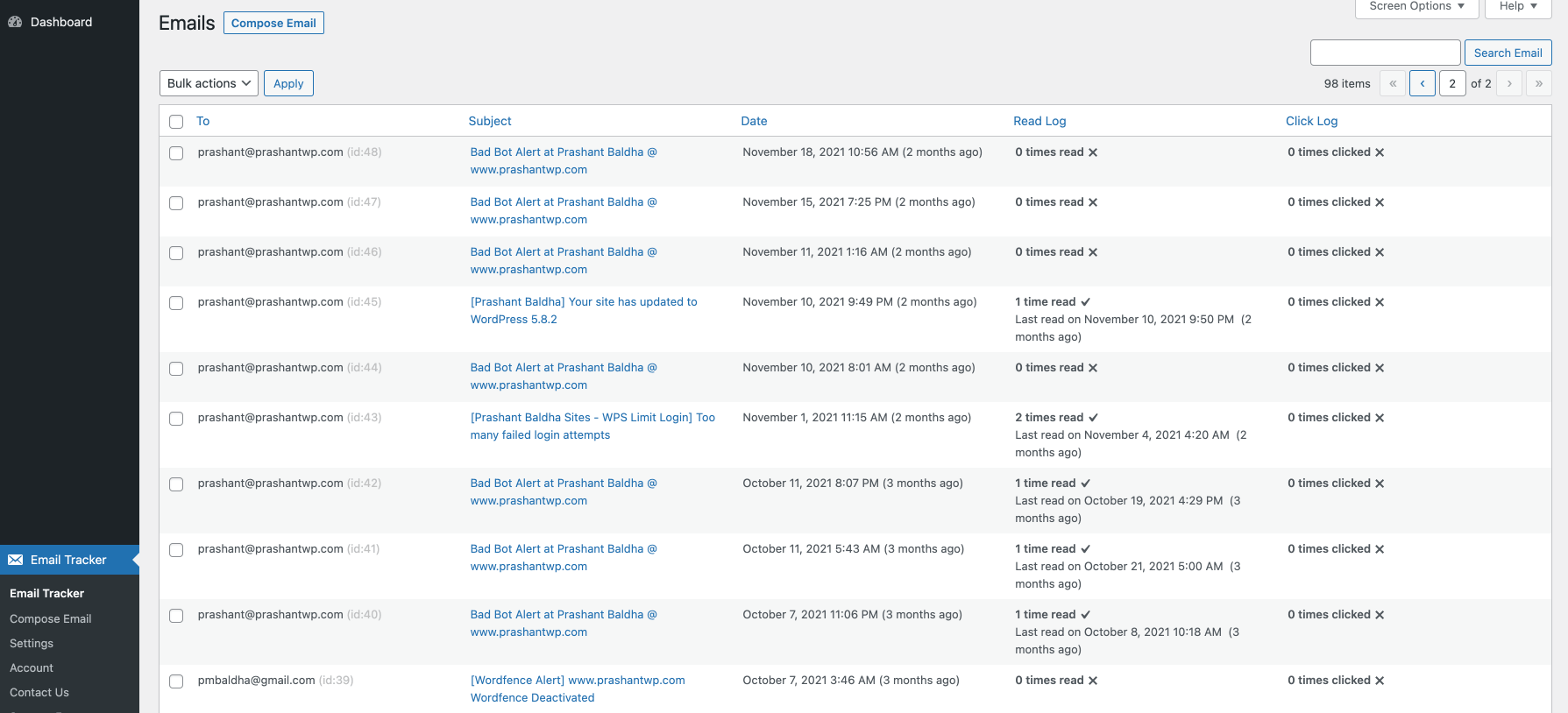
Email List Dashboard – View all tracked emails with open status, timestamps, and email analytics 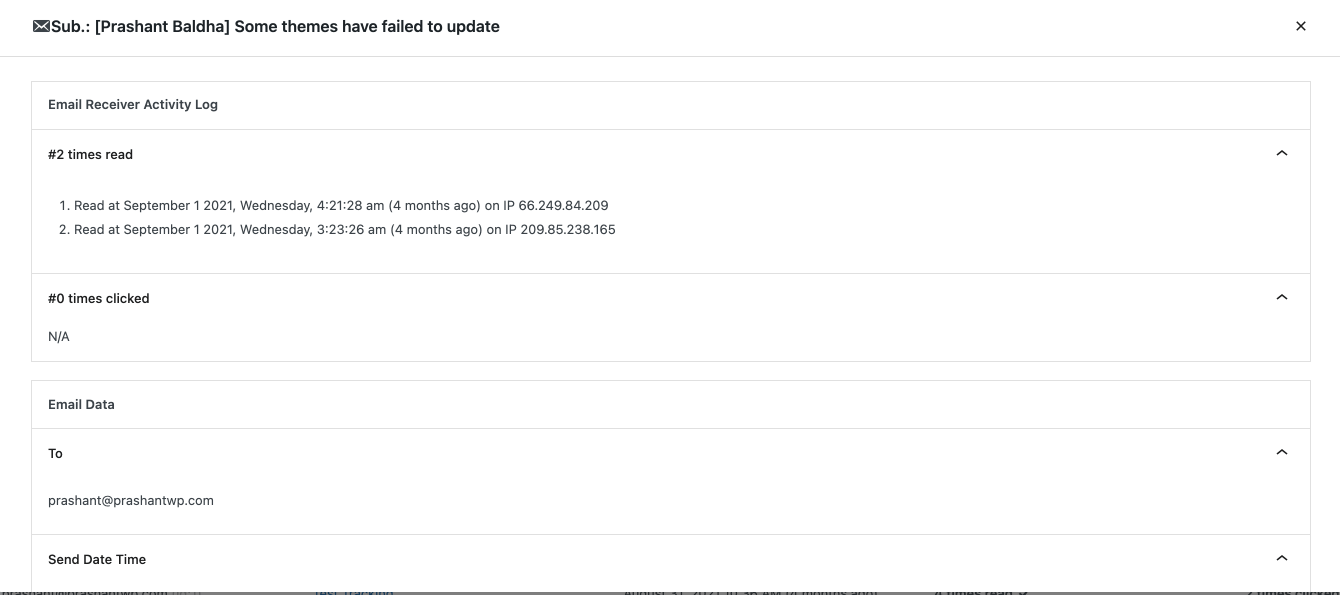
Email Detail View – See complete email information including content, headers, and tracking data 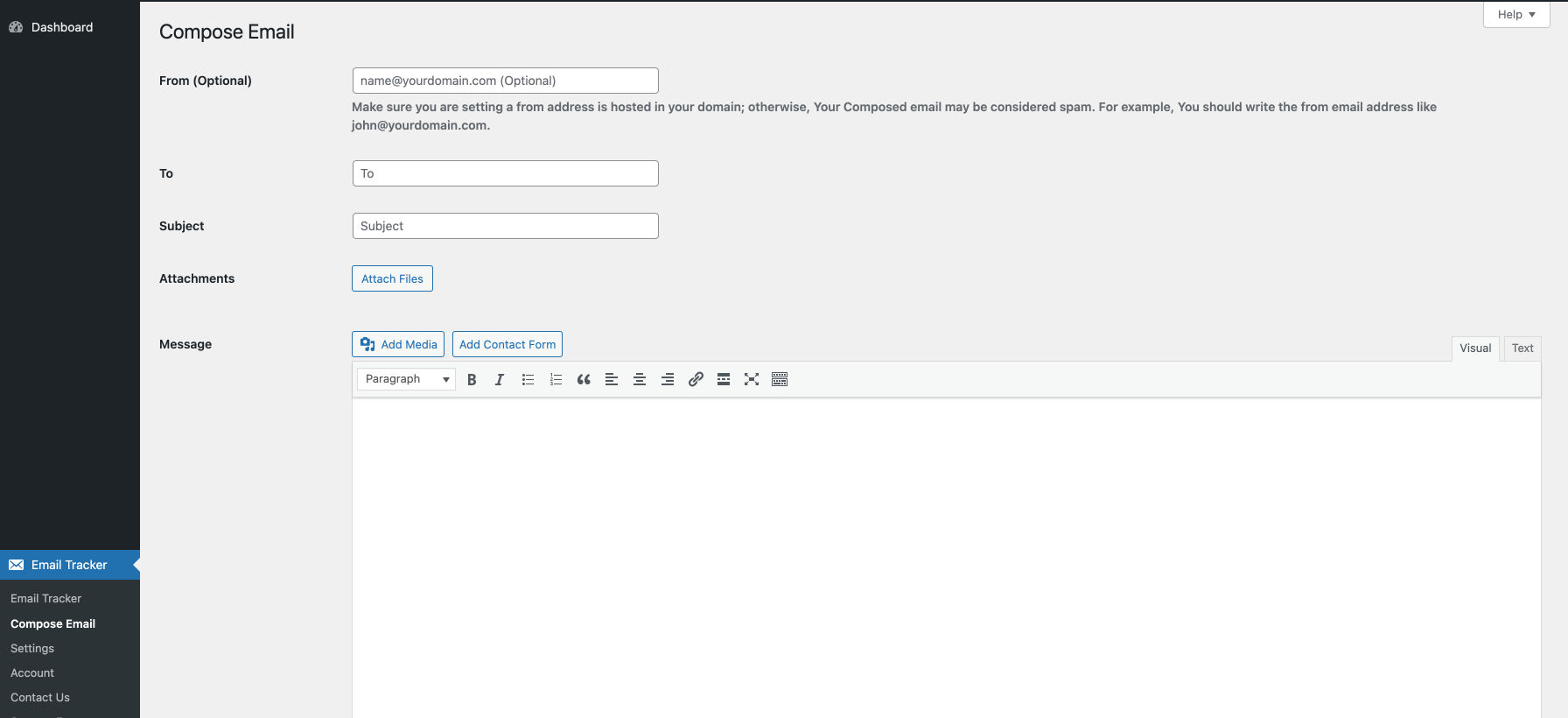
Email Open Tracking Log – Detailed email log showing when emails were opened, IP addresses, and user agents 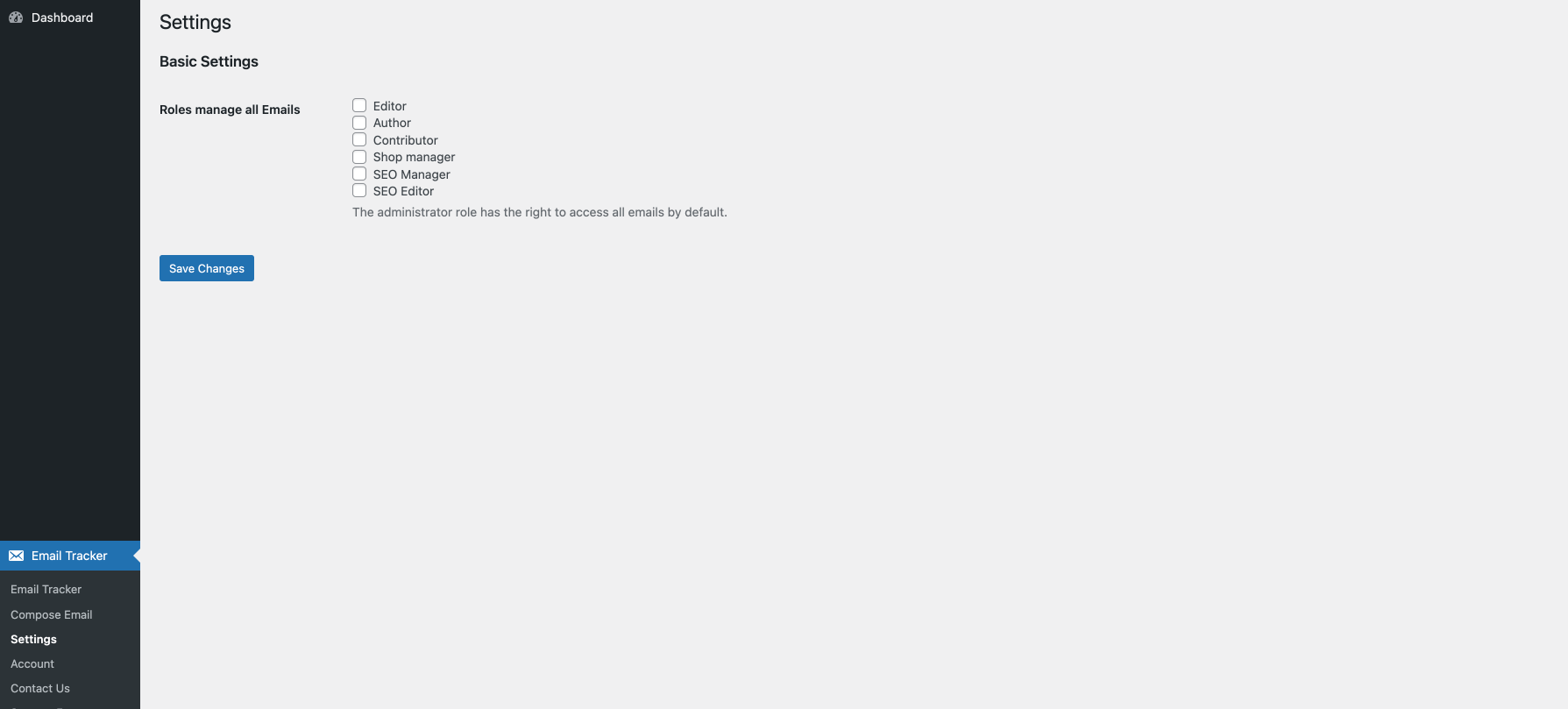
Compose Email – Send tracked emails directly from WordPress with full email tracking enabled


Installation
Quick Email Tracker Installation
- Install Email Tracker through the WordPress plugins screen directly, or upload the plugin files to
/wp-content/plugins/email-tracker - Activate Email Tracker through the ‘Plugins’ screen in WordPress
- That’s it! Email Tracker will automatically start tracking all emails sent from your WordPress site
- View your email tracking data by going to Email Tracker in your WordPress admin menu
Start Tracking Your WordPress Emails
- After activation, every email sent from WordPress will be tracked automatically
- Access email analytics from Email Tracker > Email List in your admin dashboard
- Send tracked emails manually from Email Tracker > Compose Email
- Configure email tracking settings from Email Tracker > Settings
- No additional configuration needed – email tracking starts immediately upon activation
FAQ
-
How many emails can I track using Email Tracker Plugin?
-
You can track unlimited emails. Email Tracker monitors every email sent from your WordPress site without any restrictions on the number of emails tracked.
-
Does Email Tracker work with all WordPress emails?
-
Yes! Email Tracker automatically tracks all emails sent through WordPress’s wp_mail() function, including WooCommerce emails, contact form emails, password reset emails, admin notification emails, and any other emails sent by WordPress or its plugins.
-
Can I track when someone opens my email?
-
Absolutely! Email Tracker provides real-time email open tracking. You’ll see exactly when each email is opened, including the date, time, IP address, and how many times the email was viewed.
-
Does Email Tracker require any third-party email service?
-
No, Email Tracker works entirely within your WordPress installation. It doesn’t require any external email services, APIs, or third-party email tracking services.
-
How does email open tracking work?
-
Email Tracker adds an invisible tracking pixel to your emails. When the recipient opens the email, the tracking pixel loads and Email Tracker records the email open event with all relevant details.
-
Can I track links clicked in my emails?
-
Yes! The Pro version of Email Tracker includes email link click tracking. You can see which links in your emails are clicked, when they’re clicked, and by whom.
-
Will Email Tracker slow down my email sending?
-
No, Email Tracker is optimized for performance. Email tracking happens seamlessly in the background without affecting your email delivery speed.
-
Can I see email statistics and analytics?
-
Yes, Email Tracker provides comprehensive email analytics including open rates, click rates (Pro version), email history, and detailed logs for every email sent from your site.
-
Does Email Tracker work with email marketing plugins?
-
Email Tracker works with any plugin that uses WordPress’s native wp_mail() function to send emails. This includes most contact form plugins, membership plugins, and e-commerce plugins.
-
Is email tracking GDPR compliant?
-
Email tracking itself is a technical feature. GDPR compliance depends on how you use it. We recommend informing your email recipients about email tracking in your privacy policy.
-
What’s the difference between Free and Pro versions?
-
The Free version includes email open tracking, email logs, and basic email analytics. The Pro version adds email link click tracking, advanced email analytics, auto-delete old emails, and priority support.
-
How do I install Email Tracker on my WordPress site?
-
Simply install Email Tracker through the WordPress plugin repository or upload the plugin files to your plugins directory. Once activated, Email Tracker automatically starts tracking all emails sent from your site. No configuration required!
-
Can I disable email tracking for specific emails?
-
Yes, you can control email tracking settings from the Email Tracker > Settings page. The Pro version offers more granular control over which emails to track.
-
Does Email Tracker work with multisite WordPress installations?
-
Yes, Email Tracker is fully compatible with WordPress Multisite. You can activate it network-wide or on individual sites within your network.
-
What happens to my email data if I deactivate the plugin?
-
Your email tracking data remains in the database when you deactivate the plugin. If you want to completely remove all data, you need to uninstall the plugin through the WordPress admin panel.
-
Does Email Tracker work with custom email headers?
-
Yes, Email Tracker preserves all custom email headers set by your WordPress site or plugins. It only adds tracking functionality without modifying your existing email structure.
-
Can I send test emails to verify tracking is working?
-
Absolutely! Use the Email Tracker > Compose Email feature to send test emails and immediately see the tracking in action through your email logs.
-
Is there a limit on how long email data is stored?
-
By default, Email Tracker stores all email data indefinitely. The Pro version includes an auto-delete feature to automatically remove old emails after a specified number of days.
-
Can I track emails sent to multiple recipients?
-
Yes, Email Tracker can handle emails sent to multiple recipients. Each recipient’s email open and click activity is tracked individually.
-
Does Email Tracker support HTML and plain text emails?
-
Yes, Email Tracker works with both HTML and plain text emails. For plain text emails, tracking capabilities may be limited compared to HTML emails.
-
Can I see which email client or device was used to open my emails?
-
Yes, Email Tracker captures user agent information, allowing you to see which email clients (Gmail, Outlook, etc.) and devices (mobile, desktop) were used to open your emails.
-
Will email tracking work if images are blocked?
-
Email open tracking relies on images being loaded. If a recipient has images blocked in their email client, the open event won’t be tracked until they enable images.
-
Can I track forwarded emails?
-
Email Tracker can detect when a tracked email is opened, but it cannot distinguish between the original recipient and someone the email was forwarded to.
-
Does Email Tracker work with SMTP plugins?
-
Yes, Email Tracker is compatible with popular SMTP plugins like WP Mail SMTP, Post SMTP, and Easy WP SMTP. It tracks emails regardless of the delivery method.
-
How accurate is email open tracking?
-
Email open tracking is highly accurate when images are enabled in the recipient’s email client. However, some email clients may cache images or block tracking pixels, which can affect accuracy.
-
Can I customize the tracking pixel?
-
The tracking pixel is automatically managed by Email Tracker and cannot be customized. It’s designed to be invisible and not affect your email layout.
-
Does Email Tracker support email bounce tracking?
-
Email Tracker focuses on open and click tracking. For bounce tracking, we recommend using it alongside an SMTP service that provides bounce management.
-
Can I track emails sent through cron jobs or scheduled tasks?
-
Yes, Email Tracker automatically tracks all emails sent through wp_mail(), including those triggered by cron jobs, scheduled posts, or automated tasks.
-
Is Email Tracker compatible with caching plugins?
-
Yes, Email Tracker is fully compatible with popular caching plugins like WP Rocket, W3 Total Cache, and WP Super Cache. The tracking endpoints are automatically excluded from cache.
-
Can I track email replies?
-
Email Tracker tracks when emails are opened and links are clicked, but it doesn’t track email replies. Reply tracking would require integration with your email server.
-
Does Email Tracker work with email queue plugins?
-
Yes, Email Tracker is compatible with email queue plugins that use wp_mail() for sending. Emails will be tracked when they’re actually sent from the queue.
-
Can multiple admin users access email tracking data?
-
Yes, any user with administrator privileges can access Email Tracker data. The Pro version allows you to grant access to other user roles as well.
-
How do I troubleshoot if email tracking isn’t working?
-
First, ensure the plugin is activated and check the Email Tracker > Settings page. Send a test email using Email Tracker > Compose Email and check if it appears in your logs. If issues persist, check for plugin conflicts or contact support.
-
Does Email Tracker support custom post type notification emails?
-
Yes, as long as custom post types use wp_mail() for notifications, Email Tracker will automatically track those emails.
-
Can I track password reset and user registration emails?
-
Yes, Email Tracker automatically tracks all WordPress system emails including password resets, user registrations, and admin notifications.
-
Is Email Tracker translation ready?
-
Yes, Email Tracker is fully translation ready and includes POT files for easy translation into any language.
-
Can I track emails sent from WordPress REST API?
-
Yes, if your REST API endpoints use wp_mail() to send emails, Email Tracker will automatically track them.
-
Does Email Tracker affect email deliverability?
-
No, Email Tracker doesn’t affect email deliverability. It only adds tracking features without changing your email sending configuration or authentication.
-
Can I bulk delete old email logs?
-
Yes, you can bulk delete email logs from the Email Tracker > Email List page. Select the emails you want to delete and use the bulk action dropdown.
-
How can I improve my email open rates using Email Tracker data?
-
Use Email Tracker’s analytics to identify the best times to send emails, which subject lines get the most opens, and which content drives the most engagement.
-
Does Email Tracker support email templates?
-
While Email Tracker doesn’t provide email templates, it tracks any emails sent using template plugins or custom email designs that use wp_mail().
-
Can I track automated WooCommerce emails?
-
Absolutely! Email Tracker automatically tracks all WooCommerce emails including order confirmations, shipping notifications, customer invoices, and account emails.
-
Is there an API to access email tracking data programmatically?
-
The Pro version provides hooks and filters that developers can use to access and manipulate email tracking data programmatically.
-
Can I track emails sent to myself for testing?
-
Yes, Email Tracker tracks all emails regardless of the recipient. This is perfect for testing your email campaigns before sending to customers.
-
Does Email Tracker support email scheduling?
-
Email Tracker tracks scheduled emails sent by other plugins. The Pro version includes features for scheduling tracked emails directly from the compose interface.
-
How do I know if my emails are going to spam?
-
While Email Tracker shows if emails are opened, consistently low open rates might indicate deliverability issues. Consider using an SMTP service for better delivery.
-
Can I resend emails from the email log?
-
Yes, you can resend any email from your email history. This is useful for resending important communications that may have been missed.
-
Does Email Tracker work with page builders?
-
Yes, Email Tracker works with all popular page builders including Elementor, Divi, Beaver Builder, and others that send emails through WordPress.
-
Can I customize email tracking notifications?
-
The Pro version allows you to set up custom notifications for specific email events, such as when important emails are opened or links are clicked.
-
Is Email Tracker compatible with PHP 8?
-
Yes, Email Tracker is fully compatible with PHP 7.0 and above, including PHP 8.0, 8.1, and 8.2.
-
Can I track email attachments?
-
Email Tracker logs emails with attachments and shows attachment information, but doesn’t track if attachments are downloaded or opened.
-
Does Email Tracker support email campaigns?
-
While Email Tracker isn’t a full email campaign tool, it perfectly complements campaign plugins by adding tracking capabilities to their emails.
-
How do I migrate email tracking data to a new site?
-
You can export your email data from the old site and import it to the new site using WordPress database migration tools or plugins.
-
Can I white-label Email Tracker for client sites?
-
The standard version includes Email Tracker branding. Contact support for white-label options for agency use.
-
Does Email Tracker track email unsubscribes?
-
Email Tracker tracks when unsubscribe links are clicked if they’re included in your emails. Full unsubscribe management requires additional plugins.
-
Is customer support available for the free version of Email Tracker plugin?
-
Yes, we provide support for all Email Tracker users through the WordPress.org support forums. Pro users get priority support with faster response times.
Reviews


Contributors & Developers
“Email Tracker” is open source software. The following people have contributed to this plugin.
Contributors


Translate “Email Tracker” into your language.
Interested in development?
Browse the code, check out the SVN repository, or subscribe to the development log by RSS.
Changelog
5.3.16, December 10, 2025
- SECURITY: The Email Tracker plugin was vulnerable to SQL Injection via the ‘orderby’ parameter in all versions up to, and including, 5.3.12 due to insufficient escaping on the user supplied parameter and lack of sufficient preparation on the existing SQL query. The issue was fixed.
- TWEAK: The Freemius library has put in the vendor folder.
- TWEAK: Defer strategy and footer enque media upload JavaScript file in the compose email admin page.
- TWEAK: Replace date() with gmdate() function.
- COMPATIBILITY: Updated to html2Text lib to version 2.1.0.
- COMPATIBILITY: Replace _e() with esc_html_e() for compatibility with the Plugin Check plugin.
- COMPATIBILITY: Fix errors and warnings of the Plugin Check plugin.
5.3.15, August 15, 2025
- FIX: Ugly whitespace at the end of email message.
5.3.14, August 07, 2025
- FIX: PHP Notice: Function _load_textdomain_just_in_time was called incorrectly. Translation loading for the
email-trackerdomain was triggered too early. This is usually an indicator for some code in the plugin or theme running too early. Translations should be loaded at theinitaction or later. Please see Debugging in WordPress for more information. (This message was added in version 6.7.0.) - FIX: Add missing translation domain and translator comments for _n() function calls to comply with WordPress coding standards.
- FIX: Use ordered placeholders in translatable strings for better translation support.
- TWEAK: Simplify admin menu, submenu and help features and remove related unnecessary classes and interfaces.
- COMPATIBILITY: Make the plugin code compatible with the Plugin Check Plugin (PCP).
5.3.13, August 06, 2025
- TWEAK: Freemius library updated to the latest version.
- TWEAK: Tested with WordPress 6.8.2 version.
5.3.12, February 27, 2025
- TWEAK: Freemius library updated to the latest version.
5.3.11, September 08, 2024
- TWEAK: Freemius library updated to the latest version.
5.3.10, March 25, 2024
- FIX: Reset password email was showing in HTML raw format when it was sent in HTML format.
- TWEAK: Freemius library updated to the latest version.
5.3.9, July 21, 2023
- TWEAK: Freemius library updated to the latest version.
5.3.8, May 23, 2022
- TWEAK: Email Deletion in 250 batch size instead of 100. (Premium version)
- TWEAK: The user can define the constant EMTR_DELETE_EMAILS_AFTER_DAYS_LIMIT to give no. of emails deleted per scheduled hourly event. (Premium version)
5.3.7, Apil 20, 2022
- FIX: A warning when sending an email.
5.3.5, Apil 11, 2022
- TWEAK: Freemius library updated to the latest version.
- TWEAK: Test compatibility with WordPress 5.9.3.
5.3.2, February 15, 2022
- FEATURE: Send separate emails when sending mail to multiple email addresses.
5.3.1, January 15, 2022
- FEATURE: Auto Delete Email after X days in chunk (Premium Only).
- FIX: The user faced a warning when sending plain email from Admin Dashboard > Email Tracker > Compose Email in an extraordinary situation.
- TWEAK: Removed the From field from admin dashboard compose an email.
- META: screenshot-4.png of Email Tracker > Settings screenshot updated.
5.3.0, January 10, 2022
- FIX: The attachment link URL wasn’t correct in a few situations.
- META: Email Tracker testimonials are added in the readme.txt file.
5.2.13, January 08, 2022
- COMPATIBILITY: WooCommerce Plugin compatibility achieved.
- META: Update Screenshots in Email Tracker WordPress.org Plugin Repository.
5.2.12, January 07, 2022
- FIX: If a third-party plugin sends an email with an attachment from wp-content dir, The Email view displayed the wrong path of attachment.
- REFACTOR: Email body converts to plain text for better transformation.
5.2.11, January 01, 2022
- FIX: Warning MSG:DOMDocument::loadHTML(): Unexpected end tag.
5.2.10, December 28, 2021
- FIX: Email Search by subject phrase wasn’t working.
5.2.9, December 28, 2021
- FIX: Bulk email delete functionality wasn’t working in few scenarios.
5.2.8, December 22, 2021
- FIX: Bulk email delete functionality wasn’t working.
- FIX: Email Filter functionality wasn’t working.
5.2.7, November 01, 2021
- NEW: Tested up to WordPress 5.8.1.
- IMPROVE: Read tracking logic.
- IMPROVE: Added new translation strings.
- IMPROVE: Remove unneeded PHP files.
5.2.6, September 28, 2021
- IMPROVE: Security of Email List Admin Dashboard Page.
5.2.5, August 31, 2021
- IMPROVE: Send to multiple email address email entries’ to was not proper.
- IMPROVE: Send to multiple email address email entries’ to was not proper.
- IMPROVE: Track IP address logic.
5.2.4, July 14, 2021
- NEW: Give permission (capability) to other WordPress user roles for managing all emails.
- IMPROVE: Email View Tracking image styled with height and width 0. It will stop the email receiver from seeing a broken image when the sender’s WordPress site is down.
- IMPROVE: Email List UI.
- IMPROVE: Make codebase compatible with GPL v3 or later.
- IMPROVE: Email Tracker plugin codebase for future maintainability and improvements. Now, the codebase is following a more object-oriented structure.
- IMPROVE: Add Email Tracker Plugin header “Requires PHP: 5.6.1”.
- FIX: Remove Link replacement code from the free version codebase.
- FIX: When Email links have not clicked, The Email View Link shows blank instead of “N/A”.
- FIX: Remove redundant files.
- FIX: Typo error string when a single email view data fetch REST call gets an error.
5.2.3, June 08, 2021
- FIX: Corrupted plugin updated to WordPress.org.
5.2.2, June 07, 2021
- IMPROVE: UI of View Email.
5.2.1, June 06, 2021
- NEW: IP Tracking for Email Read.
- NEW: IP Tracking for Email Link Click.
5.2.0, May 14, 2021
- FIX: Open EMail track is not working in many NGinx servers.
- TWEAK: Freemius SDK library updated to version 2.4.2.
- IMPROVE: Plugin path determination.
- IMPROVE: Database table structure.
- IMPROVE: Security of the Compose EMail admin page.
- IMPROVE: Make From input field optional of Compose EMail admin page and added description of it.
5.1
- TWEAK: Freemius library updated.
- Tested upto the WordPress 5.1.
5.0
- FIX: Compose function strips HTML tag.
- FEATURE: Make clickable URL to link.
1.3.7
- TWEAK: Improve the auto-upgrade process.
- TWEAK: Updated the freemius SDK library.
1.3.6
- FIX: Fatal error was occurring in email view in particular specific condition (Maybe in PHP 7.0+).
- TWEAK: Improve codebase future feature release.
- TWEAK: Added user opt-in option.
- TWEAK: Added language file.
1.3.5
- TWEAK: Password recovery email link is handled elegantly.
- TWEAK: Registration email’s set password link is handled elegantly.
1.3.4
- FEATURE: Automatically turn non-HTML links into tracked HTML links in a mail
1.3.3
- FEATURE: From email address field in compose email admin page.
1.3.2
- FIX: Email Tracking List Click Count Column heading replaced with Click Log, which is more appropriate.
- TWEAK: Compose Mail attachment issue.
- TWEAK: Improve email open log logic
1.3.1
- FIX: Translation issue.
- FIX: After Uninstall, a few tables remain in the database.
- FIX: UI Single Email View.
- FIX: Issue of some link was missing from tracking/
1.3
- FEATURE: Link tracking functionality added
1.2.4
- FIX: Issue of plain email.
- FIX: The reset password email message link couldn’t be tracked.
1.2.3
- FIX: High security sever email tracking issue solved.
1.2.2
- FIX: Nginx server hosting email tracking issue solved.
1.1
- FIX: Image name typo mistake.
1.0
- TWEAK: Alt Attribute in track code
- FIX: Plain text within the mail to prevent mail from spam.
0.1
- Email read tracking.
