All-in-one CAD utility
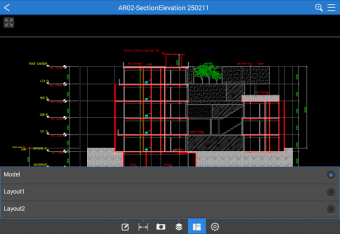
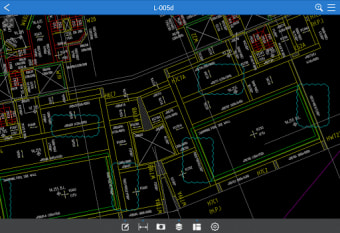
Fast CAD Reader is a free sleek, cross-platform CAD software that enables fast and intuitive handling of DWG/DXF and even PDF drawings. This utility offers valuable tools for drawing management, such as measurement and tabulation, built-in editor tools, drawing annotations, and more—allowing you to easily view, measure, edit, and comment on drawings across various devices.
Top Recommended Alternative

Fast CAD Reader is designed for professionals who require quick and reliable access to CAD drawings even on the go. It’s especially useful for architects, engineers, construction managers, quantity surveyors, and field technicians who frequently work with DWG, DXF, and PDF files.
A versatile, cross-platform CAD solution
Developed by Beijing Honghu Yuntu Technology Co., Ltd., Fast CAD Reader is a cross-platform CAD software that enables you to view, measure, annotate, and share CAD drawings even on the go. It offers essential tools, such as the Drawing Management functionality, which provides practical tools for efficiently handling CAD files. You can export high-resolution PDFs with annotations, split oversized drawings with one click, manage external reference files seamlessly, convert between CAD file versions, and quickly extract tables and text to Excel for streamlined data processing.
Moreover, the Measurement and Tabulation features simplify complex calculations with efficient, automated tools. You can quickly tabulate measured lengths and areas, count shapes and legends with one click, measure irregular polygonal areas with arc edges, perform continuous length measurements, and easily determine radius, angles, and circular dimensions. The Drawing Annotations functionality offers a range of tools for creating organized annotations. You can categorize comments for easy management, add multiline text for detailed notes, and use cloud lines to highlight important areas effectively.
Furthermore, leader lines enable you to draw arrows with text to specify annotation points, thereby enhancing clarity precisely. Mobile devices further expand functionality by allowing the insertion of site photos and voice recordings directly onto the drawings—creating rich, context-aware documentation. Additionally, the Built-In Editor Tools allow you to adjust attributes such as layers and entity properties while accessing essential drawing tools like Line, Polyline, Circle, and Arc for quick updates and additions.
Perfect for professionals
Practical editing functions like copy, mirror, move, explode, and delete provide flexibility in reshaping drawings as needed. In addition, you can add or edit text annotations and effortlessly set drawing scales, making precise adjustments efficient and straightforward. However, users unfamiliar with CAD tools may need time to utilize editing and scaling features fully. Some users also reported that they experienced occasional sluggishness when handling very detailed or large CAD files.
Fast CAD Reader is ideal for professionals and teams who need a quick, lightweight solution for viewing, measuring, and annotating CAD files without the complexity of full-featured CAD software. It is beneficial for engineers, architects, construction managers, quantity surveyors, and on-site personnel who require quick access to DWG or DXF drawings. Its user-friendly interface makes it accessible for beginners, while its measurement, tabulation, and editing tools offer enough depth for experienced CAD users managing day-to-day tasks.
Reliable CAD viewing and editing made easy
Fast CAD Reader is a lightweight, cross-platform CAD software designed for quick, reliable access to DWG, DXF, and PDF files. It offers essential tools for drawing management, measurement, annotation, and basic editing, making it particularly useful for professionals such as engineers, architects, and field technicians. With its intuitive interface and mobile compatibility, this CAD Reader provides a practical solution for efficiently viewing, measuring, and marking up CAD drawings anytime, anywhere.
.png)
























.png)