
All-in-one screen recorder and video editor
Camtasia is a professional-grade screen recording and video editing software developed by TechSmith. It is designed to help users easily create polished video tutorials, presentations, product demos, and instructional content. Popular among educators, marketers, and content creators, download Camtasia for Windows to get a seamless workflow that combines screen capture tools with an intuitive video editor, all within a single platform.
With drag-and-drop functionality, pre-built assets, and a wide array of editing tools, Camtasia simplifies the video creation process for both beginners and experienced editors. Whether you're recording a lecture, building an online course, or showcasing software features, the software provides the flexibility and functionality to produce high-quality videos on a Windows system.
Why download Camtasia for Windows video editing software?
Seamless screen recording and video editing
When you download Camtasia for Windows, you get a dual-purpose tool that allows you to capture your screen activity and
immediately edit it in a built-in video editor. The screen recorder can capture the entire screen, a specific window, or a custom region, along with audio input and webcam footage. This makes it ideal for recording tutorials, walkthroughs, and training sessions.
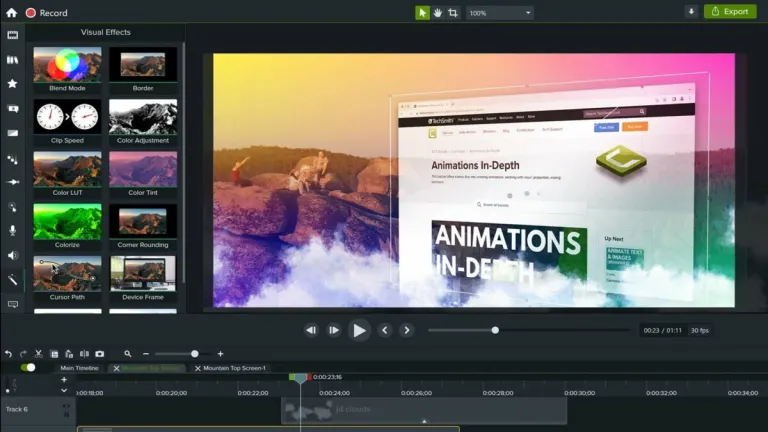
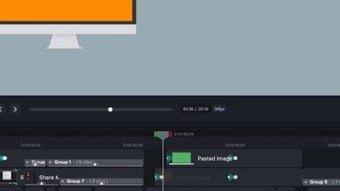
The video editor features a user-friendly timeline interface where users can cut, trim, split, and arrange clips with precision. The software also supports multi-track editing, enabling users to work with various video layers, audio, annotations, and effects.
Pre-built assets and visual effects
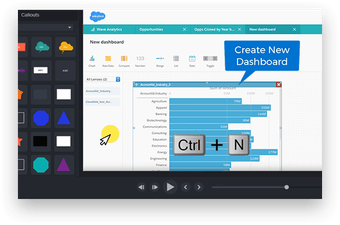
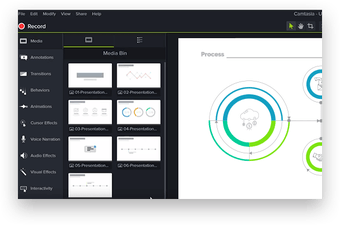
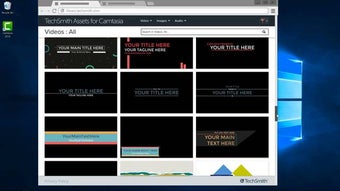
Camtasia comes bundled with a wide range of pre-made elements, including animated intros, lower thirds, callouts, transitions, and cursor effects. These assets help enhance video quality and engagement without requiring external resources or advanced animation skills.
Additional tools like zoom-and-pan, green screen functionality, and motion blur effects allow for a more professional and dynamic look. Users can add interactive quizzes and clickable hotspots for instructional content to make their videos more engaging and measurable.
Audio tools and voiceover support
The software offers built-in audio editing features that let users clean up background noise, adjust volume levels, and apply fade-in/out effects. Voiceovers can be recorded directly within the application and synced quickly with screen recordings or slideshows.
With waveform visualizations and separate audio tracks, users can fine-tune their sound design and ensure that narration or music perfectly aligns with the visuals.
Easy export and sharing options
Camtasia supports a variety of export formats, including MP4, WMV, AVI, and GIF, ensuring compatibility with most platforms. Finished videos can be uploaded directly to YouTube, Vimeo, or Screencast or saved locally for distribution.
Export presets allow users to quickly select the right settings for their target platform. In contrast, advanced compression settings are available for those who need more control over file size and quality.
Compatibility and system requirements
The software is fully optimized for Windows, offering reliable performance across a range of devices. It’s compatible with the following operating systems:
- Windows 11
- Windows 10 (64-bit version only)
It best suits systems with moderate to high performance, especially with high-definition video or complex projects.
Minimum system requirements:
- OS: Windows 10 or later (64-bit required)
- Processor: 6th Gen Intel Core i3 or AMD Ryzen 3 or better
- RAM: 8 GB minimum (16 GB recommended)
- Storage: 4 GB of available hard disk space
- Display: 1366x768 resolution or higher
- GPU: Integrated graphics minimum, discrete GPU recommended for 4K editing
The software also requires installing Microsoft .NET 4.7.2 or later on the system.
Availability
Camtasia for Windows is a paid application with a free trial period. Users can download and use the trial version for 30 days, which gives them full access to the feature set and a comprehensive preview of the software before purchasing. Licenses are offered as one-time purchases and include one year of free upgrades.
TechSmith regularly updates Camtasia to introduce new features, improve performance, and expand its asset library. Updates are available through the built-in updater, and premium users receive access to TechSmith’s customer support, including live chat and tutorials.
Why Camtasia is a smart choice for video editing
Camtasia is an excellent choice for users who need a robust, all-in-one solution for screen recording and video editing. Its simple interface and powerful tools make it easy to create professional-looking content, even for users without prior video editing experience.
From corporate training to educational content and software tutorials, Camtasia’s flexibility and ease of use make it one of the most popular tools in its category. Its combination of screen capture, timeline editing, and built-in assets reduces the need for multiple software programs, streamlining the video creation process into one cohesive experience.
For those exploring alternatives, there are several noteworthy options on the market. CapCut offers a free, mobile-friendly solution ideal for quick social media edits, while DaVinci Resolve brings high-end post-production tools to the table with advanced color grading and visual effects. Meanwhile, Adobe Premiere provides a professional, industry-standard editing suite with unmatched flexibility and integration within the Adobe Creative Cloud ecosystem. While each of these programs has its strengths, Camtasia remains one of the most accessible and well-rounded tools for users seeking a reliable screen recorder and editor in one.
Whether you're building a course, creating explainer tutorial videos for your personal or corporate brand, or producing product demonstrations, this software gives you the tools to work smarter, not harder. Download Camtasia for Windows and elevate your content with clarity, precision, and ease.
















.png)