
描述
页眉&页脚代码 plugin helps you add custom code snippets (JavaScript, CSS, or HTML) to the page even if you are not a programmer. It could be within the <head> (site verification code for various services, custom styles, meta or Webfont link), right after opening <body> (pixel tracking, analytics or heatmap code) or just before closing </body> tag.
Go to Tools → 页眉&页脚代码 in WordPress Dashboard. Insert custom code to HEAD, BODY or FOOTER section (depending on what you have to do).
All magic is done by hooking to WordPress hooks wp_head, wp_footer and wp_body_open.
💡 Trial Head & Footer Code plugin on a free dummy website before you add it on your project: Test It Now!
Various code snippets are supported, including but not limited to:
- 谷歌分析4
- Google Tag Manager
- Google Ads Conversion
- Lite Analytics
- Facebook/Meta Pixel
- Hotjar
- FullStory
- Google site verification
- Bing site verification
- Yandex site verification
- Alexa site verification
Homepage in Blog Posts mode
If your WordPress shows the latest blog posts on the homepage, you can also add specific code only for the homepage on Tools → 页眉&页脚代码 (there will be section Head, body and footer code on Homepage in Blog Posts mode)
Article specific code
To insert custom code specific for individual article (post, page or custom post type), use article-specific Metabox while editing post/page/custom post type (check out Screenshots). There choose if that specific code appends to site-wide code defined on Tools → 页眉&页脚代码, or to replace it.
Category specific code
You can also define a Category specific code on each individual category.
其他分类法(标签和自定义分类法)没有可用的特定代码,但它们使用全局代码。
Video guide
Do you need our support?
If 页眉&页脚代码 does not work on your project, please let us know by raising a new support ticket in the Community Forum and describe what does not works and how to reproduce the issue. We will make sure to resolve the issue as soon as possible.
If you find 页眉&页脚代码 useful for your project, please review plugin.
Features
- Multisite and PHP 8.3 compatible!
- Set site-wide custom content for:
- head page section (before the
</head>) - body section (after the
<body>) – Requires WordPress 5.2! - footer page section (before the
</body>)
- head page section (before the
- Homepage in Blog Posts mode:
- 为头部、主体和/或底部设置针对首页的特定自定义代码
- toggle homepage specific custom code on paged Homepage (page 2, 3, a nd so on)
- Set article specific custom code for:
- head page section (before the
</head>) - body section (after the
<body>) – Requires WordPress 5.2! - footer page section (before the
</body>)
- head page section (before the
- Set category specific custom code for head, body and/or footer of the page
- Choose priority of printed custom code to head/body/footer sections (lower number mean far from
</head>and</body>and closer to<body>, higher number means closer to</head>and</body>and farther to<body>) - Choose which post types will have enabled article specific head/body/footer fields
- Choose should article specific head/body/footer code be appended to site-wide code, or will replace site-wide code
- View on Posts/Pages/Custom Post Types listing if article has defined any article specific custom code
- Site-wide section is located under Tools > 页眉&页脚代码
- 并未翻译:If you have set WP_DEBUG constant in
wp-config.phptotrue, you’ll see site-wide and article specific entries in page source code wrapped to comments. - [新]允许无特权的用户角色编辑和作者管理单个站点和多站点上的文章特定代码(默认禁用)
Data stored in database
常规设置(HEAD、BODY、FOOTER全局代码和优先级、主页代码和行为)保存在WordPress选项auhfc_settings中。
每个帖子/页面/自定义帖子类型特定的HEAD、BODY和FOOTER代码和行为都保存到帖子meta_auhfc中。
每个类别特定的HEAD、BODY和FOOTER代码和行为都保存到分类meta_auhfc中。
在卸载过程中,所有这些数据都已从数据库中删除。
如果你想重新安装插件,不要卸载它,尽管停用,然后删除目录/wp-content/plugins-head-footer-code,然后重新安装插件。
Permissions on Multisite WordPress
- Access to Global: only Super Admin and Administrator
- 访问权限特定文章:超级管理员、管理员;可选:编辑和作者
- Access to Category specific: only Super Admin and Administrator
屏幕截图
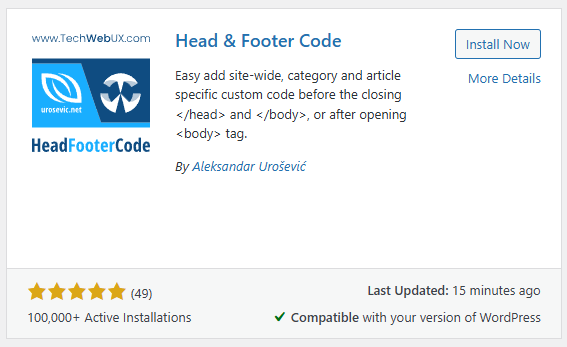
在插件搜索结果中的页眉 & 页脚代码框 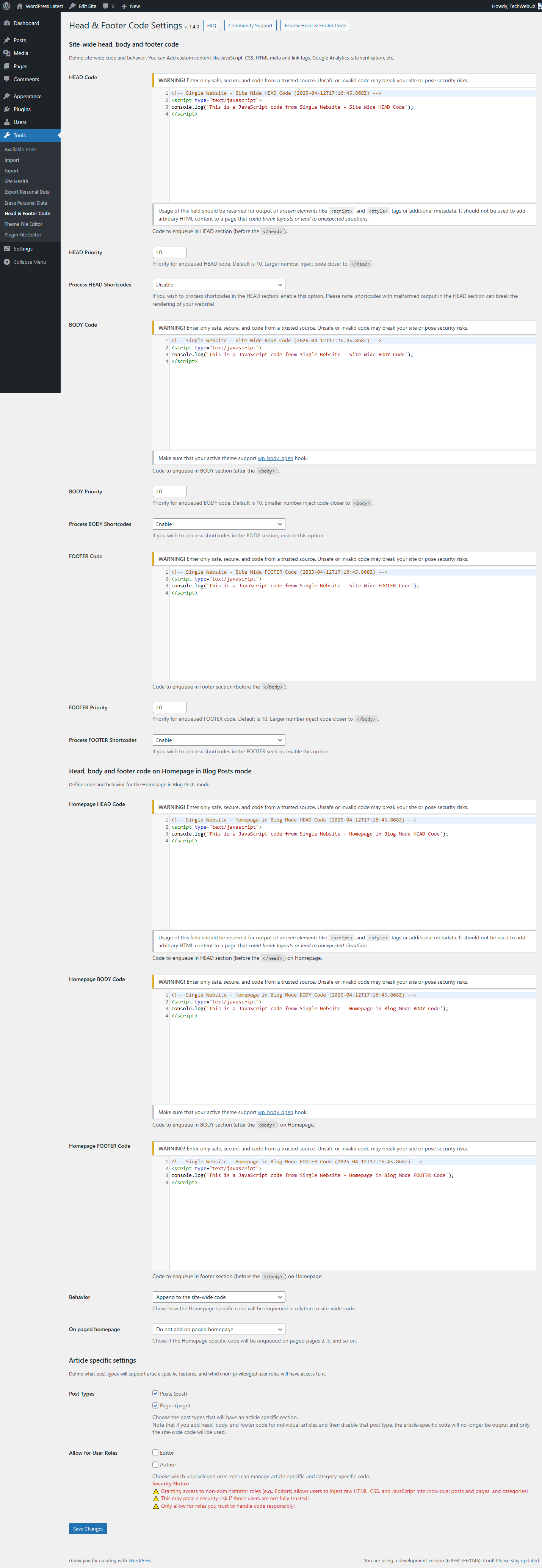
Plugin Settings page (Site-wide, Homepage and Article Post Types) 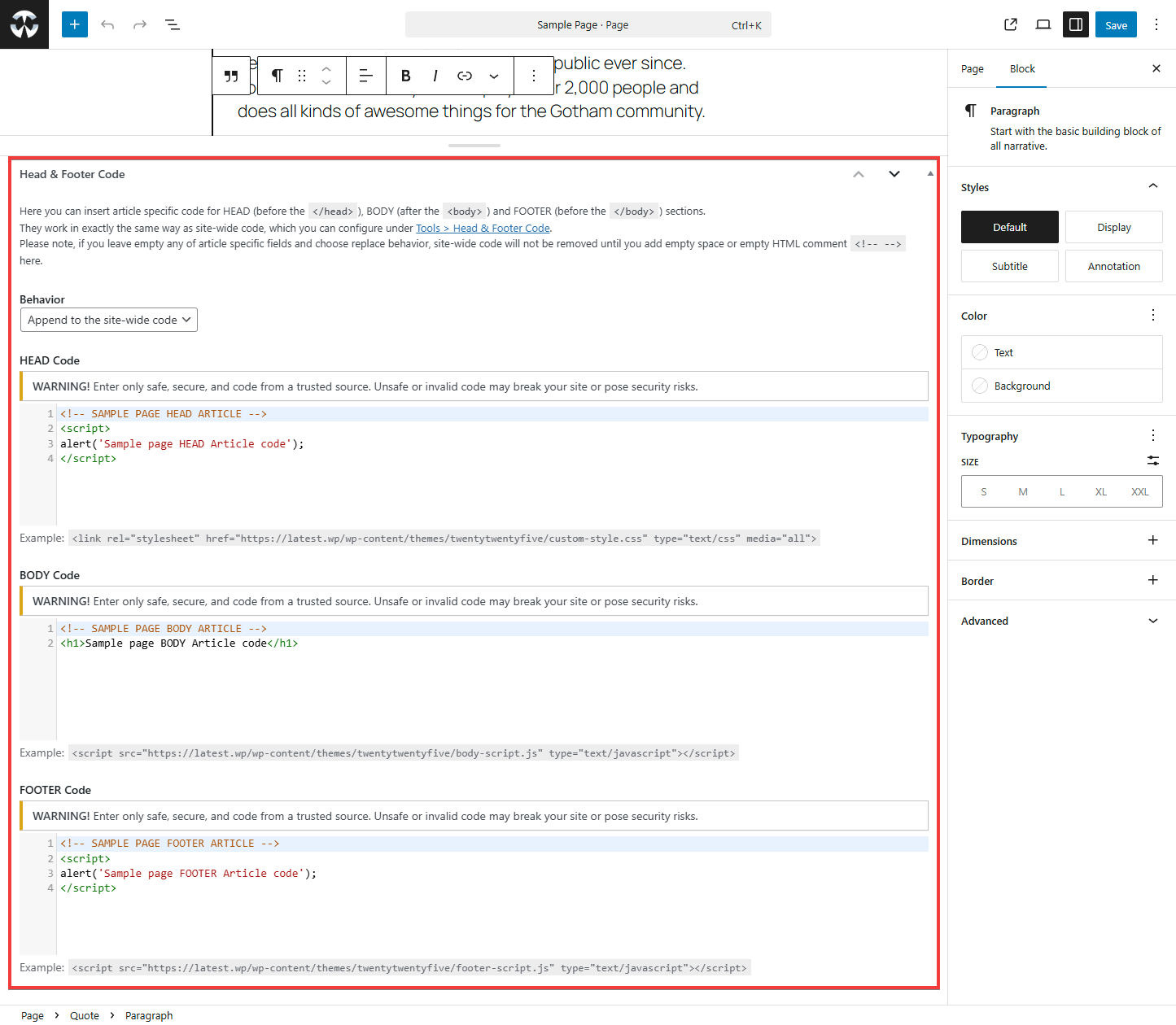
文章具体metabox(Article specific metabox) 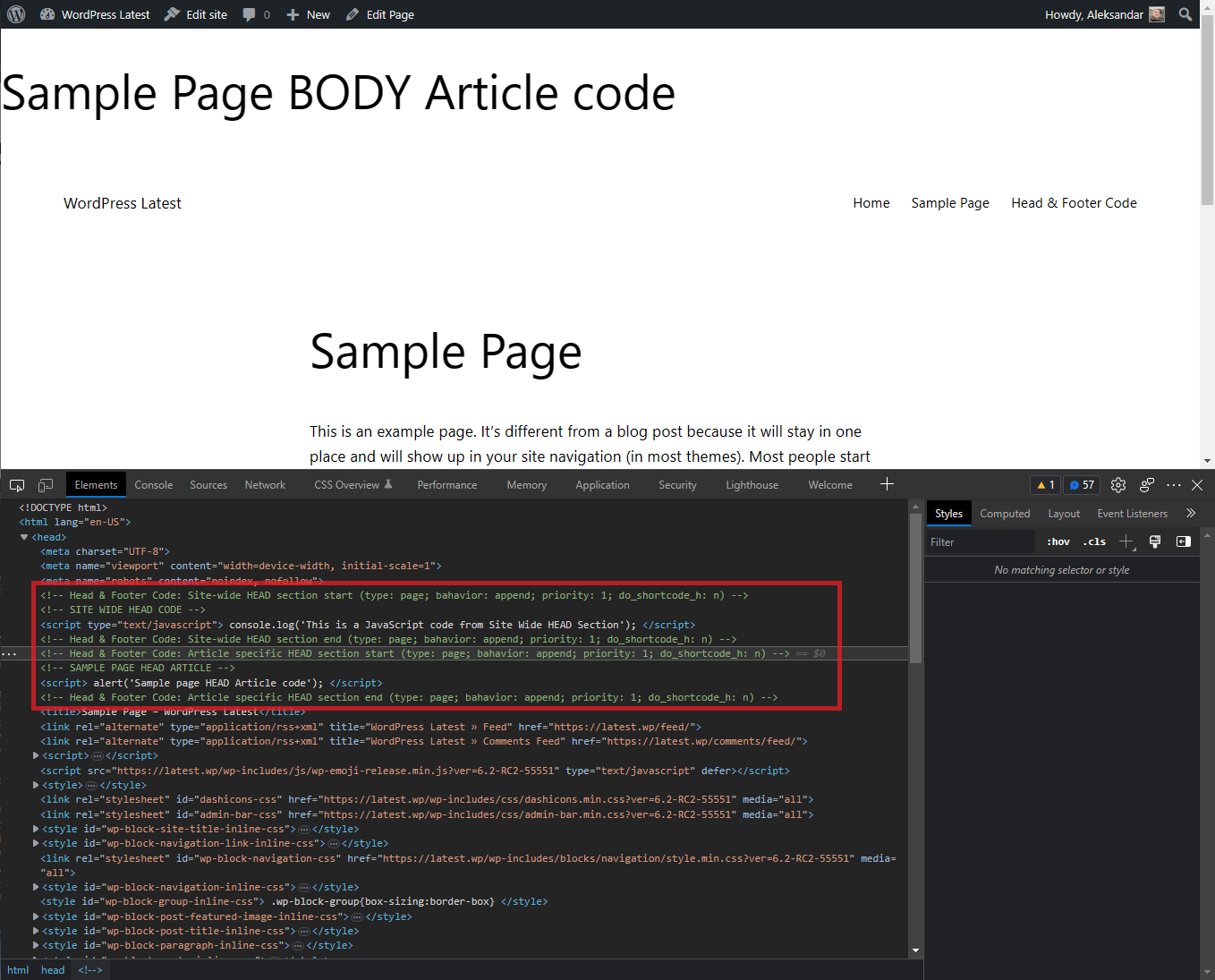
插入HEAD(页眉)部分的自定义代码示例(站点范围内附加了特定文章) 
Example of custom code inserted to BODY and FOOTER sections (site-wide with appended article specific) 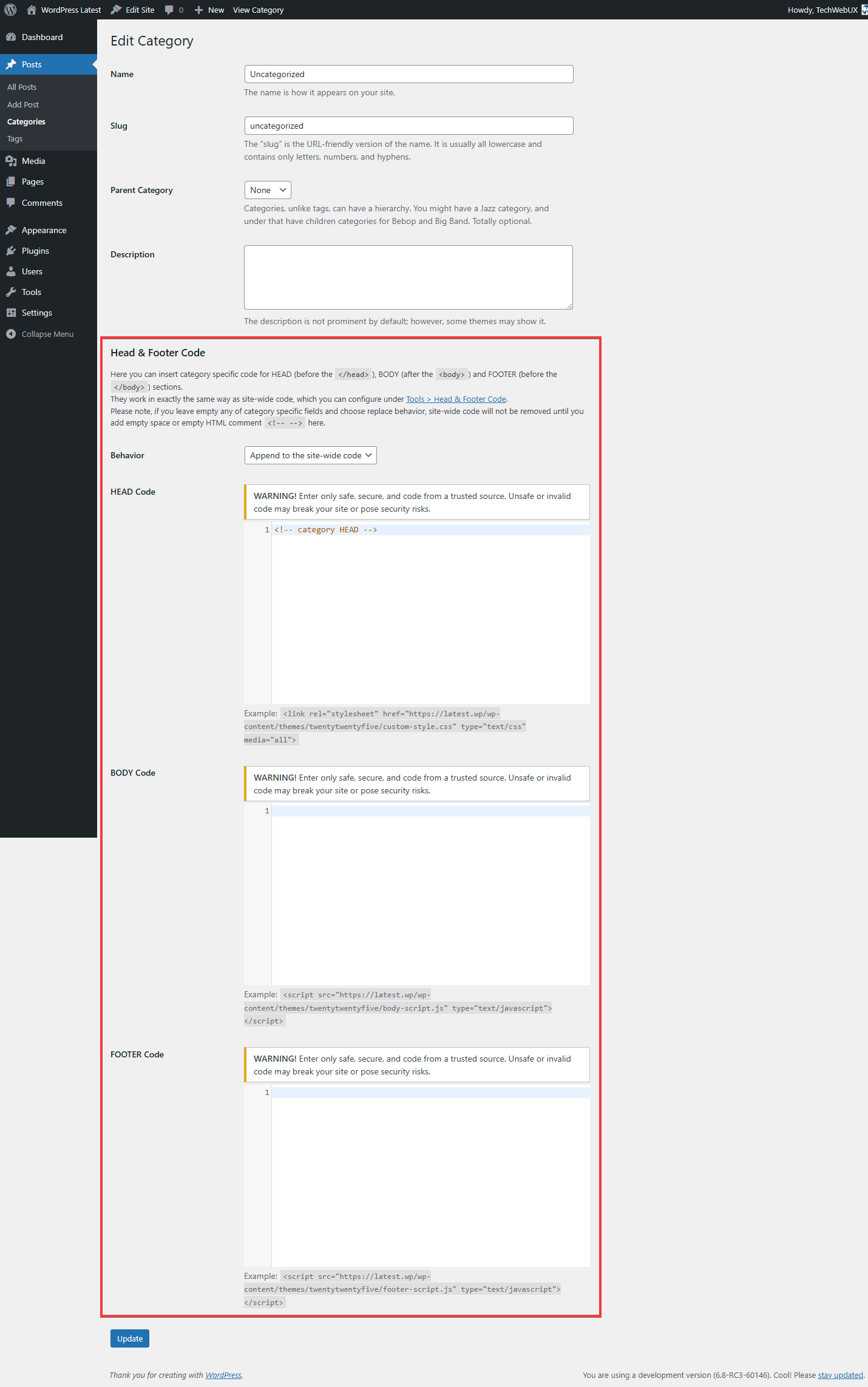
Category specific metabox 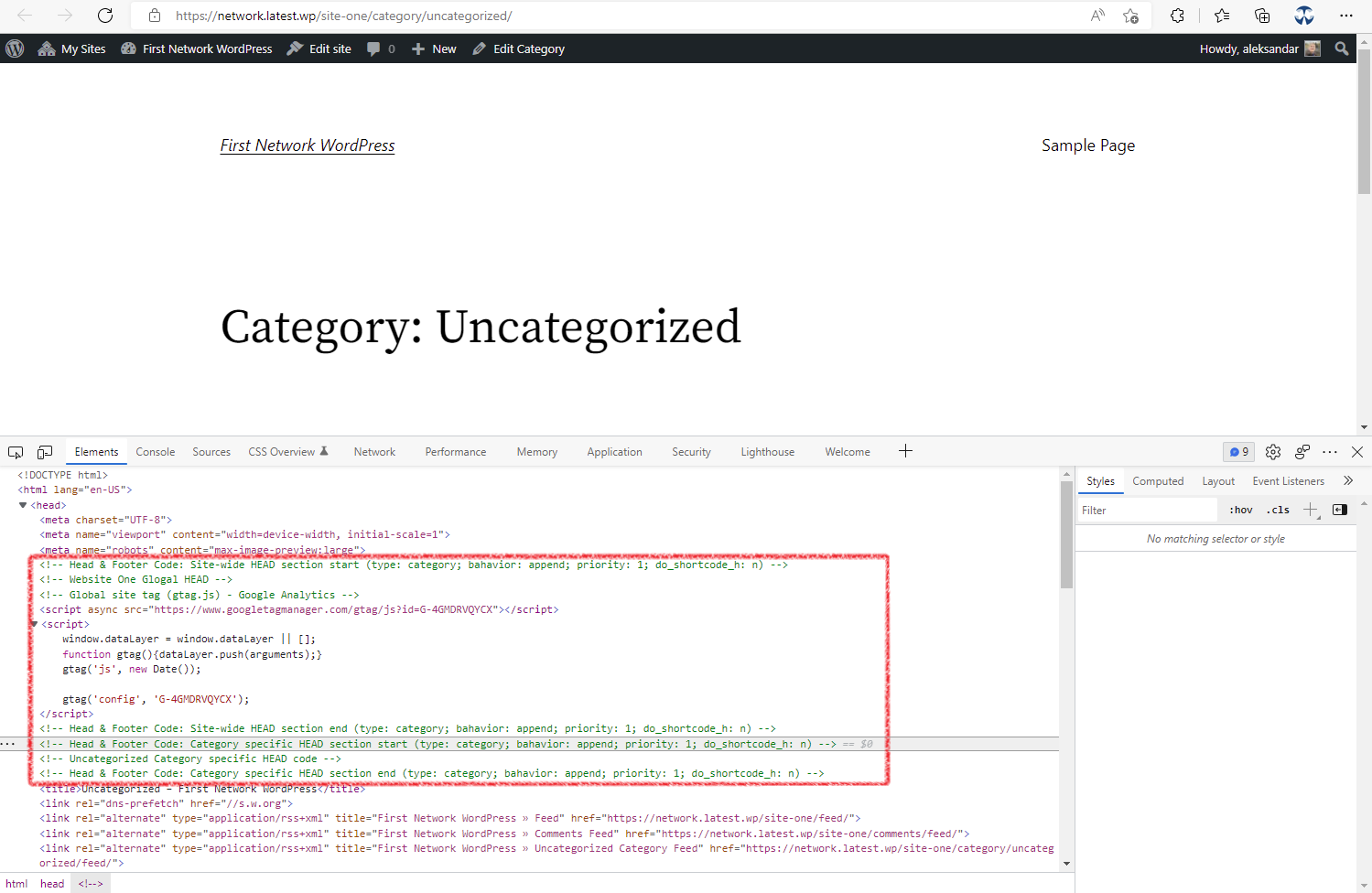
Example of custom code inserted to HEAD section (site-wide with appended category specific) 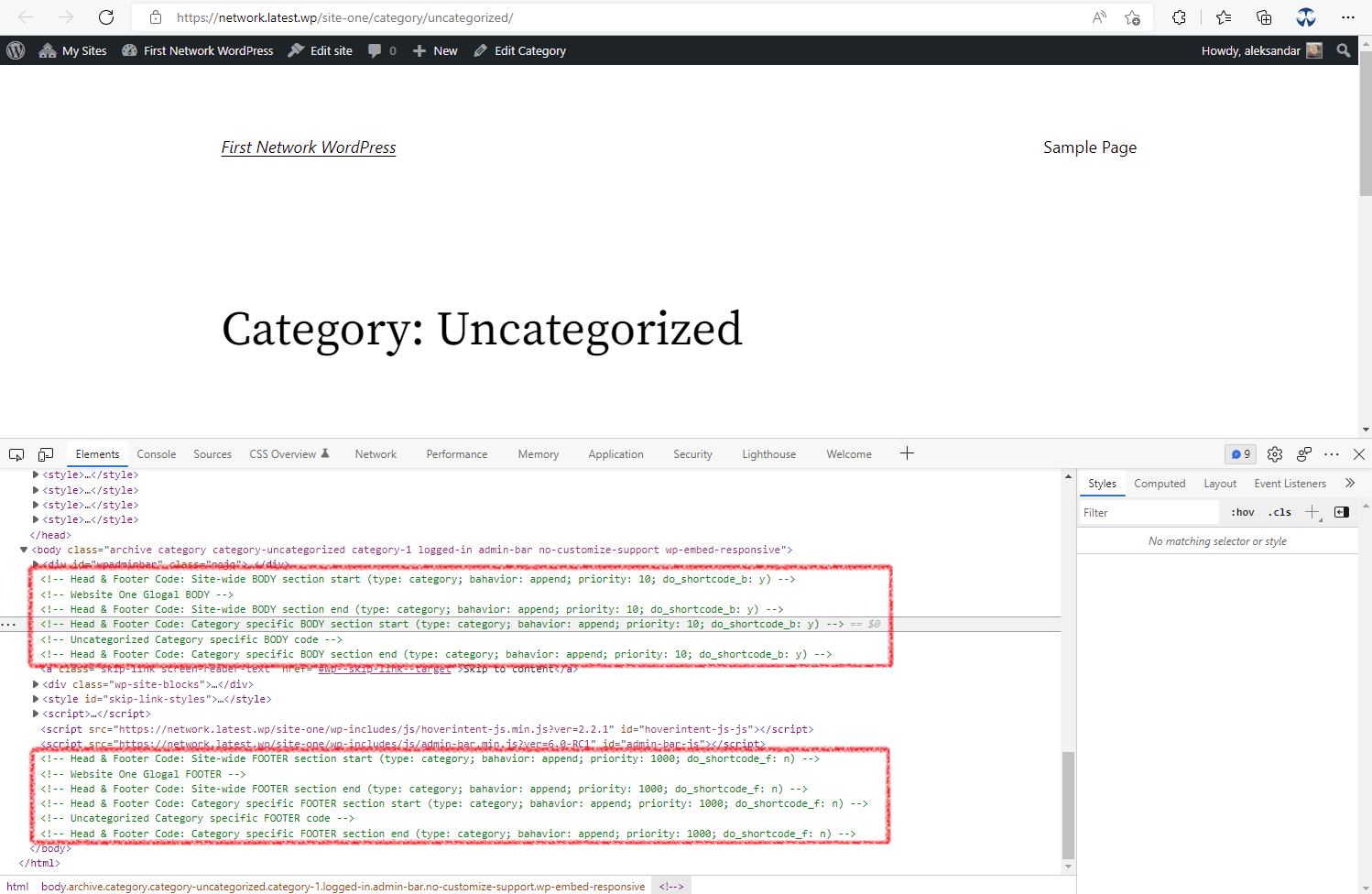
Example of custom code inserted to BODY and FOOTER section (site-wide with appended category specific) 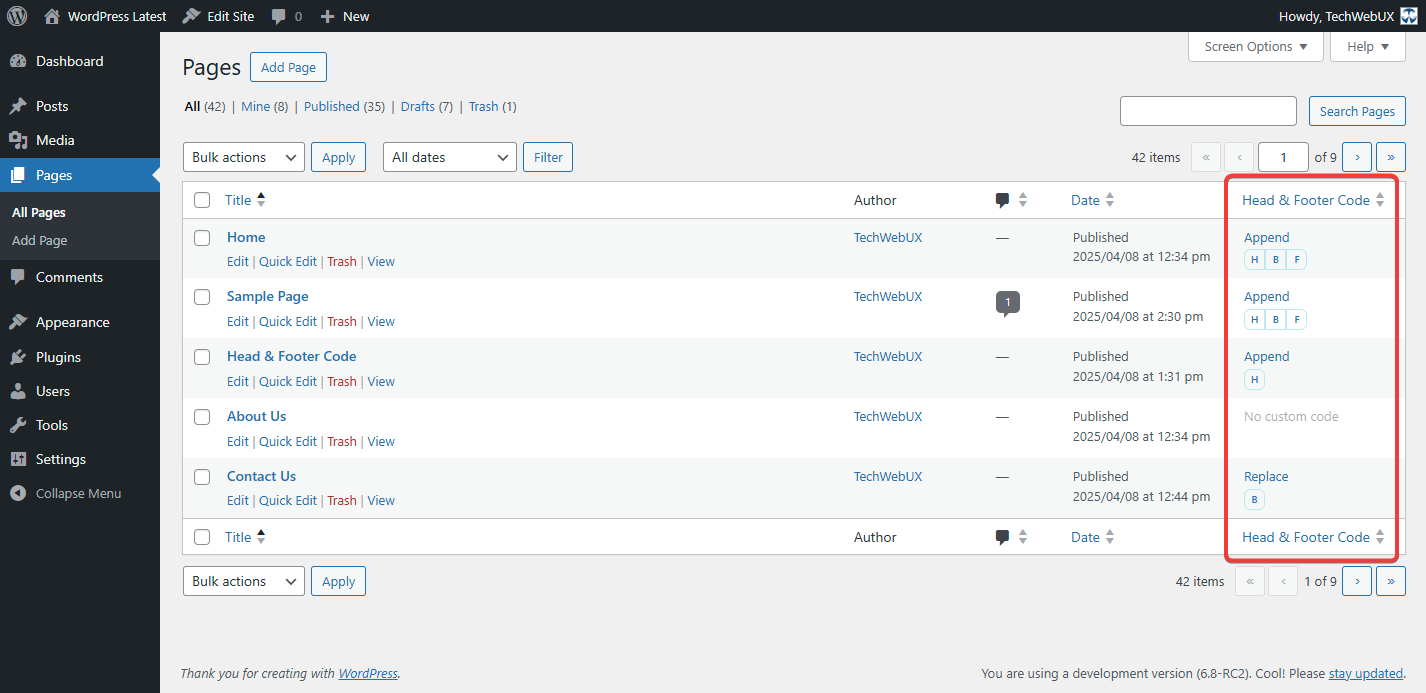
Example of 页眉&页脚代码 column on Pages listing, to identify which pages have set custom code, which one and what mode is selected


安装
Installation of the 页眉&页脚代码 is easy as any other WordPress plugin.
Standard procedure
- In WordPress Dashboard go to Plugins → Add New.
- Enter
head footer codeto the Search plugins… field and wait for the moment. - Locate 页眉&页脚代码 and click the Install Now button.
- After successful installation, click the Activate button.
- Click Settings link for 页眉&页脚代码 or visit the Tools → 页眉&页脚代码.
- Add the desired code to the target section.
FTP procedure
- Click on the Download button to get 页眉&页脚代码 installation package.
- Unpack archive head-footer-code.zip on local computer.
- Upload the entire directory head-footer-code to the
/wp-content/plugins/directory on your server. - In WordPress Dashboard go to Plugins → Installed Plugins and click the link Activate for the 页眉&页脚代码 plugin.
- Click Settings link for 页眉&页脚代码 or visit the Tools → 页眉&页脚代码.
- Add the desired code to the target section.
常见问题
-
It’s not a bug, it’s a security measure by WordPress Core.
If you wish to remove hinting errors for Administrator role, make sure you allow
unfiltered_htmlcapability for that role (Google is your friend). -
Is supported PHP code in code snippets?
-
As it’s a security risk, the 页眉&页脚代码 does not process PHP code if entered into any plugin field (global or article specific).
Any content added to HFC fields is printed on the front-end as is.
-
I entered code to BODY section, but nothing outputs on front-end
-
This feature is implemented since WordPress version 5.2 and requires theme compatibility.
To make sure if theme you use supports wp_body_open hook, open in code editor
header.phpfile from theme you use, and check if right after opening<BODY>tag there is following code (if it does not exists, add it or ask some developer to do that for you):if ( function_exists( 'wp_body_open' ) ) { wp_body_open(); } -
Where do I report security bugs found in this plugin?
-
Please report security bugs found in the source code of the Head & Footer Code plugin through the Patchstack Vulnerability Disclosure Program. The Patchstack team will assist you with verification, CVE assignment, and notify the developers of this plugin.
评价


贡献者及开发者


更新日志
1.4.6 (2025-12-01)
- Test: WordPress 6.9RC3, Twenty Twenty-Five 1.6, PHP 8.4.15
1.4.5 (2025-06-13)
- Fix: Compatibility with Jetpack > Writing > Composing > Compose using shortcode to embed media from popular sites
- Fix: Automatic conversion of false to array is deprecated in update.php
- Test: WordPress 6.8.1, Twenty Twenty-Five 1.2, Jetpack 14.7
1.4.4 (2025-05-31)
- Fix: Relaxed filtering to allow preloadans security/privacy attributes.
1.4.3 (2025-04-30)
- Fix: Relaxed filtering to allow blocks with
<,>,=>characters andtype="application/ld+json"for structured data (rich snippets), following stricter sanitization introduced in 1.4.0.
1.4.2 (2025-04-20)
- Fix: meta tag broken by security introduced in 1.4.0
1.4.1 (2025-04-13)
- 修复:1.4.0中引入的安全机制导致hreflang链接中断
1.4.0 (2025-04-12)
- Test: WordPress 6.8-RC3, Twenty Twenty-Five 1.1, Twenty Twenty-Three 1.6, Astra 4.9.2 and PHP 8.3.17
- Test: WordPress 4.9.26, Twenty Seventeen 1.7 and PHP 5.5.38
- 整理设置页面
- Improve: Security
- Improve: Refactor and reorganise codebase
- auhfc_settings() -> Techwebux\Hfc\Main::settings()
- auhfc_is_homepage_blog_posts() -> Techwebux\Hfc\Common::is_homepage_blog_posts()
- auhfc_add_to_homepage_paged() -> Techwebux\Hfc\Common::add_to_homepage_paged()
- sanitize_html_classes() -> Techwebux\Hfc\Common::sanitize_html_classes()
- auhfc_allowed_code() -> Techwebux\Hfc\Common::allowed_html()
- auhfc_form_allowed_code() -> Techwebux\Hfc\Common::form_allowed_html()
- auhfc_html2code -> Techwebux\Hfc\Common::html2code()
- auhfc_get_meta() -> Techwebux\Hfc\Common::get_meta()
- auhfc_get_post_type() -> Techwebux\Hfc\Common::get_post_type()
- auhfc_print_sitewide() -> Techwebux\Hfc\Common::print_sitewide()
- auhfc_out() -> Techwebux\Hfc\Common::out()
- auhfc_head_note() -> Techwebux\Hfc\Settings::head_note()
- auhfc_body_note() -> Techwebux\Hfc\Settings::body_note()
1.3.7 (2024-11-18)
- Fix: Compatibility with WordPress 6.7
1.3.6 (2024-10-12)
- Improve: Optimize strings for easier translation
1.3.5 (2024-07-06)
- Tested: PHP 8.3.7 and WordPress 6.6 with Twenty Twenty-Four theme 1.1 (Single and Multisite)
- Change: Move the
Settingslink on plugins listing to 1st position
1.3.4 (2024-06-30)
- Tested: PHP 8.3.7 and WordPress 6.5.5 with Twenty Twenty-Four theme 1.1 (Single and Multisite)
- Change: PHP version lowered to 5.5
- Fix: Activation on deprecated PHP or WordPress
1.3.3 (2023-07-21)
- Tested: PHP 8.2.8 and WordPress 6.3-RC1 with Twenty Twenty-Three theme (Single and Multisite)
1.3.2 (2023-06-02)
- Tested: on PHP 8.2.6 and WordPress 6.2.2 with Twenty Twenty-Three theme (Single and Multisite)
- Fixed: Deprecated and Warning notices in update.php on PHP 8.2.6
- Improve: Multisite support CodeMirror on Article and Category
1.3.1 (2023-03-18)
- Tested: on PHP 8.1.14/8.2.1 and WordPress 6.2-RC2 with Twenty Twenty-Three theme (Single and Multisite)
- Add: support do not add homepage in Blog Post related code on paged pages (2, 3, and so on)
- Add: CodeEditor on textareas in article Meta boxes
- Fix: Fatal error due to relocated plugin update file
- Cleanup: Remove donate button from settings page
- Improve: Security.
- Improve: Coding Standard.
1.3.0 (2022-05-08)
- Tested: on PHP 8.1.5 and WordPress 6.0-RC1 with Twenty Twenty-Two theme (Single and Multisite)
- Add: Support for Categotry specific code.
- Improve: Coding Standard.
- Improve: Important notes on settings page.
- Improve: README converted to MarkDown.
- Improve: Remove PayPal logo and load minified admin stylesheet.
